Exely Connect APIs (1.0.0)
Download OpenAPI specification:Download
To use the API, you must obtain an access token (access_token). Access tokens are issued based on the client_id and client_secret credentials.
You can obtain these credentials through a property integration.
The hotelier creates an API integration in the Exely account and provides you with the client_id and client_secret credentials. For more information, see Integration through the property.
Once you have obtained your credentials, send a request to the authorization endpoint. The response will include an access token (access_token).
Include access_token in the Authorization header of every API request:
Authorization: Bearer <access_token>
Authorization is performed using OAuth2.0.
OAuth 2.0 is a standard protocol that allows applications to obtain access to data.
To access the API, include an access token in each request. The token is issued in the JSON Web Token (JWT) format.
JWT (JSON Web Token) is a secure, compact format for transmitting information between a client and a server.
Access tokens are obtained using Client credentials flow, which requires authorization using a client secret. To request an access token, the following parameters are required:
- client_id,
- client_secret.
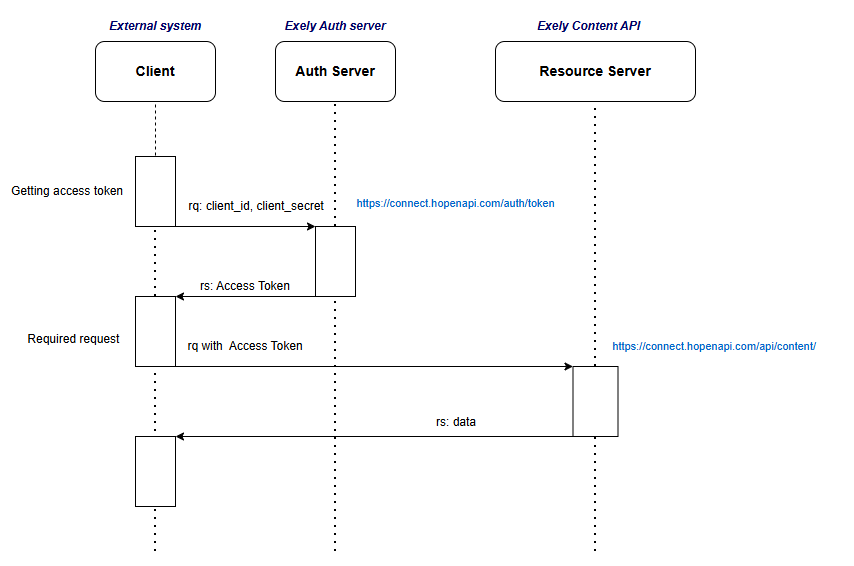
Exely. Authorization server: https://connect.hopenapi.com/auth/token
Rate limits
- 3 requests per second,
- 15 requests per minute,
- 300 requests per hour per IP address.
Token lifetime
Access tokens are valid for 15 minutes.
Token refresh is not supported. Once the token expires, obtain a new access token through the authorization endpoint.
Authorization endpoint
- Production: https://connect.hopenapi.com/auth/token
Decoded token example:
eyJhbGciOiJSUzI1NiIsInR5cCIgOiAiSldUIiwia2lkIiA6ICI2OGZjOHRNUGFSUHRyRHYtVHV2WEpncUNGTE1CVGRheTBpQkdJSUE3amxvIn0.eyJleHAiOjE2OTg5MTYwMzYsImlhdCI6MTY5ODkxNTEzNiwianRpIjoiYTJjZGJhMGQtYzQwNy00OWRmLThiNGQtOTJhNTM1NWQxYTFmIiwiaXNzIjoiaHR0cHM6Ly9wYXJ0bmVyLnRsaW50ZWdyYXRpb24uY29tL2F1dGgvcmVhbG1zL1BhcnRuZXJBcGkiLCJhdWQiOiJUcmF2ZWxMaW5lLlBhcnRuZXJBUEkiLCJzdWIiOiI4NmE0YjZiZS0wYTc0LTRjYjktYjNhYi1iNDYyZWUwYmIyYmQiLCJ0eXAiOiJCZWFyZXIiLCJhenAiOiJwYTMiLCJzY29wZSI6IiIsImFwaV9hY2Nlc3NlcyI6WyJjb250ZW50Il19.Nz6dyaHGyIN5IKv30oM-HrqdQBqaGdzEFrk7ACUWbfvsNCHNowg96iJrGwQbkOUSVPtQJF9Cwf1_jywP6c2UPHclzBIDp9HTsYdVM5QS_k9ecs0GCiI8ACBqld3yatY4dJz3MRkxnU_rp0NbJJQ-uBcmg_9UCSCIc3mKR7UAosr5XOXeb4ckrFd67DK5xfofT0ykE46Qkc6nvev3AGx11fPAVsFnmmPOSnlpQzJTI7XBWbD120q5fDdksVlaiq3YoBueDEeOPFH08Ia6xdTVjIf_zsyOEKt2N8_7BTyWG_3YPThBbgn-eAgybSdeop6_eCrWTfQvX5g8qtR2e9J32A
You can decode the token using JWT.IO.
Decoded token example
Request body:
{
  "exp": 1698916036,
  "iat": 1698915136,
  "jti": "a2cdba0d-c407-49df-8b4d-92a5355d1a1f",
  "iss": "https://connect.hopenapi.com/auth/realms/PartnerApi",
  "aud": "Exely.ConnectApi",
  "sub": "86a4b6be-0a74-4cb9-b3ab-b462ee0bb2bd",
  "typ": "Bearer",
  "azp": "pa3",
  "scope": "",
  "api_accesses": [
    "content"
  ]
}
*Note: Refresh tokens are not used.
Cache the access token on the client side and reuse it in subsequent requests.
Use OAuth 2.0 libraries:
.NET:
IdentityModelMicrosoft.Extensions.DependencyInjectionJavaScript:
oidc-client
oidc-client-js WikicURL:
curl -L -X POST "https://connect.hopenapi.com/auth/token" \
-H "Content-Type: application/x-www-form-urlencoded" \
-d "grant_type=client_credentials" \
-d "client_id=XXXXXXXXXXXX" \
-d "client_secret=XXXXXXXXXXXX"
To ensure the stability of the service, we apply limits to the number of API requests. If a limit is exceeded, the API returns a 429 Too Many Requests error and the request is not processed.
Unless otherwise specified, limits are applied separately to each API client. All requests made by the same client are counted against the same limit, regardless of the IP address or the number of access tokens used.
Request limits define the maximum number of requests that can be made per second, minute, or hour. For each incoming request, the system evaluates the number of requests made during the corresponding time window immediately preceding that request. For example, if the limit is set to 50 requests per second, the 51st request sent within the same second will be rejected. Requests can be made again once the number of requests made during the last second falls below the set limit. The same principle applies to per-minute and per-hour limits.
| API | Description | Limits |
|---|---|---|
| Standard API limits | All API methods that do not have dedicated limits | 50 requests per second, 200 requests per minute, 3,000 requests per hour |
| PMS Integration Storage API | All API methods | 50 requests per second, 1,200 requests per minute, 30,000 requests per hour |
| Read Reservation API | Retrieve a list of bookings | 3 requests per second, 100 requests per minute, 3,000 requests per hour |
| Read Reservation API | Retrieve booking details | 10 requests per second, 200 requests per minute, 4,000 requests per hour |
| Search API | Search for accommodation options by the lowest available price | 3 requests per second, 20 requests per minute, 900 requests per hour |
| Search API | Retrieve accommodation options | 50 requests per second, 200 requests per minute, 1,000 requests per hour |
| Search API | Retrieve accommodation options with extra services, early check-in, or late check-out | 10 requests per second, 50 requests per minute, 500 requests per hour |
| Search API | Retrieve extra services, early check-in, or late check-out options | 10 requests per second, 100 requests per minute, 1,000 requests per hour |
Each API response returns headers that help you track the remaining number of requests:
x-ratelimit-remaining-hour- number of remaining requests within one hour from the time the request was sentx-ratelimit-remaining-minute- number of remaining requests within one minute from the time the request was sentx-ratelimit-remaining-second- number of remaining requests within one second from the time the request was sentretry-afteris returned with the429 Too Many Requestserror and specifies the time in seconds after which the request can be retried
| Error code | Message | Description |
|---|---|---|
| 400 | Bad Request | The request contains errors. For example, required headers are missing or parameter values are invalid. |
| 401 | Unauthorized | This error may occur if the OAuth token is missing, invalid, or expired. In the latter case, obtain a new token. |
| 403 | Forbidden | The user does not have access to specific API methods. |
| 404 | Not Found | The requested resource does not exist or is outdated. Check the request URL. |
| 429 | Too Many Requests | The requests-per-second (RPS) limit has been exceeded. Make sure you're not sending unnecessary requests. |
| 500 | Internal Server Error | Internal server error. Try again later. |
| 503 | Service Unavailable | The server is overloaded. Try again later. |
Swagger
Booking cancellation rules are set by the property to define the period when free cancellation is available,
as well as the penalty for late cancellation. These rules are applied to selected rate plans through cancellationRuleId.
A rule can take effect starting from one of the following reference times:
ProviderArrivalTime: Standard check-in time. For example, if the check-in time is set to 14:00, free cancellation is available until 14:00 on the day before check-in.
ProviderDepartureTime: Standard check-out time. The cancellation period is calculated based on the property's standard check-out time applied to the check-in date. For example, if the property check-out time is set to 12:00, free cancellation is available until 12:00 on the day before check-in.
GuestArrivalTime: Check-in time selected by the guest when booking. For example, if the standard check-in time is 14:00, but the guest selects 16:00, free cancellation is available until 16:00 on the day before check-in. If guests cannot select a check-in time, the standard check-in time is applied.
CustomArrivalTime: Custom time from which the cancellation rule calculation starts. The time is specified in the
referencePointTimefield using the property's time zone.BookingCreationTime: The time (but not the date) when the guest made the booking. For example, if the check-in time is set to 14:00 and the guest made a booking at 09:00, free cancellation is available until 09:00 on the day before check-in.
Penalty for a specific period
A penalty is set using a time frame that includes time units and a period before the reference time.
Time units:
None: Not specified, used only with theNoMatterperiodDay: DaysHour: Hours
Period before the reference time:
NoMatter: Does not depend on a specific timeAtLeast: Greater than or equal tobeforeArrivalValue.NoMoreThan: Less than or equal tobeforeArrivalValue.Between: Within the range frombeforeArrivalValuetobeforeArrivalValueMax.
Penalty calculation methods
NoPenalty: No penalty is appliedFirstNightPercent: The penalty is a specified percentage of the first night's costPrepaymentPercent: The penalty is a specified percentage of the prepayment amountFirstNights: The penalty equals the full cost of the first N nights
The penalty for the selected calculation method is specified as a numeric value and currency.
The rule validity period can be set by selecting check-in dates in the property's time zone. The period
includes both the start and end dates. If the end date is not specified, it can be set to "Not limited",
which corresponds to isEndless = true.
If the rule does not contain cancellation terms, cancellation is free of charge.
Endpoint
GET /v1/properties/{propertyId}/cancellation-rules
Retrieves booking cancellation rules
Parameters:
propertyId(string, path): Property ID
Example:
GET /v1/properties/7291/cancellation-rules

{
  "cancellationRules": [
    {
      "id": "556875",
      "propertyId": "7291",
      "referencePointKind": "CustomArrivalTime",
      "referencePointTime": "10:57",
      "cancellationTerms": [
        {
          "beforeArrivalMatching": "Between",
          "beforeArrivalUnit": "Day",
          "beforeArrivalValue": 1,
          "beforeArrivalValueMax": 3,
          "penaltyCalculationMethod": "PrepaymentPercent",
          "penaltyValue": 10,
          "penaltyValueCurrency": "EUR",
          "arrivalDates": [
            {
              "startDate": "2024-07-11",
              "endDate": "2024-07-11",
              "isEndless": true
            }
          ]
        },
        {
          "beforeArrivalMatching": "NoMoreThan",
          "beforeArrivalUnit": "Hour",
          "beforeArrivalValue": 24,
          "penaltyCalculationMethod": "PrepaymentPercent",
          "penaltyValue": 100,
          "penaltyValueCurrency": "EUR",
          "arrivalDates": [
            {
              "startDate": "2021-02-09",
              "endDate": "2021-02-09",
              "isEndless": true
            }
          ]
        }
      ]
    }
  ]
}
Receive cancellation rules
path Parameters
| propertyId required | string Example: 1024 Property ID |
Responses
Response samples
- 200
{- "cancellationRules": [
- {
- "id": "232241",
- "propertyId": "1024",
- "referencePointKind": "ProviderArrivalTime",
- "referencePointTime": "15:00",
- "cancellationTerms": [
- {
- "beforeArrivalMatching": "NoMatter",
- "beforeArrivalUnit": "None",
- "beforeArrivalValue": 24,
- "beforeArrivalValueMax": 0,
- "penaltyCalculationMethod": "PrepaymentPercent",
- "penaltyValue": 0,
- "penaltyValueCurrency": "RUB",
- "arrivalDates": [
- {
- "startDate": "2026-11-13",
- "endDate": "2026-11-13",
- "isEndless": true
}
]
}
]
}
]
}Swagger
Content API retrieves photos and descriptions of the property, room types, rate plans, services, and amenities. This information is displayed in Exely Booking Engine on the property's website.
- Main settings, description, and photos of the property
services- all services, including mealsratePlans- rate plansroomTypes- room typesamenities- amenities- Settings that are not available in the property's account:
currency- currency determined by the countrytimeZone- time zone determined by the citystayUnitKind-NightRateorDailyRateroom sales in the booking engine determined by the property typemultiLocationProperty- allows different addresses for room types and can be enabled upon request to Exely customer support.
In addition, API provides available selection options.
Some common reference data, such as payment methods and property kinds, is available in the separate Reference Data API.
meal-plans- meal plan types, for example:- code
EnglishBreakfastnameEnglish breakfast - code
FullBoardnameFull board
- code
room-type-categories- accommodation offers. For example:- code
ApartmentsnameApartment - code
PlaceInRoomnameBed in room - code
SmallHousenameSmall house
- code
room-amenity-categories- room amenities. For example:- group
Internet and telephonycodewifi_internetnameWi-Fi - group
Furniturecodejournal_tablenamecoffee table
- group
Services
The service type can be determined by the kind field value:
Common- any services except mealsMeal- meals
For meals, the mealPlanCode and mealPlanName fields are provided and completed with values from the meal plans reference.
Rate plans
Rate plans are linked to other API sections:
extraStayRuleIdfield - early check-in and late check-out rule (see ExtraStayRules)cancellationRuleIdfield - booking cancellation rule (see CancellationRules)
Room types
Room types are linked to references:
categoryCodeandcategoryNamefields - accommodation offercodeandnameelements of theamenitiesarray - room amenities
Amenities
List of property amenities:
code- identifierdisplayName- display namechargeType- charge type:- free - free-of-charge service
- chargeable - paid service
- none - charge type does not apply (the service does not require payment, for example: concierge)
Amenities with the swimming_pool and restaurant identifiers may be duplicated because there can be several of them within a single property.
Receive property entity
query Parameters
| since | string Example: since=UlUtNDE5NQ== Key to continue viewing from the required spot The number of accommodations in the response is limited, so you may not always be able to get them all within one request. To continue from the spot you left off, use this option. The value of this parameter can always be obtained from the response (‘next’ property). If you do not specify this parameter, you will obtain accommodations from the very beginning of the list. Analogue to pagination. |
| count | integer <int32> Example: count=200 The number of elements in the response. Maximum number of elements - 200 (default value) |
| include | string Example: include= Add additional information to the response ‘All’ value: information about the hotel, room types, rate plans and services Empty value: ‘Id’ only |
| languageCode | string Example: languageCode= Language code. Allowed values: 'en' (English). If you do not specify this parameter, you will obtain accommodations in the property’s language. |
Responses
Response samples
- 200
{- "next": "string",
- "properties": [
- {
- "id": "1024",
- "name": "Test hotel",
- "description": "Hotel is located in a picturesque location. \n\nThere are 11 hotel rooms of \"Standard\" and \"Standard +\" categories, as well as 4 separate cottages of the \"Duplex\" type for accommodation of guests on the territory of the club.",
- "images": [
- {
- "url": "string"
}
], - "stars": 4,
- "stayUnitKind": "NightRate",
- "propertyKindId": 1,
- "contactInfo": {
- "address": {
- "postalCode": "SW1A 1AA",
- "countryCode": "GBR",
- "region": "London",
- "regionId": "020",
- "cityName": "London",
- "cityId": "1",
- "addressLine": "123 Main St.",
- "latitude": 51.5074,
- "longitude": -0.1278,
- "remark": "Take the second left after the bridge"
}, - "phones": [
- {
- "phoneNumber": "+44 20 1234 5678",
- "remark": "Voice Assistant"
}
], - "emails": [
- "email@example.com"
]
}, - "policy": {
- "checkInTime": "14:00",
- "checkOutTime": "12:00"
}, - "timeZone": {
- "id": "Europe/London"
}, - "ratePlans": [
- {
- "id": "133528",
- "name": "Main rate plan",
- "description": "<p>Book your accommodation at the best price!</p>\n<p>The accommodation price includes: </p>\n<p>- Free secure parking on site</p>\n<p>- High-speed wireless Internet</p>\n<p>- Playground on site</p>",
- "currency": "GBP",
- "isStayWithChildrenOnly": false,
- "cancellationRuleId": "56454",
- "extraStayRuleId": "202584",
- "vat": {
- "applicable": true,
- "included": true,
- "percent": 20
}, - "availableServices": [
- {
- "id": 0,
- "included": true,
- "roomTypeIds": [
- 0
], - "roomTypeAvailability": "All"
}
], - "corporateOnly": false
}
], - "roomTypes": [
- {
- "id": "82751",
- "name": "Standard",
- "description": "Each room (25 m2) style combines elegant classics with modern decorative elements and a high level of comfort. Standard rooms can accommodate 2 people on two twin one-and-a-half beds (120*200). A third guest can be accommodated on an extra folding bed. Cots are provided for small children. Among amenities of each room: - High-speed WiFi, LCD TV with a wide choice of cable channels and the option to watch movies online - Spacious bathrooms with walk-in and rain shower; - Cosmetics and toiletries, bathrobes and slippers - High quality bed linen - Balcony with comfortable furniture, views of the Gulf of Finland and the islands.",
- "amenities": [
- {
- "code": "wifi_internet"
}
], - "images": [
- {
- "url": "string"
}
], - "size": {
- "value": 25
}, - "categoryCode": "PlaceInRoom",
- "categoryName": "Place in the room",
- "address": {
- "postalCode": "SW1A 1AA",
- "countryCode": "GBR",
- "region": "London",
- "regionId": "020",
- "cityName": "London",
- "cityId": "1",
- "addressLine": "123 Main St.",
- "latitude": 51.5074,
- "longitude": -0.1278,
- "remark": "Take the second left after the bridge"
}, - "occupancy": {
- "adultBed": 0,
- "extraBed": 0,
- "childWithoutBed": 0
}, - "placements": [
- {
- "kind": "Adult",
- "count": 2,
- "minAge": 0,
- "maxAge": 0
}
], - "position": 100
}
], - "services": [
- {
- "id": "42807",
- "name": "Christmas tree",
- "description": "Children's New Year party",
- "kind": "Common",
- "mealPlanCode": "string",
- "mealPlanName": "string",
- "images": [
- {
- "url": "string"
}
], - "status": "Active",
- "vat": {
- "applicable": true,
- "included": true,
- "percent": 20
}
}
], - "multiLocationProperty": true,
- "companyDetails": {
- "legalEntityName": "Google LLC",
- "taxpayerIdentificationNumber": "770493581",
- "companyRegistrationNumber": "1027700132195",
- "legalAddress": "1600 Amphitheatre Parkway, Mountain View, CA 94043, USA"
}, - "currency": "GBP",
- "amenities": [
- {
- "code": "parking",
- "displayName": "Paid parking",
- "chargeType": "None"
}
]
}
], - "warnings": [
- {
- "code": "NotEnoughRights",
- "message": "Not enough rights to hotel"
}
]
}Receive description of a property
path Parameters
| propertyId required | string Example: 1024 Property ID |
query Parameters
| languageCode | string Example: languageCode= Language code. Allowed values: 'en' (English). If you do not specify this parameter, you will obtain accommodations in the property’s language. |
Responses
Response samples
- 200
{- "id": "1024",
- "name": "Test hotel",
- "description": "Hotel is located in a picturesque location. \n\nThere are 11 hotel rooms of \"Standard\" and \"Standard +\" categories, as well as 4 separate cottages of the \"Duplex\" type for accommodation of guests on the territory of the club.",
- "currency": "GBP",
- "images": [
- {
- "url": "string"
}
], - "stars": 4,
- "stayUnitKind": "NightRate",
- "propertyKindId": 1,
- "contactInfo": {
- "address": {
- "postalCode": "SW1A 1AA",
- "countryCode": "GBR",
- "region": "London",
- "regionId": "020",
- "cityName": "London",
- "cityId": "1",
- "addressLine": "123 Main St.",
- "latitude": 51.5074,
- "longitude": -0.1278,
- "remark": "Take the second left after the bridge"
}, - "phones": [
- {
- "phoneNumber": "+44 20 1234 5678",
- "remark": "Voice Assistant"
}
], - "emails": [
- "email@example.com"
]
}, - "policy": {
- "checkInTime": "14:00",
- "checkOutTime": "12:00"
}, - "timeZone": {
- "id": "Europe/London"
}, - "ratePlans": [
- {
- "id": "133528",
- "name": "Main rate plan",
- "description": "<p>Book your accommodation at the best price!</p>\n<p>The accommodation price includes: </p>\n<p>- Free secure parking on site</p>\n<p>- High-speed wireless Internet</p>\n<p>- Playground on site</p>",
- "currency": "GBP",
- "isStayWithChildrenOnly": false,
- "cancellationRuleId": "56454",
- "extraStayRuleId": "202584",
- "vat": {
- "applicable": true,
- "included": true,
- "percent": 20
}, - "availableServices": [
- {
- "id": 0,
- "included": true,
- "roomTypeIds": [
- 0
], - "roomTypeAvailability": "All"
}
], - "corporateOnly": false
}
], - "roomTypes": [
- {
- "id": "82751",
- "name": "Standard",
- "description": "Each room (25 m2) style combines elegant classics with modern decorative elements and a high level of comfort. Standard rooms can accommodate 2 people on two twin one-and-a-half beds (120*200). A third guest can be accommodated on an extra folding bed. Cots are provided for small children. Among amenities of each room: - High-speed WiFi, LCD TV with a wide choice of cable channels and the option to watch movies online - Spacious bathrooms with walk-in and rain shower; - Cosmetics and toiletries, bathrobes and slippers - High quality bed linen - Balcony with comfortable furniture, views of the Gulf of Finland and the islands.",
- "amenities": [
- {
- "code": "wifi_internet"
}
], - "images": [
- {
- "url": "string"
}
], - "size": {
- "value": 25
}, - "categoryCode": "PlaceInRoom",
- "categoryName": "Place in the room",
- "address": {
- "postalCode": "SW1A 1AA",
- "countryCode": "GBR",
- "region": "London",
- "regionId": "020",
- "cityName": "London",
- "cityId": "1",
- "addressLine": "123 Main St.",
- "latitude": 51.5074,
- "longitude": -0.1278,
- "remark": "Take the second left after the bridge"
}, - "occupancy": {
- "adultBed": 0,
- "extraBed": 0,
- "childWithoutBed": 0
}, - "placements": [
- {
- "kind": "Adult",
- "count": 2,
- "minAge": 0,
- "maxAge": 0
}
], - "position": 100
}
], - "services": [
- {
- "id": "42807",
- "name": "Christmas tree",
- "description": "Children's New Year party",
- "kind": "Common",
- "mealPlanCode": "string",
- "mealPlanName": "string",
- "images": [
- {
- "url": "string"
}
], - "status": "Active",
- "vat": {
- "applicable": true,
- "included": true,
- "percent": 20
}
}
], - "multiLocationProperty": true,
- "companyDetails": {
- "legalEntityName": "Google LLC",
- "taxpayerIdentificationNumber": "770493581",
- "companyRegistrationNumber": "1027700132195",
- "legalAddress": "1600 Amphitheatre Parkway, Mountain View, CA 94043, USA"
}, - "amenities": [
- {
- "code": "parking",
- "displayName": "Paid parking",
- "chargeType": "None"
}
]
}Swagger
The early check-in and late check-out rules allow properties to set surcharges for early check-in and late check-out.
These rules are applied to selected rate plans through extraStayRuleId.
The "Check-in and check-out" setting defines the standard check-in and check-out times that do not require an extra charge.
These rules allow properties to apply surcharges for specific time periods between the early check-in/late check-out time and the standard check-in/check-out time.
Surcharge calculation methods
Free: free of chargeFixed: fixed ratePercent: percentage of the daily rateHourlyRate: hourly fixed rateHourlyRateAutoCalculated: hourly auto-calculated priceForbidden: no early check-in/late check-out
Fixed and HourlyRate allow multiple rates to be set in different currencies.
Percent allows setting a surcharge percentage and additional parameters:
extraPlacementEnabled:'true'if a surcharge is applied for an extra guest,'false'if no surcharge is applied for an extra guestextraServiceOption: extra services with the[None, All, MealOnly]surcharge
OccupyQuota specifies whether room availability is guaranteed for an extra stay.
true: room availability is guaranteedfalse: room availability is not guaranteed, even if the extra stay is prepaid
Endpoint
GET /v1/properties/{propertyId}/extra-stay-rules
Retrieves early check-in and late check-out rules
Parameters:
propertyId(string, path): Property ID
Example:
GET /v1/properties/7291/extra-stay-rules

{
  "extraStayRules": [
    {
      "id": "519845",
      "propertyId": "7291",
      "checkInTime": "13:00",
      "overridesPropertyCheckInTime": false,
      "earlyCheckInPeriods": [
        {
          "startTime": "00:00",
          "endTime": "09:00",
          "chargeType": "Forbidden",
          "rates": [],
          "occupyQuota": false
        },
        {
          "startTime": "09:00",
          "endTime": "13:00",
          "chargeType": "Percent",
          "rates": [],
          "percentOptions": {
            "percentage": 0,
            "extraPlacementEnabled": false,
            "extraServiceOption": "MealOnly"
          },
          "occupyQuota": false
        }
      ],
      "checkOutTime": "12:00",
      "overridesPropertyCheckOutTime": true,
      "lateCheckOutPeriods": [
        {
          "startTime": "12:00",
          "endTime": "16:00",
          "chargeType": "Fixed",
          "rates": [
            {
              "currency": "EUR",
              "rate": 20
            }
          ],
          "occupyQuota": false
        },
        {
          "startTime": "16:00",
          "endTime": "24:00",
          "chargeType": "Forbidden",
          "rates": [],
          "occupyQuota": false
        }
      ]
    }
  ]
}
Receive early check-in and late check-out rules
path Parameters
| propertyId required | string Example: 1024 Property ID |
Responses
Response samples
- 200
{- "extraStayRules": [
- {
- "id": "string",
- "propertyId": "1024",
- "checkInTime": "13:00",
- "overridesPropertyCheckInTime": true,
- "earlyCheckInPeriods": [
- {
- "startTime": "09:00",
- "endTime": "13:00",
- "chargeType": "Free",
- "rates": [
- {
- "currency": "string",
- "rate": 0.1
}
], - "percentOptions": {
- "percentage": 0.1,
- "extraPlacementEnabled": true,
- "extraServiceOption": "None"
}, - "occupyQuota": false
}
], - "checkOutTime": "10:00",
- "overridesPropertyCheckOutTime": true,
- "lateCheckOutPeriods": [
- {
- "startTime": "09:00",
- "endTime": "13:00",
- "chargeType": "Free",
- "rates": [
- {
- "currency": "string",
- "rate": 0.1
}
], - "percentOptions": {
- "percentage": 0.1,
- "extraPlacementEnabled": true,
- "extraServiceOption": "None"
}, - "occupyQuota": false
}
]
}
]
}Swagger
Payment Methods API returns a reference of payment methods available in Partner API. This reference data can be used to map payment method codes to their corresponding types and to maintain consistency across integrations.
Each payment method includes:
code- payment method code.type- payment method type.
Use the values from this reference when sending or processing payment information in related APIs.
Swagger
Property Amenity API returns a reference of property amenities. These values can be used to display and map amenities in user interfaces and across integrations.
Each amenity includes the following fields:
code- amenity code, for example,parking.displayName- amenity name.chargeTypeApplicable- indicates whether the amenity supports a payment type.
If chargeTypeApplicable is true, the amenity may be offered either free of charge or for an additional fee.
Swagger
Property Kind API returns a reference of property types. This reference data can be used to determine the type of a property, such as a hotel, apartment, etc.
Each property type includes the following fields:
id- numeric identifier of the property type.displayName- property name.propertyKindType- system-defined property type.
Use this reference data to store and display property types consistently across systems and integrations.
Swagger
Read Reservation API allows you to retrieve booking details from Exely Booking Engine, Exely Channel Manager, and Exely PMS.
Get booking summaries
This method returns a paginated list with brief information about each booking.
lastModificationallows you to retrieve bookings created or updated after the specified UTC date and time. If omitted, the API performs a full synchronization.continueTokenallows you to continue retrieving the list. Its value is returned in the response of the previous request. The token does not expire. The request may return bookings that were previously retrieved but have since been updated.hasMoreData = falseindicates that the end of the current result set has been reached. Even after this, subsequent requests may return new data created after the previous request.
If continueToken is lost, it is recommended to start a new synchronization
using lastModification to obtain new continueToken.
It is recommended to set the lastModification value as follows:
use the booking lastModification value minus two days.
This helps avoid missing bookings in subsequent requests.
Get booking details
This method returns detailed information about a single booking.
The response includes related data available through ContentApi:
booking.roomStays[].ratePlans[]- rate plansbooking.roomStays[].dailyRates[].RatePlanId- rate plan identifiersbooking.roomStays[].roomType- room typesbooking.roomStays[].services[]- servicesbooking.services[]- services with the "Per booking" charge type.
Receive booking summaries
path Parameters
| propertyId required | string Example: 1024 Property ID |
query Parameters
| continueToken | string Example: continueToken=V2Ugd2lzaCB5b3UgcHJvZHVjdGl2ZSBpbnRlcmFjdGlvbiE= Use the token from the previous response to continue receiving booking summaries including new and updated ones. |
| count | integer <int32> Example: count=1000 Maximum mumber of booking summaries in response. |
| lastModification | string <date-time> Example: lastModification=2023-06-20T10:41:04Z Enumerate booking summaries based on the last modification datetime, starting from the specified datetime in UTC. |
Responses
Response samples
- 200
{- "continueToken": "Qm9va2luZ0NvbnRpbnVhdGlvblRva2Vu",
- "hasMoreData": false,
- "bookingSummaries": [
- {
- "number": "20191001-1024-45675262",
- "propertyId": 1024,
- "status": "Cancelled",
- "createdDateTime": "2019-06-20T10:41:04Z",
- "modifiedDateTime": "2019-06-20T11:41:04Z"
}
]
}Receive booking details by the external number
path Parameters
| propertyId required | string Example: 7291 Property ID |
query Parameters
| externalNumber required | string Example: externalNumber=CHAN-7852371940 External number |
| channelCode required | string Example: channelCode=channel Channel code associated with the external number |
Responses
Response samples
- 200
- 502
{- "booking": {
- "propertyId": "7291",
- "number": "20240325-7291-260123396",
- "externalNumber": "CHAN-7852371940",
- "status": "Cancelled",
- "createdDateTime": "2024-03-23T10:41:04Z",
- "modifiedDateTime": "2024-03-27T11:41:04Z",
- "guaranteeInfo": {
- "loyalty": {
- "cards": [
- {
- "cardNumber": "11039500047840",
- "loyaltySystemId": "TLStatusLevel"
}
]
}, - "totalPrepaid": 1234,
- "guarantees": [
- {
- "paymentMethod": "BankCard"
}
]
}, - "currencyCode": "RUB",
- "roomStays": [
- {
- "index": 0,
- "stayDates": {
- "arrivalDateTime": "2024-03-27T14:00",
- "departureDateTime": "2024-03-28T12:00"
}, - "ratePlans": [
- {
- "id": "341178",
- "name": "Best offer of the day"
}
], - "roomType": {
- "id": "82751",
- "name": "Standard"
}, - "guestCount": {
- "adultCount": 1,
- "childAges": [
- 5
]
}, - "guests": [
- {
- "firstName": "Sherlock",
- "lastName": "Holmes"
}
], - "dailyRates": [
- {
- "ratePlanId": "133467",
- "priceBeforeTax": 8550,
- "date": "2024-03-27"
}
], - "total": {
- "priceBeforeTax": 8550,
- "priceAfterTax": 8650,
- "taxAmount": 100,
- "taxes": [
- {
- "amount": 100,
- "index": 1
}
], - "discounts": [
- {
- "amount": 1185,
- "discountType": "Percentage",
- "name": "Gold",
- "percent": 15
}
]
}, - "services": [
- {
- "id": "42965",
- "name": "Breakfast",
- "description": "Breakfast at a restaurant at a special price",
- "total": {
- "priceBeforeTax": 8550,
- "priceAfterTax": 8650,
- "taxAmount": 100,
- "taxes": [
- {
- "amount": 100,
- "index": 1
}
]
}, - "inclusive": false,
- "kind": "Meal",
- "mealPlanCode": "ContinentalBreakfast"
}
], - "extraStayCharges": {
- "earlyArrival": {
- "overriddenDateTime": "2024-03-27T18:00",
- "total": {
- "priceBeforeTax": 8550,
- "priceAfterTax": 8650,
- "taxAmount": 100,
- "taxes": [
- {
- "amount": 100,
- "index": 1
}
], - "discounts": [
- {
- "amount": 1185,
- "discountType": "Percentage",
- "name": "Gold",
- "percent": 15
}
]
}
}, - "lateDeparture": {
- "overriddenDateTime": "2024-03-27T18:00",
- "total": {
- "priceBeforeTax": 8550,
- "priceAfterTax": 8650,
- "taxAmount": 100,
- "taxes": [
- {
- "amount": 100,
- "index": 1
}
], - "discounts": [
- {
- "amount": 1185,
- "discountType": "Percentage",
- "name": "Gold",
- "percent": 15
}
]
}
}
}
}
], - "services": [
- {
- "id": "7898",
- "name": "Fruit platter",
- "description": "Fruit platter at check-in",
- "total": {
- "priceBeforeTax": 8550,
- "priceAfterTax": 8650,
- "taxAmount": 100,
- "taxes": [
- {
- "amount": 100,
- "index": 1
}
]
}
}
], - "total": {
- "priceBeforeTax": 8550,
- "priceAfterTax": 8650,
- "taxAmount": 100,
- "taxes": [
- {
- "amount": 100,
- "index": 1
}
], - "discounts": [
- {
- "amount": 1185,
- "discountType": "Percentage",
- "name": "Gold",
- "percent": 15
}
]
}, - "taxes": [
- {
- "index": 1,
- "name": "Lodging fee",
- "description": "Fee per guest, payable at check-in"
}
], - "cancellation": {
- "penaltyAmount": 8550,
- "cancelledDateTime": "2024-03-27T07:10:04Z"
}, - "customer": {
- "firstName": "Sherlock",
- "lastName": "Holmes"
}
}, - "warning": "string"
}Receive booking details
path Parameters
| propertyId required | string Example: 7291 Property ID |
| number required | string Example: 20240303-7291-14573801 Booking number |
Responses
Response samples
- 200
{- "booking": {
- "propertyId": "7291",
- "number": "20240325-7291-260123396",
- "externalNumber": "CHAN-7852371940",
- "status": "Cancelled",
- "createdDateTime": "2024-03-23T10:41:04Z",
- "modifiedDateTime": "2024-03-27T11:41:04Z",
- "guaranteeInfo": {
- "loyalty": {
- "cards": [
- {
- "cardNumber": "11039500047840",
- "loyaltySystemId": "TLStatusLevel"
}
]
}, - "totalPrepaid": 1234,
- "guarantees": [
- {
- "paymentMethod": "BankCard"
}
]
}, - "currencyCode": "RUB",
- "roomStays": [
- {
- "index": 0,
- "stayDates": {
- "arrivalDateTime": "2024-03-27T14:00",
- "departureDateTime": "2024-03-28T12:00"
}, - "ratePlans": [
- {
- "id": "341178",
- "name": "Best offer of the day"
}
], - "roomType": {
- "id": "82751",
- "name": "Standard"
}, - "guestCount": {
- "adultCount": 1,
- "childAges": [
- 5
]
}, - "guests": [
- {
- "firstName": "Sherlock",
- "lastName": "Holmes"
}
], - "dailyRates": [
- {
- "ratePlanId": "133467",
- "priceBeforeTax": 8550,
- "date": "2024-03-27"
}
], - "total": {
- "priceBeforeTax": 8550,
- "priceAfterTax": 8650,
- "taxAmount": 100,
- "taxes": [
- {
- "amount": 100,
- "index": 1
}
], - "discounts": [
- {
- "amount": 1185,
- "discountType": "Percentage",
- "name": "Gold",
- "percent": 15
}
]
}, - "services": [
- {
- "id": "42965",
- "name": "Breakfast",
- "description": "Breakfast at a restaurant at a special price",
- "total": {
- "priceBeforeTax": 8550,
- "priceAfterTax": 8650,
- "taxAmount": 100,
- "taxes": [
- {
- "amount": 100,
- "index": 1
}
]
}, - "inclusive": false,
- "kind": "Meal",
- "mealPlanCode": "ContinentalBreakfast"
}
], - "extraStayCharges": {
- "earlyArrival": {
- "overriddenDateTime": "2024-03-27T18:00",
- "total": {
- "priceBeforeTax": 8550,
- "priceAfterTax": 8650,
- "taxAmount": 100,
- "taxes": [
- {
- "amount": 100,
- "index": 1
}
], - "discounts": [
- {
- "amount": 1185,
- "discountType": "Percentage",
- "name": "Gold",
- "percent": 15
}
]
}
}, - "lateDeparture": {
- "overriddenDateTime": "2024-03-27T18:00",
- "total": {
- "priceBeforeTax": 8550,
- "priceAfterTax": 8650,
- "taxAmount": 100,
- "taxes": [
- {
- "amount": 100,
- "index": 1
}
], - "discounts": [
- {
- "amount": 1185,
- "discountType": "Percentage",
- "name": "Gold",
- "percent": 15
}
]
}
}
}
}
], - "services": [
- {
- "id": "7898",
- "name": "Fruit platter",
- "description": "Fruit platter at check-in",
- "total": {
- "priceBeforeTax": 8550,
- "priceAfterTax": 8650,
- "taxAmount": 100,
- "taxes": [
- {
- "amount": 100,
- "index": 1
}
]
}
}
], - "total": {
- "priceBeforeTax": 8550,
- "priceAfterTax": 8650,
- "taxAmount": 100,
- "taxes": [
- {
- "amount": 100,
- "index": 1
}
], - "discounts": [
- {
- "amount": 1185,
- "discountType": "Percentage",
- "name": "Gold",
- "percent": 15
}
]
}, - "taxes": [
- {
- "index": 1,
- "name": "Lodging fee",
- "description": "Fee per guest, payable at check-in"
}
], - "cancellation": {
- "penaltyAmount": 8550,
- "cancelledDateTime": "2024-03-27T07:10:04Z"
}, - "customer": {
- "firstName": "Sherlock",
- "lastName": "Holmes"
}
}
}Swagger
Important: A mandatory condition for using Search API is to use search results for creating bookings in Exely Suite. If this requirement is violated, API access may be disabled by the provider. To restore access, contact support@exely.com
Search API retrieves accommodations with the lowest price across all available properties (up to 200) and offers provided by a specific property. For accommodation options under a specific rate plan to appear in Search API results, the rate plan must be available in Exely Booking Engine.
Search data is available up to one year from the current date.
Maximum number of days between arrivalDate and departureDate is 100.
Maximum number of days between arrivalDate and the current date is 365.
Two additional methods are available to retrieve early check-in / late check-out information
and extra services provided by a specific property. Both types of data can be retrieved in a single request:
GET /api/search/v1/properties/{propertyId}/room-stays when using includeExtraStays=true and includeExtraServices=true.
Filters in aggregated search
In the method /api/search/v1/properties/room-stays/search, you can specify the following filters:
By meal availability — mealPreference.mealType. Available values:
All — returns the lowest-priced accommodation in each property.
MealOnly — returns the lowest-priced accommodation with meals included. If such an option is not available, the property is not returned.
By meal plan — mealPreference.mealsIncluded. You can specify meal plans using values
returned by the following endpoints: content/v1/meal-plans — list of available meal plans,content/v1/properties — information about all available properties, and
content/v1/properties{propertyId} — information about a specific property.
Search results return the lowest-priced accommodation per property for the specified meal plans
included in the rate plan. For example, if only BreakFast is specified, the response
will include only the lowest-priced options with BreakFast. Options such as AllInclusive or HalfBoard are excluded.
The meal plan filter is available only when MealOnly is selected.
By minimum and maximum price — pricePreference.minPrice and pricePreference.maxPrice
These fields are optional. If provided, the search results will return the lowest-priced accommodations across all available properties based on the selected filters.
Search for the lowest priced accommodation options across all available accommodations. The maximum number of accommodation to be searched - 200.
Request Body schema:
Search parameters
| propertyIds | Array of strings or null Accommodations IDs Maximum number of IDs - 200 |
| adults required | integer <int32> Number of adults |
| childAges | Array of integers or null <int32> Child age range |
| include | string or null Add additional information about room types and rate plans to the response empty by default, but values can be accepted as follows: roomTypeShortContent - content by room types only ratePlanShortContent - content by rate plans only roomTypeShortContent|ratePlanShortContent - content by both rate plans and room types |
| arrivalDate required | string <date-time> Check-in date. Date format complies with ISO-8601 YYYY-MM-DD |
| departureDate required | string <date-time> Check-out date. Date format complies with ISO-8601 YYYY-MM-DD |
object (SearchApi_MealPreference) Meal filters | |
object (SearchApi_PricePreference) Price filters |
Responses
Request samples
- Payload
{- "propertyIds": [
- "1024",
- "11"
], - "adults": 1,
- "childAges": [
- 5
], - "include": "",
- "arrivalDate": "2026-11-12",
- "departureDate": "2026-11-13",
- "mealPreference": {
- "mealType": "MealOnly",
- "mealsIncluded": {
- "mealPlanCodes": [
- "BreakFast"
]
}
}, - "pricePreference": {
- "currencyCode": "GBP",
- "minPrice": 0,
- "maxPrice": 10000
}
}Response samples
- 200
{- "roomStays": [
- {
- "propertyId": "1024",
- "roomType": {
- "id": "45687",
- "placements": [
- {
- "code": "AdultBed-2",
- "count": 2,
- "kind": "Adult",
- "minAge": 0,
- "maxAge": 0
}
]
}, - "ratePlan": {
- "id": "987657"
}, - "currencyCode": "GBP",
- "dailyRates": [
- {
- "priceBeforeTax": 76.47,
- "date": "2026-11-13"
}
], - "total": {
- "priceBeforeTax": 50.5,
- "taxAmount": 5.5,
- "taxes": [
- {
- "amount": 5.5,
- "name": "Lodging fee",
- "description": "Fee per guest, payable at check-in"
}
]
}, - "includedServices": [
- {
- "id": "46545",
- "mealPlanCode": null
}
], - "mealPlanCode": "RoomOnly",
- "bookingFormLink": "",
- "availableDiscounts": [
- {
- "reason": "StayDatesDiscount",
- "amount": 100
}
], - "fullPlacementsName": "2 adults in adult beds, 1 child in an extra bed."
}
], - "warnings": [
- {
- "code": "NotEnoughRights",
- "message": "Not enough rights to hotel"
}
]
}Search for accommodation options by specific accommodation
path Parameters
| propertyId required | string Example: 1024 Accommodation ID |
query Parameters
| arrivalDate required | string Example: arrivalDate=2026-11-12 Check-in date. Format complies with ISO-8601 YYYY-MM-DD |
| departureDate required | string Example: departureDate=2026-11-13 Check-out date. Format complies with ISO-8601 YYYY-MM-DD |
| adults required | integer <int32> Example: adults=1 Number of adults |
| childAges | Array of integers <int32> [ items <int32 > ] Child age range |
Responses
Response samples
- 200
{- "roomStays": [
- {
- "propertyId": "1024",
- "roomType": {
- "id": "45687",
- "placements": [
- {
- "code": "AdultBed-2",
- "count": 2,
- "kind": "Adult",
- "minAge": 0,
- "maxAge": 0
}
]
}, - "ratePlan": {
- "id": "987657"
}, - "guestCount": {
- "adultCount": 1,
- "childAges": [
- 5
]
}, - "stayDates": {
- "arrivalDateTime": "2026-11-12T14:00",
- "departureDateTime": "2026-11-13T12:00"
}, - "availability": 50,
- "currencyCode": "GBP",
- "dailyRates": [
- {
- "priceBeforeTax": 76.47,
- "date": "2026-11-13"
}
], - "total": {
- "priceBeforeTax": 50.5,
- "taxAmount": 5.5,
- "taxes": [
- {
- "amount": 5.5,
- "name": "Lodging fee",
- "description": "Fee per guest, payable at check-in"
}
]
}, - "cancellationPolicy": {
- "freeCancellationPossible": true,
- "freeCancellationDeadlineLocal": "2026-11-12T12:00",
- "freeCancellationDeadlineUtc": "2026-11-12T09:00Z",
- "penaltyAmount": 9.72
}, - "includedServices": [
- {
- "id": "46545",
- "mealPlanCode": null
}
], - "mealPlanCode": "RoomOnly",
- "checksum": "eyJDaGVja3N1bVdpdGhPdXRFeHRyYXMiOnsiVG90YWxBbW91bnRBZnRlclRheCI6IjU1LjUwIiwiQ3VycmVuY3lDb2RlIjoiR0JQIiwiU3RhcnRQZW5hbHR5QW1vdW50IjoiOS43MiJ9LCJDaGVja3N1bVdpdGhFeHRyYXMiOnsiVG90YWxBbW91bnRBZnRlclRheCI6IjU1LjUwIiwiQ3VycmVuY3lDb2RlIjoiR0JQIiwiU3RhcnRQZW5hbHR5QW1vdW50IjoiOS43MiJ9fQ==",
- "fullPlacementsName": "2 adults in adult beds, 1 child in an extra bed.",
- "bookingFormLink": "",
- "availableDiscounts": [
- {
- "reason": "StayDatesDiscount",
- "amount": 100
}
], - "extraServicesAvailable": true
}
], - "warnings": [
- null
]
}Search for extra services by accommodation conditions
path Parameters
| propertyId required | string Example: 1024 Accommodation ID |
Request Body schema: required
Search parameters
required | object (SearchApi_StayDates) Period of stay |
required | object (SearchApi_RoomTypeRq) |
required | object (SearchApi_RatePlan) Rate plan entity |
required | object (SearchApi_GuestCount) Number of guests entity |
Responses
Request samples
- Payload
{- "stayDates": {
- "arrivalDateTime": "2026-11-12T14:00",
- "departureDateTime": "2026-11-13T12:00"
}, - "roomType": {
- "id": "82751",
- "placements": [
- {
- "code": "AdultBed-2"
}
]
}, - "ratePlan": {
- "id": "987657"
}, - "guestCount": {
- "adultCount": 1,
- "childAges": [
- 5
]
}
}Response samples
- 200
{- "roomStayExtraServices": [
- {
- "id": "8770",
- "kind": "Meal",
- "mealPlanCode": "Dinner",
- "maxQuantity": 0,
- "quantity": 1,
- "currencyCode": "GBP",
- "calculationMethod": "PerPerson",
- "total": {
- "priceBeforeTax": 50.5,
- "taxAmount": 5.5,
- "taxes": [
- {
- "amount": 5.5,
- "name": "Lodging fee",
- "description": "Fee per guest, payable at check-in"
}
]
}, - "quantityByGuests": {
- "adultsServiceQuantity": 1,
- "childrenServiceQuantity": [
- {
- "age": 5,
- "count": 2
}
]
}
}
]
}Search for extra stays by accommodation conditions
path Parameters
| propertyId required | string Example: 1024 Accommodation ID |
Request Body schema: required
Search parameters
object (SearchApi_StayDates) Period of stay | |
object (SearchApi_RoomTypeRq) | |
object (SearchApi_RatePlan) Rate plan entity | |
object (SearchApi_GuestCount) Number of guests entity |
Responses
Request samples
- Payload
{- "stayDates": {
- "arrivalDateTime": "2026-11-12T14:00",
- "departureDateTime": "2026-11-13T12:00"
}, - "roomType": {
- "id": "82751",
- "placements": [
- {
- "code": "AdultBed-2"
}
]
}, - "ratePlan": {
- "id": "987657"
}, - "guestCount": {
- "adultCount": 1,
- "childAges": [
- 5
]
}
}Response samples
- 200
{- "extraStays": {
- "earlyCheckIn": [
- {
- "total": {
- "priceBeforeTax": 50.5,
- "taxAmount": 5.5,
- "taxes": [
- {
- "amount": 5.5,
- "name": "Lodging fee",
- "description": "Fee per guest, payable at check-in"
}
]
}, - "currencyCode": "GBP",
- "dateTimeLocal": "2026-11-13T12:00",
- "isOccupyQuota": false
}
], - "lateCheckOut": [
- {
- "total": {
- "priceBeforeTax": 50.5,
- "taxAmount": 5.5,
- "taxes": [
- {
- "amount": 5.5,
- "name": "Lodging fee",
- "description": "Fee per guest, payable at check-in"
}
]
}, - "currencyCode": "GBP",
- "dateTimeLocal": "2026-11-13T12:00",
- "isOccupyQuota": false
}
]
}
}Retrieves the accommodation inventory for a property.
path Parameters
| propertyId required | string Example: 5431 Property Identifier |
Responses
Response samples
- 200
- 400
- 404
{- "warnings": [
- {
- "code": "11",
- "message": "Incorrect dates format"
}
], - "errors": [
- {
- "code": "11",
- "message": "Incorrect dates format"
}
], - "accommodationInventory": {
- "buildings": [
- {
- "id": "4503599628227393",
- "name": "Main building",
- "floors": [
- {
- "id": "440357547227393",
- "name": "1st floor",
- "rooms": [
- {
- "id": "324235253",
- "displayName": "111",
- "roomTypeId": "315367",
- "floorId": "4"
}
]
}
]
}
]
}
}Swagger
The methods allow you to search for and retrieve information about companies from the property's account. This information is displayed in "Property management" > "Companies".
Retrieves the list of companies for a property.
path Parameters
| propertyId required | string Example: 5431 Property Identifier |
query Parameters
| maxPageSize | integer <int32> Example: maxPageSize=100 Maximum number of items to return (<=100) |
| pageToken | string Example: pageToken=V2Ugd2lzaCB5b3UgcHJvZHVjdGl2ZSBpbnRlcmFjdGlvbiE= Pagination token for next page. Token is in the response if the number of items exceeds the limit. Send it back to get the next set of items. If the request contains the token, other parameters passed in the query are ignored. |
Responses
Response samples
- 200
- 400
- 404
{- "warnings": [
- {
- "code": "11",
- "message": "Incorrect dates format"
}
], - "errors": [
- {
- "code": "11",
- "message": "Incorrect dates format"
}
], - "nextPageToken": "b24aRNO0Q0WD2CLexb8G6EnqlYqQTWUdGdkrh9DqjLYBthewTbDErm55sLvB+41A5p8aoDpkA6CG1QCGz63jBOqWcPrwZoHwDLUnPp6HZx4FKcRzBSrItBLY2QpAOWxYZnAF57I8dPg7/fgj/xgWEWT/M9qwM8MNihVJX1twL2jABZ3pG49qjbMJMUpXAHdnFtMNjV1ILwg+WhOXnnHjr+4BdmSTiQMAvo3inEewRRg=",
- "hasNextPage": true,
- "companies": [
- {
- "id": "4503599628227391",
- "name": "Undefined Incorporated",
- "type": "Customer"
}
]
}Swagger
These methods allow you to search, retrieve, and update guest profiles and related data, including loyalty cards, bookings, and documents, for a property. The information is available in Exely PMS under the "Guest profiles" section.
Searches guest profiles by name, phone or room number.
path Parameters
| propertyId required | string Example: 5431 Property Identifier |
query Parameters
| phone | string Example: phone=91390 Partial phone number to match |
| roomName | string Example: roomName=111 Room/suite display name. |
| name | string Example: name=Jo Partial first or last name to match |
| languageCode | string Example: languageCode=en ISO 639-1 language code. Supported: en, ru, bg, cs, fr, id, ka, km, ko, pl, th, tr, uk, uz, vi. |
| maxPageSize | integer <int32> Example: maxPageSize=100 Maximum number of items to return (<=100) |
| pageToken | string Example: pageToken=V2Ugd2lzaCB5b3UgcHJvZHVjdGl2ZSBpbnRlcmFjdGlvbiE= Pagination token for next page. Token is in the response if the number of items exceeds the limit. Send it back to get the next set of items. If the request contains the token, other parameters passed in the query are ignored. |
Responses
Response samples
- 200
- 400
- 404
{- "warnings": [
- {
- "code": "11",
- "message": "Incorrect dates format"
}
], - "errors": [
- {
- "code": "11",
- "message": "Incorrect dates format"
}
], - "nextPageToken": "b24aRNO0Q0WD2CLexb8G6EnqlYqQTWUdGdkrh9DqjLYBthewTbDErm55sLvB+41A5p8aoDpkA6CG1QCGz63jBOqWcPrwZoHwDLUnPp6HZx4FKcRzBSrItBLY2QpAOWxYZnAF57I8dPg7/fgj/xgWEWT/M9qwM8MNihVJX1twL2jABZ3pG49qjbMJMUpXAHdnFtMNjV1ILwg+WhOXnnHjr+4BdmSTiQMAvo3inEewRRg=",
- "hasNextPage": true,
- "guests": [
- {
- "pmsPersonId": "4503599627465719",
- "personName": {
- "lastName": "Doe",
- "firstName": "John",
- "middleName": "M."
}, - "birthDate": "1999-09-09",
- "citizenship": "NLD",
- "status": {
- "id": "0",
- "displayName": "Not selected"
}, - "emails": [
- {
- "address": "abc@abc.com"
}
], - "phones": [
- {
- "phoneNumber": "+11111111111111111"
}
], - "gender": "Male"
}
]
}Retrieves basic loyalty card details for a guest.
path Parameters
| propertyId required | string Example: 5431 Property Identifier |
| pmsPersonId required | string Example: 4503599627465719 Guest identifier in PMS |
query Parameters
| maxPageSize | integer <int32> Example: maxPageSize=100 Maximum number of items to return (<=100) |
| pageToken | string Example: pageToken=V2Ugd2lzaCB5b3UgcHJvZHVjdGl2ZSBpbnRlcmFjdGlvbiE= Pagination token for next page. Token is in the response if the number of items exceeds the limit. Send it back to get the next set of items. If the request contains the token, other parameters passed in the query are ignored. |
Responses
Response samples
- 200
- 400
- 404
{- "warnings": [
- {
- "code": "11",
- "message": "Incorrect dates format"
}
], - "errors": [
- {
- "code": "11",
- "message": "Incorrect dates format"
}
], - "nextPageToken": "b24aRNO0Q0WD2CLexb8G6EnqlYqQTWUdGdkrh9DqjLYBthewTbDErm55sLvB+41A5p8aoDpkA6CG1QCGz63jBOqWcPrwZoHwDLUnPp6HZx4FKcRzBSrItBLY2QpAOWxYZnAF57I8dPg7/fgj/xgWEWT/M9qwM8MNihVJX1twL2jABZ3pG49qjbMJMUpXAHdnFtMNjV1ILwg+WhOXnnHjr+4BdmSTiQMAvo3inEewRRg=",
- "hasNextPage": true,
- "loyaltyCards": [
- {
- "programId": "1234567",
- "cardNumber": "1234567"
}
]
}Retrieves a guest profile by its PMS identifier.
path Parameters
| propertyId required | string Example: 5431 Property Identifier |
| pmsPersonId required | string Example: 4503599627465719 Guest identifier in PMS |
query Parameters
| languageCode | string Example: languageCode=en ISO 639-1 language code. Supported: en, ru, bg, cs, fr, id, ka, km, ko, pl, th, tr, uk, uz, vi. |
Responses
Response samples
- 200
- 400
- 404
{- "warnings": [
- {
- "code": "11",
- "message": "Incorrect dates format"
}
], - "errors": [
- {
- "code": "11",
- "message": "Incorrect dates format"
}
], - "guest": {
- "pmsPersonId": "4503599627465719",
- "personName": {
- "lastName": "Doe",
- "firstName": "John",
- "middleName": "M."
}, - "birthDate": "1999-09-09",
- "citizenship": "NLD",
- "status": {
- "id": "0",
- "displayName": "Not selected"
}, - "emails": [
- {
- "address": "abc@abc.com"
}
], - "phones": [
- {
- "phoneNumber": "+11111111111111111"
}
], - "gender": "Male"
}
}Retrieves the list of stays for a given guest.
path Parameters
| propertyId required | string Example: 5431 Property Identifier |
| pmsPersonId required | string Example: 4503599627465719 Guest identifier in PMS |
query Parameters
| maxPageSize | integer <int32> Example: maxPageSize=100 Maximum number of items to return (<=100) |
| pageToken | string Example: pageToken=V2Ugd2lzaCB5b3UgcHJvZHVjdGl2ZSBpbnRlcmFjdGlvbiE= Pagination token for next page. Token is in the response if the number of items exceeds the limit. Send it back to get the next set of items. If the request contains the token, other parameters passed in the query are ignored. |
Responses
Response samples
- 200
- 400
- 404
{- "warnings": [
- {
- "code": "11",
- "message": "Incorrect dates format"
}
], - "errors": [
- {
- "code": "11",
- "message": "Incorrect dates format"
}
], - "nextPageToken": "b24aRNO0Q0WD2CLexb8G6EnqlYqQTWUdGdkrh9DqjLYBthewTbDErm55sLvB+41A5p8aoDpkA6CG1QCGz63jBOqWcPrwZoHwDLUnPp6HZx4FKcRzBSrItBLY2QpAOWxYZnAF57I8dPg7/fgj/xgWEWT/M9qwM8MNihVJX1twL2jABZ3pG49qjbMJMUpXAHdnFtMNjV1ILwg+WhOXnnHjr+4BdmSTiQMAvo3inEewRRg=",
- "hasNextPage": true,
- "roomStays": [
- {
- "pmsRoomStayId": "4503599628227391",
- "roomId": "4503599627373585",
- "roomTypeId": "315367",
- "guestsIds": [
- "4503599627465719",
- "4503599627465718"
], - "checkInDateTime": "2024-07-11T14:00",
- "checkOutDateTime": "2024-07-15T12:00",
- "actualCheckInDateTime": "2024-07-11T16:15",
- "actualCheckOutDateTime": "2024-07-11T16:15",
- "status": "New",
- "guestCount": {
- "adults": 2,
- "children": 3
}, - "deposit": {
- "value": 10000.11,
- "currencyCode": "USD"
}, - "totalPrice": {
- "amount": {
- "value": 10000.11,
- "currencyCode": "USD"
}, - "payAmount": {
- "value": 10000.11,
- "currencyCode": "USD"
}, - "refundAmount": {
- "value": 10000.11,
- "currencyCode": "USD"
}
}, - "amenities": [
- {
- "name": "Swimming pool"
}
]
}
]
}Updates guest’s identity document details.
path Parameters
| propertyId required | string Example: 5431 Property Identifier |
| pmsPersonId required | string Example: 4503599627465719 Guest identifier in PMS |
Request Body schema:
request
| series | string or null Document series (1–64 alphanumeric) |
| number | string or null Document number (1–64 alphanumeric) |
| effectiveDate | string or null Issue date in ISO-8601 YYYY-MM-DD format |
| expiryDate | string or null Expiry date in ISO-8601 YYYY-MM-DD format |
| departmentCode | string or null Issuing authority subdivision code (max 16 chars) |
| issueAuthority | string or null Full issuing authority name (max 2048 chars) |
| type | string Enum: "ForeignPassport" "InternationalPassportBiometric" "InternationalPassport" "TemporaryPassport" "BirthCertificate" "Diplomatic" "BirthCertificateForeign" "MilitaryOfficer" "ForeignPassportForeign" "Another" "DiplomaticForeign" "TemporaryResidence" "Residence" "TemporaryRefuge" "Cis" "WorkPassport" "ResidenceStateless" "NationalPassport" "KazPassport" "ResidenceStatelessBiometric" "TemporaryResidenceStateless" "TemporaryResidenceStatelessBlank" "Patent" "DriverLicense" "PersonalCard" "Passport" Document type (required parameter) New values can be added (enum is not frozen).
|
Responses
Request samples
- Payload
{- "series": "5000",
- "number": "999999",
- "effectiveDate": "2020-11-11",
- "expiryDate": "2040-12-22",
- "departmentCode": "1234",
- "issueAuthority": "Some authority",
- "type": "ForeignPassport"
}Response samples
- 400
- 404
{- "warnings": [
- {
- "code": "11",
- "message": "Incorrect dates format"
}
], - "errors": [
- {
- "code": "11",
- "message": "Incorrect dates format"
}
]
}Updates guest's place of birth details.
path Parameters
| propertyId required | string Example: 5431 Property Identifier |
| pmsPersonId required | string Example: 4503599627465719 Guest identifier in PMS |
Request Body schema:
request
| countryCode | string or null ISO 3166-1 alpha-3 code of birth country |
Responses
Request samples
- Payload
{- "countryCode": "ARG"
}Response samples
- 400
- 404
{- "warnings": [
- {
- "code": "11",
- "message": "Incorrect dates format"
}
], - "errors": [
- {
- "code": "11",
- "message": "Incorrect dates format"
}
]
}Uploads guest’s identity document scan files.
path Parameters
| propertyId required | string Example: 5431 Property Identifier |
| pmsPersonId required | string Example: 4503599627465719 Guest identifier in PMS |
Request Body schema:
request
Array of objects or null (PmsApi_FileInfo) Details of files to upload | |||||
Array
| |||||
Responses
Request samples
- Payload
{- "files": [
- {
- "content": "base64",
- "name": "jackal.jpg"
}
]
}Response samples
- 400
- 404
{- "warnings": [
- {
- "code": "11",
- "message": "Incorrect dates format"
}
], - "errors": [
- {
- "code": "11",
- "message": "Incorrect dates format"
}
]
}Swagger
Read Reservation API retrieves booking details from Exely PMS.
Get booking summaries
This method returns a paginated list with brief information about each booking.
pageTokenallows you to continue retrieving the list. Its value is returned in the response of the previous request. The token does not expire. The request may return bookings that were previously retrieved but have since been updated.hasNextPage = falseindicates that the end of the current result set has been reached. Even after this, subsequent requests may return new data created after the previous request.
If the pageToken is lost, it is recommended to start a new request to obtain new pageToken.
Get booking details
This method returns detailed information about a single booking.
The response contains identifiers that can be used to retrieve additional information:
Through ContentApi:
reservation.roomStays[].roomType- room typesreservation.roomStays[].options[]- services
Through PMS API > PropertyRoom:
reservation.roomStays[].room- rooms
Through PMS API > PropertyGuest:
reservation.roomStays[].guestIds- guests
Save payment to a stay
This method allows you to save a payment to a stay using the pmsRoomStayId identifier, which can be retrieved
from booking details through PMS API > PropertyReservation.
Input parameters:
pmsPaymentSystemId- payment method identifier. Specify one of the available payment methods that can be retrieved by: GET/v2/properties/{propertyId}/reservations/{number}/room-stays/{pmsRoomStayId}/find-available-payment-systems
Retrieves reservation details by reservation number.
path Parameters
| propertyId required | string Example: 5431 Property Identifier |
| number required | string Example: 22200222-111-99999999 Reservation number |
query Parameters
| languageCode | string Example: languageCode=en ISO 639-1 language code. Supported: en, ru, bg, cs, fr, id, ka, km, ko, pl, th, tr, uk, uz, vi. |
Responses
Response samples
- 200
- 400
- 404
{- "warnings": [
- {
- "code": "11",
- "message": "Incorrect dates format"
}
], - "errors": [
- {
- "code": "11",
- "message": "Incorrect dates format"
}
], - "reservation": {
- "number": "22200222-111-99999999",
- "customerLanguageCode": "ru",
- "visitPurpose": {
- "id": "1",
- "displayName": "Business"
}, - "customerComment": "I want room with the sea view",
- "modifyDateTime": "2024-07-11T13:15:18Z",
- "groupName": "Wedding",
- "currencyCode": "USD",
- "customer": {
- "pmsPersonId": "4503599627465719",
- "personName": {
- "lastName": "Doe",
- "firstName": "John",
- "middleName": "M."
}, - "birthDate": "1999-09-09",
- "citizenship": "NLD",
- "status": {
- "id": "0",
- "displayName": "Not selected"
}, - "emails": [
- {
- "address": "abc@abc.com"
}
], - "phones": [
- {
- "phoneNumber": "+11111111111111111"
}
], - "gender": "Male"
}, - "customerCompany": {
- "id": "4503599628227391",
- "name": "Undefined Incorporated",
- "type": "Customer"
}, - "creationSource": {
- "id": "999",
- "name": "Channel"
}, - "channelInformation": {
- "channelName": "booking.com"
}, - "reservationStatus": "Unconfirmed",
- "roomStays": [
- {
- "pmsRoomStayId": "4503599628227391",
- "roomId": "4503599627373585",
- "roomTypeId": "315367",
- "guestsIds": [
- "4503599627465719",
- "4503599627465718"
], - "checkInDateTime": "2024-07-11T14:00",
- "checkOutDateTime": "2024-07-15T12:00",
- "actualCheckInDateTime": "2024-07-11T16:15",
- "actualCheckOutDateTime": "2024-07-11T16:15",
- "status": "New",
- "guestCount": {
- "adults": 2,
- "children": 3
}, - "deposit": {
- "value": 10000.11,
- "currencyCode": "USD"
}, - "totalPrice": {
- "amount": {
- "value": 10000.11,
- "currencyCode": "USD"
}, - "payAmount": {
- "value": 10000.11,
- "currencyCode": "USD"
}, - "refundAmount": {
- "value": 10000.11,
- "currencyCode": "USD"
}
}, - "amenities": [
- {
- "name": "Swimming pool"
}
]
}
], - "agentCommission": {
- "percent": 0.1,
- "calculationSource": "Pms",
- "amount": {
- "value": 10000.11,
- "currencyCode": "USD"
}, - "discount": {
- "value": 10000.11,
- "currencyCode": "USD"
}
}
}
}Searches reservations by parameters; at least one time period must be specified.
path Parameters
| propertyId required | string Example: 5431 Property Identifier |
query Parameters
| roomId | string Example: roomId=4503599627373585 Room/suite identifier |
| state required | string Example: state=Active Reservation status filter ("Active" or "Cancelled") |
| startModifyDateTime | string Example: startModifyDateTime=2024-09-09T11:11 Last modification of the reservation is on or after the specified datetime in ISO-8601 yyyy-MM-ddTHH:mm format, local time. Limit for "Modify" range is 365 days. |
| endModifyDateTime | string Example: endModifyDateTime=2025-09-09T11:11 Last modification of the reservation is on or before the specified datetime in ISO-8601 yyyy-MM-ddTHH:mm format, local time. Limit for "Modify" range is 365 days. |
| startAffectPeriodDateTime | string Example: startAffectPeriodDateTime=2024-09-09T11:11 Stay or part of stay is after the specified datetime in ISO-8601 yyyy-MM-ddTHH:mm format, local time. Limit for "AffectPeriod" range is 365 days |
| endAffectPeriodDateTime | string Example: endAffectPeriodDateTime=2025-09-09T11:11 Stay or part of stay is before the specified datetime in ISO-8601 yyyy-MM-ddTHH:mm format, local time. Limit for "AffectPeriod" range is 365 days |
| maxPageSize | integer <int32> Example: maxPageSize=100 Maximum number of items to return (<=100) |
| pageToken | string Example: pageToken=V2Ugd2lzaCB5b3UgcHJvZHVjdGl2ZSBpbnRlcmFjdGlvbiE= Pagination token for next page. Token is in the response if the number of items exceeds the limit. Send it back to get the next set of items. If the request contains the token, other parameters passed in the query are ignored. |
Responses
Response samples
- 200
- 400
- 404
{- "warnings": [
- {
- "code": "11",
- "message": "Incorrect dates format"
}
], - "errors": [
- {
- "code": "11",
- "message": "Incorrect dates format"
}
], - "nextPageToken": "b24aRNO0Q0WD2CLexb8G6EnqlYqQTWUdGdkrh9DqjLYBthewTbDErm55sLvB+41A5p8aoDpkA6CG1QCGz63jBOqWcPrwZoHwDLUnPp6HZx4FKcRzBSrItBLY2QpAOWxYZnAF57I8dPg7/fgj/xgWEWT/M9qwM8MNihVJX1twL2jABZ3pG49qjbMJMUpXAHdnFtMNjV1ILwg+WhOXnnHjr+4BdmSTiQMAvo3inEewRRg=",
- "hasNextPage": true,
- "reservations": [
- {
- "number": "22200222-111-99999999"
}
]
}Searches available rooms for each stay in the reservation.
path Parameters
| propertyId required | string Example: 5431 Property Identifier |
| number required | string Example: 22200222-111-99999999 Reservation number |
query Parameters
| maxPageSize | integer <int32> Example: maxPageSize=100 Maximum number of items to return (<=100) |
| pageToken | string Example: pageToken=V2Ugd2lzaCB5b3UgcHJvZHVjdGl2ZSBpbnRlcmFjdGlvbiE= Pagination token for next page. Token is in the response if the number of items exceeds the limit. Send it back to get the next set of items. If the request contains the token, other parameters passed in the query are ignored. |
Responses
Response samples
- 200
- 400
- 404
{- "warnings": [
- {
- "code": "11",
- "message": "Incorrect dates format"
}
], - "errors": [
- {
- "code": "11",
- "message": "Incorrect dates format"
}
], - "nextPageToken": "b24aRNO0Q0WD2CLexb8G6EnqlYqQTWUdGdkrh9DqjLYBthewTbDErm55sLvB+41A5p8aoDpkA6CG1QCGz63jBOqWcPrwZoHwDLUnPp6HZx4FKcRzBSrItBLY2QpAOWxYZnAF57I8dPg7/fgj/xgWEWT/M9qwM8MNihVJX1twL2jABZ3pG49qjbMJMUpXAHdnFtMNjV1ILwg+WhOXnnHjr+4BdmSTiQMAvo3inEewRRg=",
- "hasNextPage": true,
- "availableRoomForRoomStays": [
- {
- "pmsRoomStayId": "4503599628227391",
- "currentRoomId": "4503599628227391",
- "roomIds": [
- "4503599628227391",
- "4503599628227392"
]
}
]
}Assigns room/suite for each stay in the reservation.
path Parameters
| propertyId required | string Example: 5431 Property Identifier |
| number required | string Example: 22200222-111-99999999 Reservation number |
Request Body schema:
request
| pmsRoomStayId | string or null Stay identifier in PMS |
| roomId | string or null Room or suite identifier |
Responses
Request samples
- Payload
[- {
- "pmsRoomStayId": "4503599627373585",
- "roomId": "4503599627373522"
}
]Response samples
- 400
- 404
{- "warnings": [
- {
- "code": "11",
- "message": "Incorrect dates format"
}
], - "errors": [
- {
- "code": "11",
- "message": "Incorrect dates format"
}
]
}Assigns the actual check-in time for a stay.
path Parameters
| propertyId required | string Example: 5431 Property Identifier |
| number required | string Example: 22200222-111-99999999 Reservation number |
| pmsRoomStayId required | string Example: 4503599628227391 Room stay identifier in PMS |
Request Body schema:
request
| actualCheckInDateTime | string or null Actual check-in date and time in ISO-8601 YYYY-MM-DDThh:mm format, local time |
Responses
Request samples
- Payload
{- "actualCheckInDateTime": "2024-07-11T14:00"
}Response samples
- 400
- 404
{- "warnings": [
- {
- "code": "11",
- "message": "Incorrect dates format"
}
], - "errors": [
- {
- "code": "11",
- "message": "Incorrect dates format"
}
]
}Assigns the actual check-out time for a stay.
path Parameters
| propertyId required | string Example: 5431 Property Identifier |
| number required | string Example: 22200222-111-99999999 Reservation number |
| pmsRoomStayId required | string Example: 4503599628227391 Room stay identifier in PMS |
Request Body schema:
request
| actualCheckOutDateTime | string or null Actual check-out date and time in ISO-8601 YYYY-MM-DDThh:mm format, Local time |
Responses
Request samples
- Payload
{- "actualCheckOutDateTime": "2024-07-11T14:00"
}Response samples
- 400
- 404
{- "warnings": [
- {
- "code": "11",
- "message": "Incorrect dates format"
}
], - "errors": [
- {
- "code": "11",
- "message": "Incorrect dates format"
}
]
}Retrieves available payment methods for a stay.
path Parameters
| propertyId required | string Example: 5431 Property Identifier |
| number required | string Example: 22200222-111-99999999 Reservation number |
| pmsRoomStayId required | string Example: 4503599628227391 Room stay identifier in PMS |
query Parameters
| action | string Enum: "Payment" "Refund" Example: action=Payment Transaction type ("Payment" or "Refund") |
| languageCode | string Example: languageCode=en ISO 639-1 language code. Supported: en, ru, bg, cs, fr, id, ka, km, ko, pl, th, tr, uk, uz, vi. |
| maxPageSize | integer <int32> Example: maxPageSize=100 Maximum number of items to return (<=100) |
| pageToken | string Example: pageToken=V2Ugd2lzaCB5b3UgcHJvZHVjdGl2ZSBpbnRlcmFjdGlvbiE= Pagination token for next page. Token is in the response if the number of items exceeds the limit. Send it back to get the next set of items. If the request contains the token, other parameters passed in the query are ignored. |
Responses
Response samples
- 200
- 400
- 404
{- "warnings": [
- {
- "code": "11",
- "message": "Incorrect dates format"
}
], - "errors": [
- {
- "code": "11",
- "message": "Incorrect dates format"
}
], - "nextPageToken": "b24aRNO0Q0WD2CLexb8G6EnqlYqQTWUdGdkrh9DqjLYBthewTbDErm55sLvB+41A5p8aoDpkA6CG1QCGz63jBOqWcPrwZoHwDLUnPp6HZx4FKcRzBSrItBLY2QpAOWxYZnAF57I8dPg7/fgj/xgWEWT/M9qwM8MNihVJX1twL2jABZ3pG49qjbMJMUpXAHdnFtMNjV1ILwg+WhOXnnHjr+4BdmSTiQMAvo3inEewRRg=",
- "hasNextPage": true,
- "paymentSystems": [
- {
- "pmsPaymentSystemId": "0oHjfSIZS0ng==",
- "displayName": "Bank transfer for legal entities"
}
]
}Processes a payment for a stay.
path Parameters
| propertyId required | string Example: 5431 Property Identifier |
| number required | string Example: 22200222-111-99999999 Reservation number |
| pmsRoomStayId required | string Example: 4503599628227391 Room stay identifier in PMS |
Request Body schema:
request
| actionDateTime | string or null Action date and time in ISO-8601 YYYY-MM-DDThh:mm format, local time |
| pmsPaymentSystemId | string or null Payment system ID in PMS |
object or null Total amount | |
| comment | string or null Payment comment |
Responses
Request samples
- Payload
{- "actionDateTime": "2024-07-11T14:00",
- "pmsPaymentSystemId": "0oHjfSIZS0ng==",
- "total": {
- "value": 10000.11,
- "currencyCode": "USD"
}, - "comment": "Payment for something"
}Response samples
- 400
- 404
{- "warnings": [
- {
- "code": "11",
- "message": "Incorrect dates format"
}
], - "errors": [
- {
- "code": "11",
- "message": "Incorrect dates format"
}
]
}Processes a refund for a stay.
path Parameters
| propertyId required | string Example: 5431 Property Identifier |
| number required | string Example: 22200222-111-99999999 Reservation number |
| pmsRoomStayId required | string Example: 4503599628227391 Room stay identifier in PMS |
Request Body schema:
request
| actionDateTime | string or null Action date and time in ISO-8601 YYYY-MM-DDThh:mm format, local time |
| pmsPaymentSystemId | string or null Payment system ID in PMS |
object or null Total amount | |
| comment | string or null Payment comment |
Responses
Request samples
- Payload
{- "actionDateTime": "2024-07-11T14:00",
- "pmsPaymentSystemId": "0oHjfSIZS0ng==",
- "total": {
- "value": 10000.11,
- "currencyCode": "USD"
}, - "comment": "Payment for something"
}Response samples
- 400
- 404
{- "warnings": [
- {
- "code": "11",
- "message": "Incorrect dates format"
}
], - "errors": [
- {
- "code": "11",
- "message": "Incorrect dates format"
}
]
}Assigns a room for a stay.
path Parameters
| propertyId required | string Example: 5431 Property Identifier |
| number required | string Example: 22200222-111-99999999 Reservation number |
| pmsRoomStayId required | string Example: 4503599628227391 Room stay identifier in PMS |
Request Body schema:
request
| roomId | string or null Room or suite identifier |
Responses
Request samples
- Payload
{- "roomId": "4503599627373585"
}Response samples
- 400
- 404
{- "warnings": [
- {
- "code": "11",
- "message": "Incorrect dates format"
}
], - "errors": [
- {
- "code": "11",
- "message": "Incorrect dates format"
}
]
}Retrieves all invoices related to a reservation.
path Parameters
| propertyId required | string Example: 5431 Property Identifier |
| number required | string Example: 22200222-111-99999999 Reservation number |
query Parameters
| languageCode | string Example: languageCode=en ISO 639-1 language code. Supported: en, ru, bg, cs, fr, id, ka, km, ko, pl, th, tr, uk, uz, vi. |
| maxPageSize | integer <int32> Example: maxPageSize=100 Maximum number of items to return (<=100) |
| pageToken | string Example: pageToken=V2Ugd2lzaCB5b3UgcHJvZHVjdGl2ZSBpbnRlcmFjdGlvbiE= Pagination token for next page. Token is in the response if the number of items exceeds the limit. Send it back to get the next set of items. If the request contains the token, other parameters passed in the query are ignored. |
Responses
Response samples
- 200
- 400
- 404
{- "warnings": [
- {
- "code": "11",
- "message": "Incorrect dates format"
}
], - "errors": [
- {
- "code": "11",
- "message": "Incorrect dates format"
}
], - "nextPageToken": "b24aRNO0Q0WD2CLexb8G6EnqlYqQTWUdGdkrh9DqjLYBthewTbDErm55sLvB+41A5p8aoDpkA6CG1QCGz63jBOqWcPrwZoHwDLUnPp6HZx4FKcRzBSrItBLY2QpAOWxYZnAF57I8dPg7/fgj/xgWEWT/M9qwM8MNihVJX1twL2jABZ3pG49qjbMJMUpXAHdnFtMNjV1ILwg+WhOXnnHjr+4BdmSTiQMAvo3inEewRRg=",
- "hasNextPage": true,
- "invoices": [
- {
- "number": "20150823-1111-676271-01",
- "pmsRoomStayId": "4503599628227391",
- "payer": {
- "name": "John Richard Doe"
}, - "items": [
- {
- "accountingCode": "6945A37BC11CE3F42738E4EAA1D109699A08645006B837F66D7C684A4E7454F3",
- "name": "Accomodation",
- "kind": "RoomType",
- "total": {
- "value": 10000.11,
- "currencyCode": "USD"
}, - "vat": {
- "applicable": true,
- "included": false,
- "percent": 20
}, - "quantity": {
- "value": 10,
- "unit": "Pcs"
}
}
]
}
]
}Swagger
These methods allow you to search and retrieve information about rooms included in a property's room inventory. The information is available in Exely PMS under the "Room inventory" section.
Retrieves the list of rooms/suites for a property.
path Parameters
| propertyId required | string Example: 5431 Property Identifier |
query Parameters
| roomTypeId | string Example: roomTypeId=315367 Room type identifier |
| maxPageSize | integer <int32> Example: maxPageSize=100 Maximum number of items to return (<=100) |
| pageToken | string Example: pageToken=V2Ugd2lzaCB5b3UgcHJvZHVjdGl2ZSBpbnRlcmFjdGlvbiE= Pagination token for next page. Token is in the response if the number of items exceeds the limit. Send it back to get the next set of items. If the request contains the token, other parameters passed in the query are ignored. |
Responses
Response samples
- 200
- 400
- 404
{- "warnings": [
- {
- "code": "11",
- "message": "Incorrect dates format"
}
], - "errors": [
- {
- "code": "11",
- "message": "Incorrect dates format"
}
], - "nextPageToken": "b24aRNO0Q0WD2CLexb8G6EnqlYqQTWUdGdkrh9DqjLYBthewTbDErm55sLvB+41A5p8aoDpkA6CG1QCGz63jBOqWcPrwZoHwDLUnPp6HZx4FKcRzBSrItBLY2QpAOWxYZnAF57I8dPg7/fgj/xgWEWT/M9qwM8MNihVJX1twL2jABZ3pG49qjbMJMUpXAHdnFtMNjV1ILwg+WhOXnnHjr+4BdmSTiQMAvo3inEewRRg=",
- "hasNextPage": true,
- "rooms": [
- {
- "id": "324235253",
- "displayName": "111",
- "roomTypeId": "315367",
- "floorId": "4"
}
]
}Swagger
PMS Analytics API retrieves daily statistics from Exely PMS.
Get daily occupancy statistics
The method returns property's daily statistics for the given period.
- The date range is limited to 31 days. The
startStayDateandendStayDateparameters are required and must be in ISO-8601 format (YYYY-MM-DD). - The optional
otbDateparameter filters historical statistics to include only bookings created on the given date (OTB — On-the-Books).
Response fields:
currencyCode— currency code (ISO-4217)propertyRoomCount— total number of rooms in the property according to the property profiledailyOccupancies— daily statistics:date— dateoccupancyRate— property occupancy rate (0.0–1.0, where 1.0 = 100%)closedRoomCount— out-of-order rooms (maintenance or other)occupancyRoomCount— occupied rooms (includes only paid rooms; rooms with a zero rate are excluded)complimentaryOccupancyRoomCount— occupied rooms with a zero rateroomRevenue— net room revenue (excluding VAT, commissions, and extra services)revenue— property's gross revenue for the daymealRevenue— meal revenuearrivalCount— number of check-ins for the dateguestCount— number of guests (adults + children)
Retrieves daily occupancy statistics for a property.
path Parameters
| propertyId required | string Example: 5431 Property Identifier |
query Parameters
| startStayDate required | string <date> Example: startStayDate=2026-01-01 Start date of the stay period for reported statistics (ISO-8601 format YYYY-MM-DD). Limit for date range is 31 days |
| endStayDate required | string <date> Example: endStayDate=2026-01-25 End date of the stay period for reported statistics. (ISO-8601 format YYYY-MM-DD). Limit for date range is 31 days |
| otbDate | string <date> Example: otbDate=2025-01-15 Optional OTB (On-the-Books) snapshot date. If specified, the historical statistics will be filtered based solely on the booking creation date |
Responses
Response samples
- 200
- 400
- 404
{- "warnings": [
- {
- "code": "11",
- "message": "Incorrect dates format"
}
], - "errors": [
- {
- "code": "11",
- "message": "Incorrect dates format"
}
], - "currencyCode": "RUB",
- "propertyRoomCount": 90,
- "dailyOccupancies": [
- {
- "date": "2025-01-15",
- "occupancyRate": 0.85,
- "closedRoomCount": 7,
- "occupancyRoomCount": 76,
- "complimentaryOccupancyRoomCount": 3,
- "roomRevenue": 158000,
- "revenue": 195000,
- "mealRevenue": 0.1,
- "arrivalCount": 15,
- "guestCount": 120
}
]
}Retrieves booking details. The bookingId is obtained from a pms_integration_storage:booking_changed webhook event.
path Parameters
| propertyId required | string Example: 2490 Property ID |
| bookingId required | string Example: 606541 Booking id |
Responses
Response samples
- 200
- 401
- 403
- 404
- 422
- 500
{- "booking": {
- "id": "606541",
- "status": "Confirmed",
- "uniqueIds": [
- {
- "id": "RES-12345",
- "idContext": "Pms"
}
], - "bookingChannels": [
- {
- "code": "TA001",
- "codeType": "Pms",
- "name": "Booking.com",
- "bookingChannelType": "TravelAgent"
}
], - "roomStays": [
- {
- "index": 1,
- "sourceOfBusiness": "WEB",
- "marketCode": "LEISURE",
- "roomTypes": [
- {
- "index": 0,
- "pmsSideCode": "STD",
- "pmsSideRoomNumber": "301"
}
], - "ratePlans": [
- {
- "index": 0,
- "pmsSideCode": "BAR"
}
], - "inventoryBlocks": [
- {
- "index": 0,
- "pmsSideCode": "GRP-2024"
}
], - "roomRates": [
- {
- "stayDate": "2024-03-28",
- "roomTypeIndex": 0,
- "ratePlanIndex": 0,
- "inventoryBlockIndex": 0,
- "total": {
- "amountAfterTax": 15000,
- "currencyCode": "USD"
}
}
], - "services": [
- {
- "quantity": 1,
- "pmsSideCode": "BRKF",
- "name": "Breakfast",
- "startDate": "2024-03-27",
- "durationStayUnits": 3,
- "total": {
- "amountAfterTax": 15000,
- "currencyCode": "USD"
}, - "inclusive": true
}
], - "guestCounts": [
- {
- "ageQualifyingCode": "AdultBed",
- "count": 2,
- "age": 5
}
], - "stayDates": {
- "arrivalDateTime": "2024-03-27T14:00:00",
- "departureDateTime": "2024-03-30T12:00:00",
- "actualCheckInDateTime": "2024-03-27T14:15:00",
- "actualCheckOutDateTime": "2024-03-30T11:30:00"
}, - "roomShare": {
- "roomShareCode": "30014",
- "isPrimaryRoomShare": true
}
}
], - "total": {
- "amountAfterTax": 15000,
- "currencyCode": "USD"
}, - "guaranteeInfo": {
- "guaranteeCode": "CC"
}, - "propertyId": "2490",
- "pmsSideUpdateDateTime": "2024-03-27T16:45:00",
- "pmsSideCreateDateTime": "2024-03-20T10:30:00",
- "updateDateTime": "2024-03-27T13:45:00Z",
- "cancellationInfo": {
- "pmsSideCancelDateTime": "2024-03-25T09:00:00",
- "cancelReason": "Guest request"
}, - "roomRevenues": [
- {
- "stayDate": "2024-03-28",
- "amount": {
- "amountAfterTax": 15000,
- "currencyCode": "USD"
}
}
]
}
}Returns PMS inventory filtered by room type codes and date range.
path Parameters
| propertyId required | string Example: 2490 Property ID |
Request Body schema: required
Search filters: room type codes and date range
| roomTypeCodes required | Array of strings Room type codes to filter by (PMS codes). |
| startDate required | string <date> Start date of the search range (inclusive) in ISO-8601 yyyy-MM-dd format, property local time. Maximum date range is 2 years. |
| endDate required | string <date> End date of the search range (inclusive) in ISO-8601 yyyy-MM-dd format, property local time. Maximum date range is 2 years. |
Responses
Request samples
- Payload
{- "roomTypeCodes": [
- "DBL",
- "SGL"
], - "startDate": "2026-01-01",
- "endDate": "2026-12-31"
}Response samples
- 200
- 401
- 403
- 404
- 422
- 500
{- "inventory": {
- "propertyId": "2490",
- "inventories": [
- {
- "roomTypeCode": "DBL",
- "date": "2026-03-15",
- "physicalRoomCount": 50,
- "availableRoomCount": 25,
- "outOfOrderRoomCount": 2,
- "updateDateTime": "2026-03-15T14:30:00Z"
}
]
}
}Retrieves inventory block details. The inventoryBlockId is obtained from a pms_integration_storage:inventory_block_changed webhook event.
path Parameters
| propertyId required | string Example: 2490 Property ID |
| inventoryBlockId required | string Example: 12345 Inventory block id |
Responses
Response samples
- 200
- 401
- 403
- 404
- 422
- 500
{- "inventoryBlock": {
- "id": "12345",
- "propertyId": "2490",
- "pmsSideId": "BLK-001",
- "pmsSideCode": "QUOTA-2024",
- "updateDateTime": "2026-03-15T14:30:00Z",
- "pmsSideCreateDateTime": "2026-02-15T10:00:00",
- "pmsSideCancelDateTime": "2026-03-20T08:00:00",
- "ratePlanCodes": [
- "string"
], - "blockStatus": "Inquiry",
- "pmsBlockStatus": "DEF",
- "dailyItems": [
- {
- "date": "2026-03-15",
- "roomTypeCode": "DBL",
- "blockedCount": 10,
- "realizedCount": 3,
- "cutoffDate": "2019-08-24",
- "pricing": {
- "oneAdultPrice": 5500,
- "servicesPrice": 1200,
- "currencyCode": "USD"
}
}
]
}
}Calculates the number of booked stay units (days or nights) for a given period and rate plan.
path Parameters
| propertyId required | string Example: 2490 Property ID |
query Parameters
| firstStayDate required | string <date> Example: firstStayDate=2025-05-15 First date of the period for calculation (inclusive) in ISO-8601 yyyy-MM-dd format, property local time |
| lastStayDate required | string <date> Example: lastStayDate=2025-08-15 Last date of the period for calculation (inclusive) in ISO-8601 yyyy-MM-dd format, property local time |
| pmsSideRatePlanCode required | string Example: pmsSideRatePlanCode=BAR1 Rate plan code from PMS (case-sensitive). Specified rate plan is used to filter bookings for calculation |
Responses
Response samples
- 200
- 401
- 403
- 422
- 500
{- "stayUnits": 0
}