Now, properties using Exely Loyalty Program: Points or Exely Loyalty Program: Discount and Opera PMS can automatically accumulate bookings from Opera PMS on guests’ loyalty cards.
For this, you need to:
1. Enable sending business events in Opera PMS and set the “Membership” attribute for rate plans.
2. Set up accumulation of services on the loyalty card for Exely Loyalty Program: Points (optional).
3. Enable accumulation of bookings from the PMS in the loyalty program settings.
Let’s go through each step in detail below.
How to set automatic accumulation of bookings from Opera PMS on loyalty cards
Pay attention. The information below is provided for general understanding of how to work with the Opera PMS system. For questions regarding Opera PMS settings, contact the PMS support team.
1. Enable export of bookings from Opera PMS to Exely
Activate the export of bookings from Opera PMS to Exely by enabling the sending of business events.
Once configured, bookings will be stored in a bookings storage. The bookings storage is a database where all bookings from different sources (for example, Opera and Exely) are collected and stored.
2. Set up rate plans with the "Membership" attribute in Opera PMS
In the rate plan settings in Opera, set the "Membership" attribute.
If the “Membership” attribute is not set in the rate plan settings, bookings made under this rate plan will not be accumulated on the loyalty card.
3. Set up accumulation of services on the loyalty card for Exely Loyalty Program: Points
Points for services can be counted only in the Exely Loyalty Program: Points and if the loyalty program settings specify that points should be rewarded for the entire booking, including paid services.
To ensure that services cost is counted on the guest’s loyalty card:
1. Set up packages with a transaction code with the “membership = true” attribute in the Opera PMS.
The transaction code can be checked in the Exely extranet in the “PMS integration” > “PMS inventory” section > the “Services” catalog.
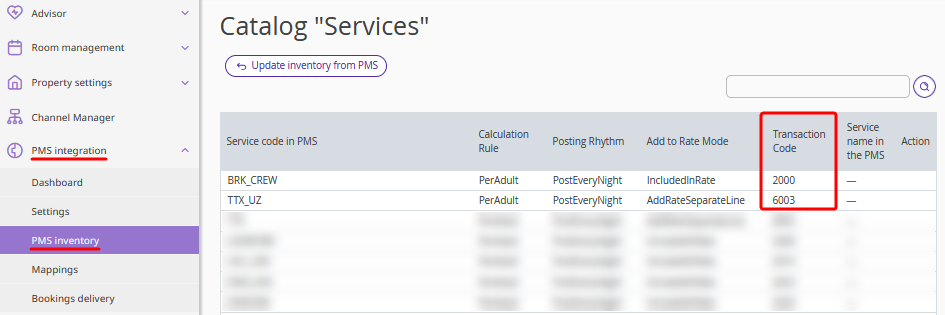
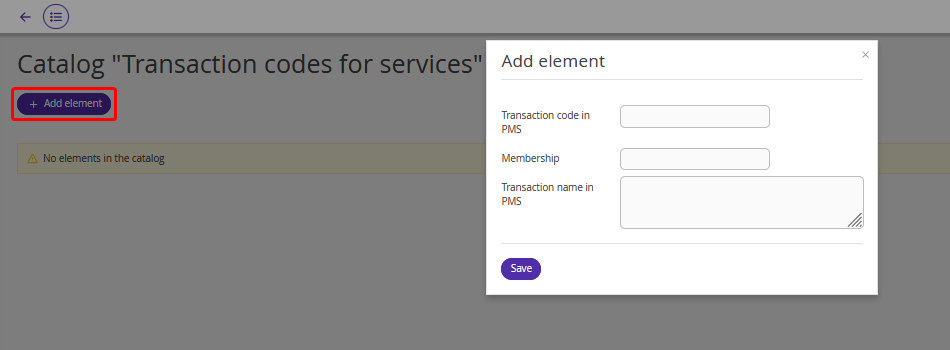
2. Fill in the “Transaction codes for services” catalog in the “PMS integration” > “PMS inventory” section.
For this, click the “Add element” button and enter the following details in the opened window:
Transaction code in PMS — you can find it in the “Services” inventory;
Membership — true;
Transaction name in PMS.
Pay attention. Only paid extra services are passed to the bookings storage. The extra services included in rate plans are not passed.
4. Enable accumulation of bookings from Opera PMS in the loyalty program settings
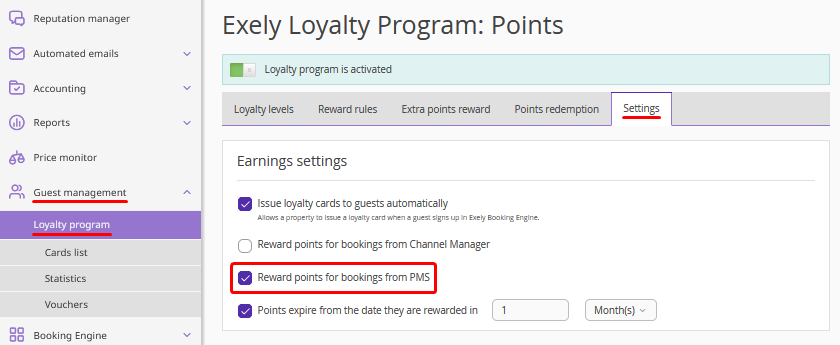
In the settings of Exely Loyalty Program: Points or Exely Loyalty Program: Discounts, enable accumulation of bookings from Opera PMS for earnings.
For this, go to “Guest management” > “Loyalty program” and click “Edit” for the loyalty program set for your property to open the settings. Then, switch to the “Settings” tab and tick the check-box:
“Use bookings from PMS for earnings” in the Exely Loyalty Program: Discounts settings,
“Reward points for bookings from PMS” in the Exely Loyalty Program: Points settings.
Note. If the required check-box is missing, contact your Customer Support manager or Exely Customer Support team.
How earnings are credited for bookings
For a booking to be accumulated on a loyalty card, the booking in the PMS must include an active loyalty card for the Exely Loyalty Program: Points or Exely Loyalty Program: Discounts.
Make sure that the “Member Type”, “Member Number”, and “Member Level” fields are filled in the “Member” section of the booking card in the Opera system. This information must be filled in for both bookings from Exely and bookings made directly in the PMS.
Earnings for bookings are credited to the guest's loyalty card in 5 days after check-out for the booking.
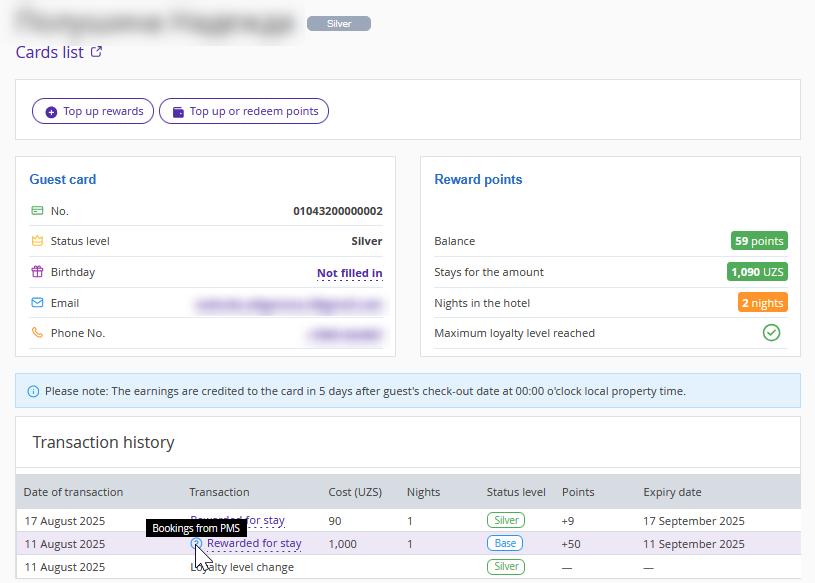
All accumulated bookings are displayed in the transaction history.
If a booking was received from the bookings storage, hovering over the icon next to the booking number will show that it came from the PMS.
The system accumulates bookings from Exely and from the bookings storage, prioritizing data from the bookings storage. If a booking is not found in Opera, the data from Exely is used.
Pay attention. The earnings credited for a booking cannot be returned.
Integration features
1. If a booking includes multiple guests with active loyalty cards, earnings will be credited only to the first guest’s card.
2. If you disable booking export in Opera, the bookings storage will not receive new bookings or update existing bookings data. In this case, data from Exely or the last received data in the bookings storage will be used.
