On the "Cards list" page, you can generate and download a report on guest loyalty card transactions in Excel format. Use this report to perform an in-depth analysis of card-related actions.
The report shows who and when manually credited points, which levels were changed, and for which bookings guests received earnings.
How to generate the report
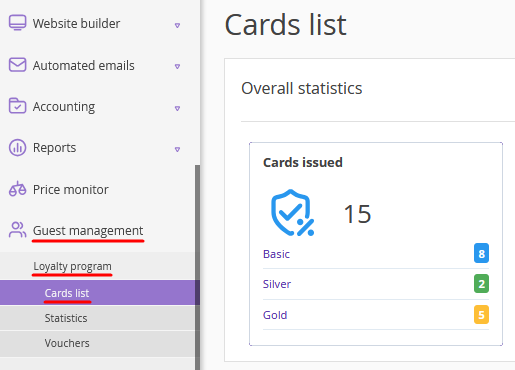
1. Go to "Guest management" > "Loyalty program" > "Cards list".
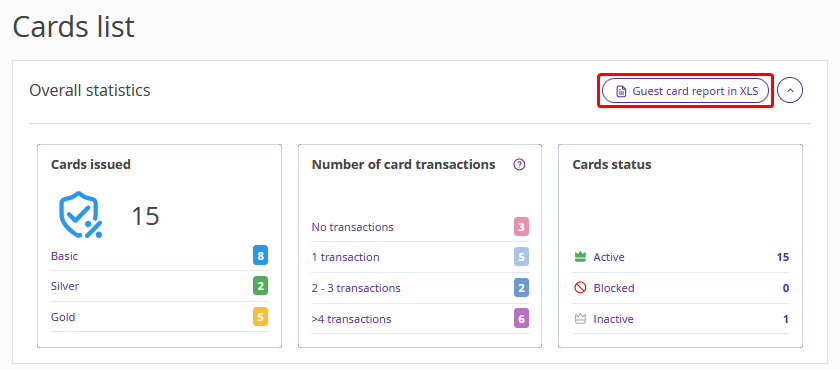
2. In the "Overall statistics" section, click the "Guest card report in XLS" button.
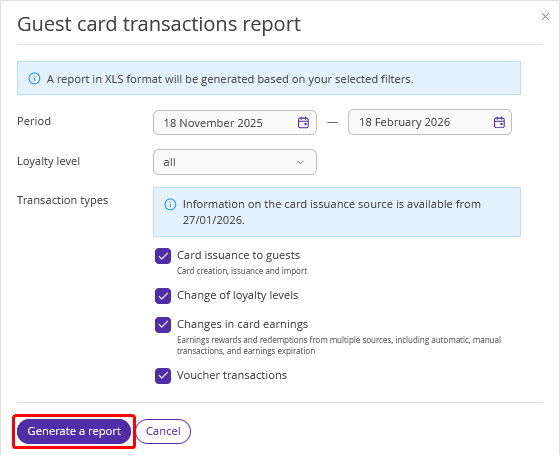
3. In the opened window, set the required filters (period, loyalty level, transaction types).
4. Click "Generate a report".
Pay attention. The file generation may take up to 10 minutes depending on the volume of data.
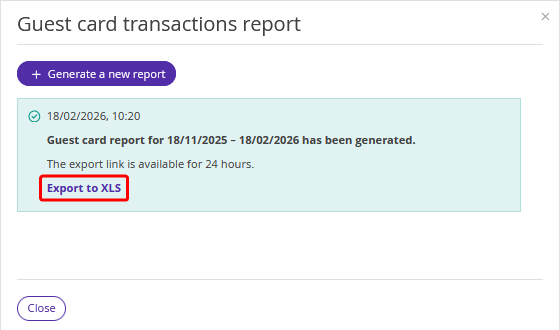
5. Click "Export to XLS". The download link is active for 24 hours from the moment the report is generated.
Report structure
The report is generated in XLSX format. Each operation type is exported to a separate sheet (tab).
Pay attention. If you use Exely Loyalty Program: Points and select the operation type "Point transactions" during report setup, the file will contain only one sheet.
Sheet (tab) name |
Issued cards list |
Change of loyalty levels |
Changes in card earnings |
Points transactions |
Sheet (tab) description |
List of new loyalty program members for the selected period |
History of guest transitions between levels (for example, from the "Silver" level to the "Gold" one) |
Data on earnings that affect a guest reaching the next level |
All point transactions |
Data in the sheet (tab) |
|
|
|
|
Report specifics
If your loyalty program operates for multiple properties within one group, the ID of a specific property is displayed only for transactions related to direct bookings.
All dates and times in the report are shown in UTC.
Only one report can be generated at a time. You can generate another report only after the previous one has been completed.
The report is available to all users with access rights allowing them to work with Exely Loyalty Program, except users with the “Read-only” access.
Column headers and system texts are displayed in the language selected in your Exely extranet. Manually added comments are preserved in their original form.
