SkyBiz is a Malaysian cloud accounting and ERP system designed to support business operations, financial reporting, and compliance with local tax regulations. The platform includes accounting, billing, and invoicing modules and supports integration with Malaysia’s e-Invoice framework, enabling businesses to generate and submit e-Invoices to IRBM in accordance with regulatory requirements.
The Integration between SkyBiz and Exely PMS allows properties to:
sync Exely transactions to SkyBiz for SST and E-invoice submission;
generate and transfer invoices near real-time;
comply with LHDN standards;
transfer data securely between systems;
seamlessly integrate with SkyBiz Cloud Accounting.
How to connect Exely PMS to SkyBiz
1. Send a request to your Exely Customer Support manager or Exely Customer Support team.
2. After integration with financial accounting systems is enabled, go to “Property management” > “Settings” > the “Integrations” tab and copy an integration key in the “Financial accounting” section.
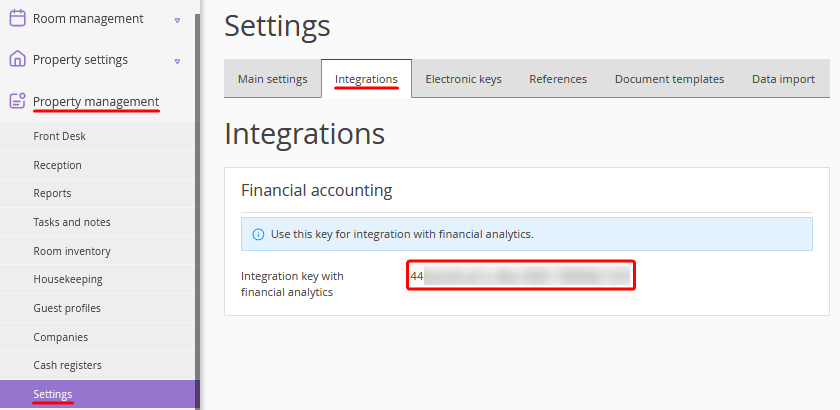
3. Provide the integration key to the SkyBiz team.
Configuration is performed by the SkyBiz team. For detailed instructions, refer to https://aisupport.skybizglobal.com/skybizclouderp/exely-vs-skybiz-e-invoicing-integration/.
