In the booking engine, guests can choose the language in which information is displayed. To make a specific payment method available only for certain languages, follow the steps below:
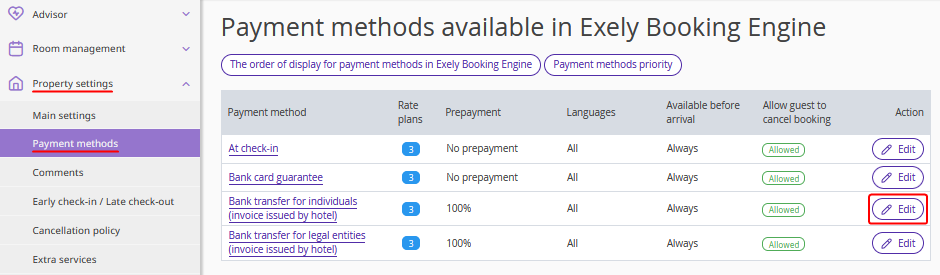
1. In the Exely extranet, go to “Property settings” > “Payment methods”.
2. Click “Edit” next to the required payment method.
3. In the section “Payment method "..." is available in Exely Booking Engine when a guest selects a language” tick check-boxes for the languages which this payment method should be available for. If the payment method should be available for all language versions, tick the “For all languages” check-box.
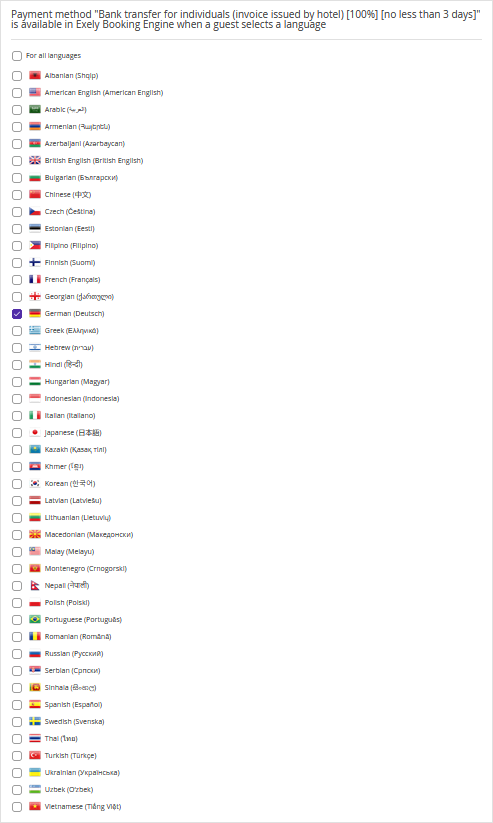
The payment method will now be displayed based on the language selected by the guest during booking.
Pay attention. At least one language must always be selected.
If you clear the “For all languages” checkbox, the property's default language (the language of the Exely account) will remain selected.
If you clear language checkboxes one by one, you won't be able to clear the checkbox for the last remaining selected language.
After you save the changes, the payment method will be available in the booking engine only when a guest selects one of the specified languages.
To hide the payment method completely from the booking engine, remove all rate plans assigned to it in the payment method settings.