Hotel Cybersecurity: How to Protect Your Hotel and Guest Data


Every hotel handles sensitive guest information, from contact details and booking records to payment data. Hotel data security becomes more complex when this information passes through multiple systems and technology providers.
A security weakness in any of these systems, or a compromised employee account, can expose guest data. Even if your hotel's own systems are well protected, a vulnerability at an external provider may still put that information at risk.
Protecting your hotel therefore means looking beyond individual software products. The following steps will help you identify security risks, assess your technology providers, and strengthen the protection of guest data.
How booking data moves between hotel systems
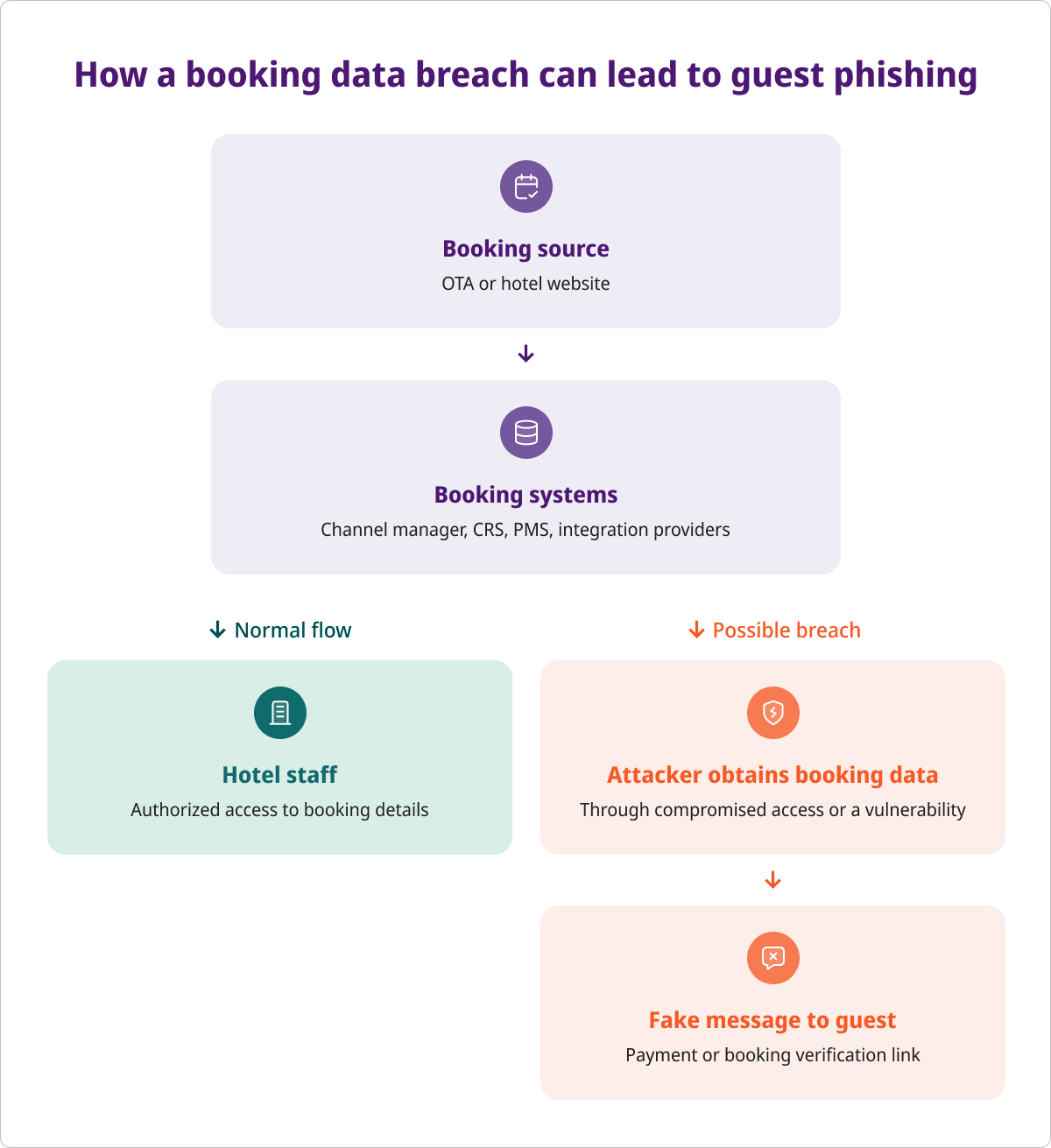
A booking made through an OTA, hotel website, or travel agency may pass through several systems before reaching the hotel's property management system (PMS). Depending on the setup, these may include a channel manager, central reservation system (CRS), and external integration providers.
Each system that stores or processes booking information represents a potential point of exposure. Channel manager security is particularly important because these systems can handle bookings for many properties. A breach affecting one provider could potentially expose guest data belonging to several hotels.
However, not every connected system carries the same risk. The potential impact depends on the information it handles, who can access it, and the security controls in place.
How to assess your hotel's cybersecurity risks
Start by identifying which systems handle your hotel's data, who can access them, and who is responsible for their security.
Make an inventory of the applications and services used for bookings, payments, guest communication, and daily operations. Include less obvious systems, such as website plugins, shared email accounts, cloud storage, and external integrations.
For each system, record what information it processes, who manages it, and which employees or external providers can access it. Pay particular attention to systems that store large amounts of guest data or allow bulk exports, as unauthorized access to these systems could expose many bookings at once.
The following questions can help structure your review:
| What to review | Questions to ask |
|---|---|
| Hotel systems | Which applications and integrations process guest data? |
| Employee access | Who can view, change, or export booking information? |
| Software maintenance | Who is responsible for updates and security patches? |
| Technology providers | Which companies handle guest data, and what security measures do they have? |
| Data storage | Where is guest information stored, and how long is it retained? |
| Business continuity | What happens if a critical hotel system becomes unavailable? |
Once you have this information, you can identify which areas need improvement and assign responsibility for addressing them.
Key cybersecurity practices for hotels
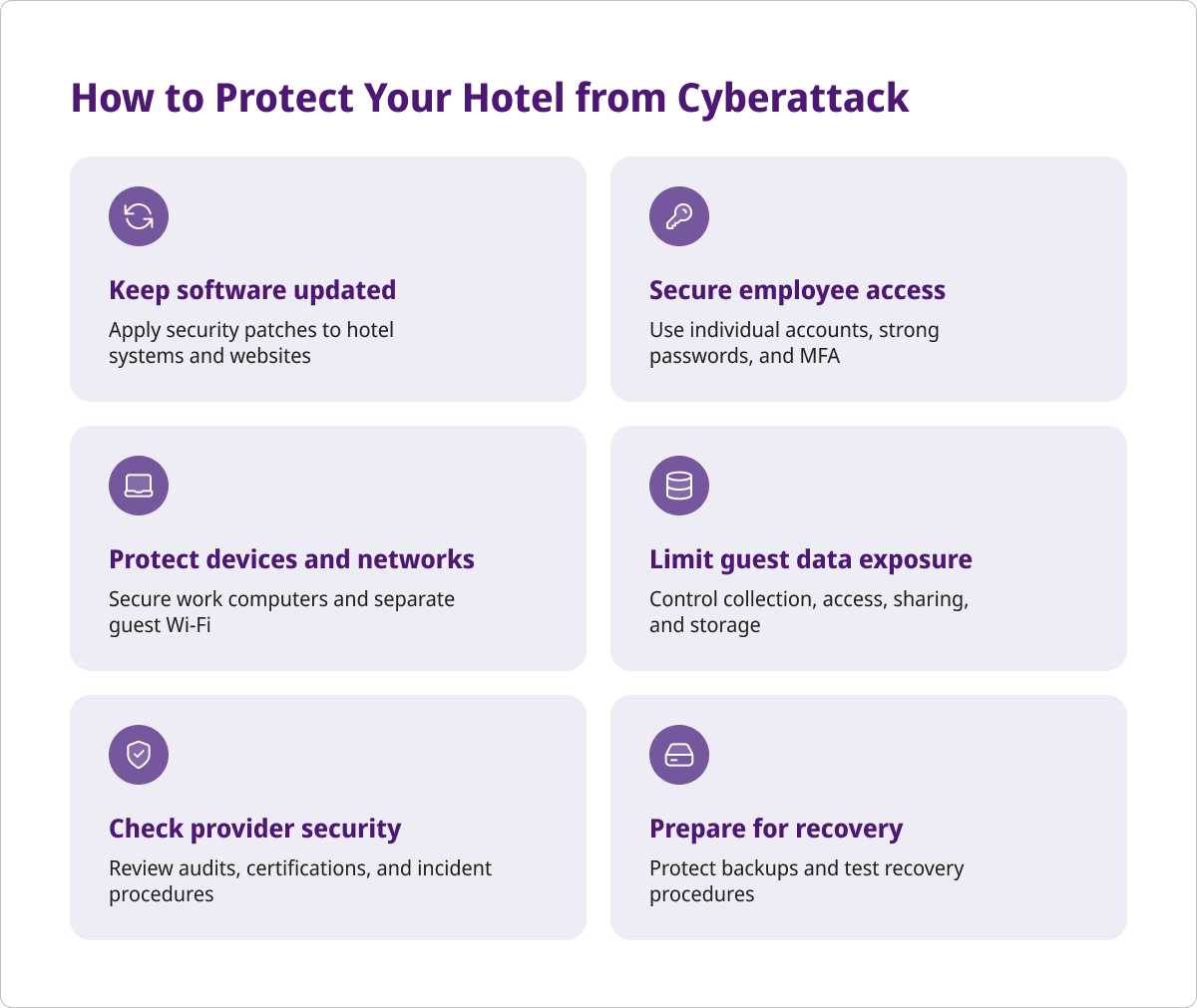
The following measures address common security risks involving hotel systems, employee accounts, guest data, and technology providers.
Keep software and websites updated
Outdated software may contain known security vulnerabilities that attackers can exploit to gain unauthorized access. This applies to hotel applications, operating systems, website plugins, and server software such as PHP.
It's important to know who is responsible for updates. SaaS providers generally maintain their own systems, while a separately hosted hotel website may be managed by a hosting company, developer, or internal IT team.
Ask how quickly critical security patches are applied. Older websites may require compatibility testing before an update, but delaying security fixes can leave known vulnerabilities unaddressed.
Secure employee accounts and access
Employees should have individual accounts rather than shared logins, with access limited to what they need for their work. For example, front desk staff may need to view upcoming bookings, but not everyone needs permission to manage system settings or access all guest records.
Use unique passwords for hotel accounts and a trusted password manager to store them securely. Enable multi-factor authentication (MFA) wherever available, particularly for email, PMS, OTA extranets, channel managers, and administrator accounts.
Review access regularly and remove it promptly when employees leave or change roles. Where available, use activity logs to identify suspicious account access or changes.
Pay particular attention to hotel email accounts. If an account is compromised, attackers may be able to read guest correspondence or send messages on the hotel's behalf. Suspicious forwarding rules and unfamiliar account access should be investigated.
Protect employee devices and hotel networks
Malware on an employee's computer can expose booking information and provide attackers with access to hotel systems. Attackers may distribute malware through malicious attachments, unsafe downloads, or compromised websites.
Keep work devices protected with reliable, up-to-date endpoint security software. Employees should avoid installing unknown applications and verify unexpected files before opening them.
Guest Wi-Fi should be separated from the hotel's internal network. Computers used to access the PMS, payment systems, and other business applications should not share the same unrestricted network as guests' devices.
Train employees to recognize suspicious attachments, unexpected software requests, and attempts to obtain account credentials. Staff should know how to report these incidents promptly.
For more information about fraudulent messages and how to recognize them, see our guide to Hotel Phishing Scams: How to Protect Guests and Staff.
Limit the collection and sharing of guest data
Data minimization means collecting, retaining, and sharing only the personal information needed for a legitimate purpose. This can reduce the amount of guest data exposed in a security incident.
Where supported, hotels can also limit unnecessary data sharing between systems. For example, some booking platforms use masked email addresses or restrict access to guest phone numbers until closer to arrival.
These measures can reduce exposure of contact information, although hotels still need reliable ways to communicate with guests about their bookings.
Avoid keeping unnecessary copies of booking records, particularly spreadsheets on personal devices or files shared through unsecured channels. Restrict bulk exports where possible and keep records of who accesses or downloads guest data.
Hotels that handle payment card data must follow applicable PCI DSS requirements. Avoid storing card details in emails, spreadsheets, or PMS notes. Use approved payment systems instead.
Set retention periods based on operational needs and applicable legal requirements, and make sure information is deleted securely when it is no longer needed.
Check your technology providers' security practices
Hotels depend on external providers to process and protect booking information. Their security practices should be part of the selection process, not something considered only after an incident.
Ask whether providers undergo independent security assessments, conduct penetration testing, and have procedures for identifying and fixing vulnerabilities.
You can also request a current ISO/IEC 27001 certificate or SOC 2 report as evidence of their security practices. Check which services are covered and the relevant certification or audit period.
These documents don't guarantee that a provider is free from vulnerabilities, but they can help you assess its security practices.
Clarify what guest data the provider receives, whether it shares information with integration partners, how access is controlled, and how long the data is retained.
Before signing an agreement, find out how the provider handles security incidents, how quickly it notifies affected customers, and what support it provides during an investigation.
Prepare backups and recovery procedures
Not every cyberattack involves stolen guest data. Malware or ransomware can also disrupt hotel operations by making booking records or essential systems unavailable.
Make sure critical data is backed up and that recovery procedures are tested. Backups should also be protected from unauthorized deletion or encryption, for example through isolated or immutable copies. For cloud-based services, ask providers what is included in their backups and how quickly systems can be restored.
The hotel should also have a plan for continuing essential operations if the PMS, website, or another critical system becomes unavailable. Staff should know how to manage arrivals, departures, and bookings while the system is unavailable.
If your hotel experiences a security incident, our guide to Hotel Data Breach Response: What to Do After a Cybersecurity Incident explains how to contain the threat, assess the impact, and restore operations.
Hotel cybersecurity checklist
Use this checklist to review your hotel's security practices and identify areas that need improvement.
- Identify all systems and providers that handle guest data.
- Confirm who is responsible for software updates and security patches.
- Use individual employee accounts, unique passwords, and multi-factor authentication (MFA).
- Review access permissions regularly and remove access when employees leave.
- Protect work devices and keep guest Wi-Fi separate from internal hotel networks.
- Limit the collection, storage, sharing, and bulk export of guest data.
- Handle payment card information through systems and processes that meet applicable PCI DSS requirements.
- Review technology providers' security assessments and incident response procedures.
- Protect backups against unauthorized access or deletion and test recovery procedures.
- Establish procedures for managing arrivals, departures, and bookings during system outages.
FAQ about hotel cybersecurity
Why are hotels attractive targets for cybercriminals?
Hotels process valuable guest information, including contact details, booking records, and payment data. Some of this information is also held by booking platforms and technology providers serving multiple properties, making these systems attractive targets for attackers.What should hotels do before connecting a new software provider?
Find out what guest information the provider needs, who can access it, and whether it will be shared with other companies. Ask for evidence of security assessments and clarify how the provider handles software updates and security incidents.How often should hotels review employee access permissions?
Review access whenever an employee changes roles or leaves the hotel. Schedule regular checks as well, particularly for administrator accounts and employees who can export large amounts of booking data.Does using cloud-based hotel software eliminate cybersecurity risks?
No. The provider typically maintains the software and underlying infrastructure, but the hotel still needs to manage employee accounts, access permissions, and the information staff share or download. Check your agreement to understand which security responsibilities belong to the provider and which remain with the hotel.Can hotels reduce cybersecurity risks without a dedicated IT team?
Yes. Even a small hotel can use individual employee accounts, enable multi-factor authentication, restrict access to guest data, and train staff to recognize suspicious messages. For technical work such as server maintenance or network security, the hotel can rely on qualified external specialists.