1. Payments for which bookings are processed by Pay Connect?
OTA |
Bookings with the payment method "Bank card guarantee" |
Bookings with the payment method "Virtual credit card" |
Booking.com |
Yes, if the property does not use Payments by Booking. |
Yes, if the property uses Payments by Booking. This mode is not available for properties in Uzbekistan. |
Expedia |
No. |
Yes, if the property uses the "Expedia Collect" payment model. |
Agoda |
No. |
Yes, if the property uses the "Pay to Agoda" payment model. |
2. How can I check that a booking was processed by Pay Connect?
To verify that a booking was processed by Pay Connect, go to "Reports" > "Bookings" and check the required booking. In the "Payment method" column in the report you will see:
Credit card guarantee (Pay Connect).
Virtual credit card guarantee (Pay Connect).
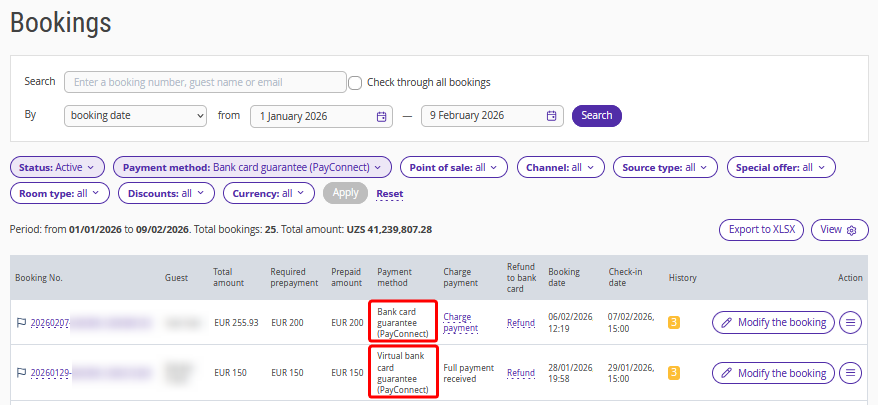
Pay attention. Viewing card details in the bookings report is not available.
3. What if Pay Connect is enabled, but there is no "(Pay Connect)" indicator in the "Payment method" column?
There may be two reasons:
The channel from which the booking was received is currently not connected to Pay Connect.
There was an issue connecting to the payment system. This may happen if the booking was received during technical maintenance on the payment provider’s side. Such cases are rare. If there is more than one such booking and the interval between them exceeds 1–2 hours, send a request to your Exely account manager or Exely Customer Support team.
4. How can I check that a virtual credit card payment was processed?
Virtual credit card processing is performed according to the channel rules. Each channel has its own conditions, but in most cases the charge is made on the guest’s check-out date at 12:00 property local time.
After the payment is processed, the charged amount is displayed in the booking details in "Reports" > "Bookings" in the "Prepaid amount" column.
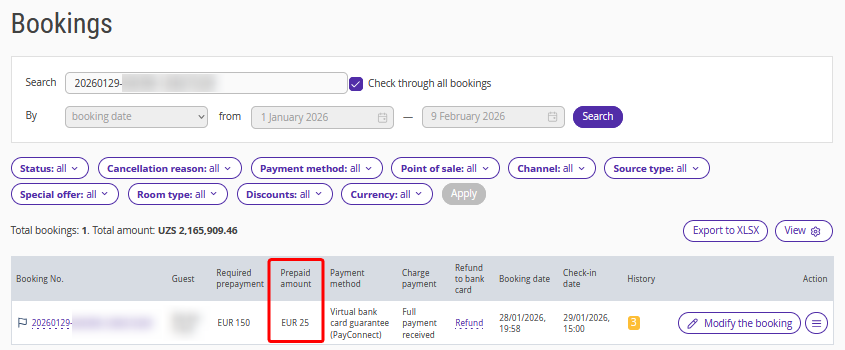
Pay attention. The amount charged from a virtual credit card shown in the "Prepayment received" column may be lower than the value in the "Total amount" column for the following reasons:
The booking includes payments that the guest pays at check-in, for example a tourist tax in Uzbekistan.
The property works with the channel under a NET settlement scheme, where the guest pays the channel and the channel withholds its commission from each booking.
5. What to do if the prepayment from the guest’s card was not received?
This situation is possible only if the property has chosen to process payments from guests' cards directly and not through the channel. When using virtual cards, there are no problems with receiving funds.
When working with guest cards, issues may arise due to incorrect data entry or the card status at the issuing bank, including the following cases:
Incorrect card details were provided.
The card is invalid or does not exist.
Insufficient funds on the card.
The card has transaction limits and the prepayment amount exceeds the allowed limit.
Other restrictions imposed by the issuing bank.
In such cases, a yellow indicator is displayed in the report on bookings, and the corresponding booking also appears in "Reports" > "Pay Connect bookings for review".
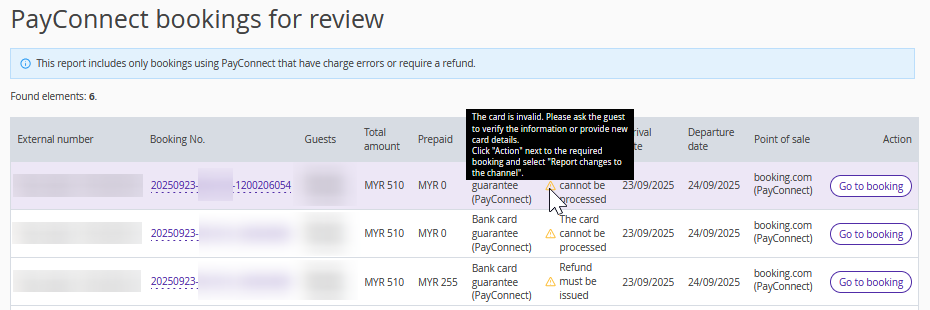
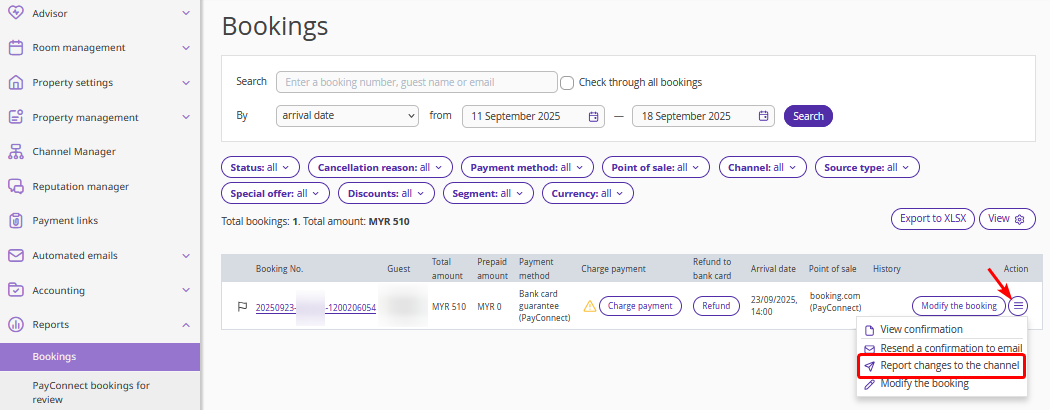
Request new card details from the guest via Booking.com: find the required booking in "Reports" > "Bookings" and click "Action" > "Report changes to the channel". For detailed instructions, see the article "How to reconcile bookings from Booking.com in Exely extranet".
6. What amount should be charged to the guest at check-in or check-out?
If the property receives funds from the channel via a virtual credit card, only taxes to be paid upon check-in may remain to be paid by the guest. The relevant amounts are indicated in the voucher.
In case the property works with the channel without using a virtual credit card, the guest may need to pay:
taxes to be paid upon check-in;
the remaining part of the prepayment, if the booking was not paid in full. Detailed information is available in the voucher.
7. What to do in case of a no-show?
If the guest did not arrive on the scheduled check-in date, when working with a virtual credit card you can still charge the full booking amount.
In case the property works with the channel without using a virtual credit card, you must notify the channel about the no-show. After that, Pay Connect switches to penalty charging mode for the booking, and the allowed range of amounts that can be charged to the guest’s card is updated automatically.
If the booking came from Booking.com, you can report the no-show in the Exely extranet. To do this, go to "Reports" > "Bookings", find the required booking, and click "Action" > "Report changes to the channel". For more details, see the article "How to reconcile bookings from Booking.com in Exely extranet".
8. What to do if a booking is canceled and the guest asks for a refund without penalties?
In some cases, a guest may ask the property to refund the payment despite the booking terms. In this situation, the booking must be canceled in the channel extranet. If the cancellation is made before the scheduled check-out date, further actions depend on the Pay Connect work mode.
Pay Connect works as follows in this case:
When using a virtual credit card, the virtual card is not processed, so no additional refund actions are required.
When using a guest’s credit card, the canceled booking appears in "Reports" > "Pay Connect bookings for review", since refunds to guest cards are performed manually only.
A property employee can process a refund by specifying an amount not exceeding the received prepayment. For details on how to make refunds, refer to the article "Pay Connect bookings for review".
Pay attention. Refunds are processed in accordance with the payment system rules. The property account used as the refund source must have sufficient funds to complete the operation. If there are insufficient funds, the system will display a refund error status (usually within a few minutes), and the booking will remain in "Reports" > "Pay Connect bookings for review". After a successful full refund, the canceled booking is automatically removed from this report.
