- How reconciliation compares guest names
- Which differences are allowed
- Which differences are rejected
- Bookings for reconciliation
- How data changes affect reconciliation
- How to check why a booking is missing from the reconciliation list
- Guest account
This article describes how guest names are compared, which bookings are included in reconciliation, and why a record or button may be missing.
For instructions on how to set up earnings reconciliation and review rewards, see the article "How to set up earnings reconciliation and review rewards".
How reconciliation compares guest names
Reconciliation compares the cardholder's full name with the guest details in the booking. A match with at least one guest is enough to preliminarily approve the reward.
The names do not always have to be written identically.
Which differences are allowed
Difference |
Example and condition |
Minor typo |
“Jogn” and “John”: a typo caused by pressing an adjacent key |
Missing or transposed letters |
One or two missing letters and transposed adjacent letters are allowed |
Different alphabet |
“Ivan” or “Иван” |
Diminutive name |
"Robert" and "Bob": commonly used forms in the same language |
Different word order |
“Emma Smith” and “Smith Emma” |
Missing middle name |
“Ashley Williams” and “Ashley Ann Williams” |
Initials |
“Alexander James Connor” and A J Connor: the last name must match exactly |
Missing second last name |
"Gabriel García Márquez" and "Gabriel Garcia": the first name and first last name must match exactly |
Last name truncated by the point of sale |
"Krishnamurthy" and "Krishnamurt": at least four characters must remain |
Note. The check also takes into account national naming conventions, including particles in last names, and names without a last name.
Which differences are rejected
Difference |
Example or condition |
Different last names |
A match based on the first name alone is not enough |
Meaning-based equivalent instead of phonetic transcription |
"Иван" and "John" |
Difference results in a different first or last name |
"Maria" and "Mary", "Martin" and "Martinez" |
Last name shortened to a syllable |
"Harrison" and "Har." |
Ambiguous short form of a name |
"Liz" can mean "Elizabeth" or "Eliza" |
Initials do not correspond to the full name |
"M. J. Taylor" and "James Michael Taylor" |
Diminutive name refers to a person of a different gender |
"Sam" — a woman and "Samuel" — a man, if gender information is available |
Pay attention. If you are unsure, check the cardholder's and guests' details. You can manually change the decision until the reconciliation period ends.
Bookings for reconciliation
A booking goes through reconciliation if it is enabled and the actual check-out occurred no earlier than the moment reconciliation was enabled. The earnings conditions for the booking point of sale must also be met.
Situation |
What happens |
Guest checked out before reconciliation was enabled |
The full name check is not applied |
Guest checked out while reconciliation was disabled |
The booking does not go through reconciliation and will not appear in it after reconciliation is enabled again |
Archived booking or bulk import |
Rewards are earned without reconciliation |
Booking from PMS with a rate plan outside the loyalty program |
The booking is not included in reconciliation |
A full name mismatch affects the earnings decision. It does not prevent the booking from appearing in the list.
Changing the rewards source settings does not interrupt reconciliation for records that have already appeared in the list.
How data changes affect reconciliation
Change |
Result |
Guest's full name was corrected in PMS after check-out |
Guest details are updated. The check is not run again, and the decision remains unchanged |
Cardholder's full name was changed in the loyalty program |
The new details appear only in records with the "Pending AI processing" status. Records that have already been checked retain the previous full name |
Card was removed from the booking in PMS |
The record immediately disappears from reconciliation. Exely Suite cancels the earnings planned to be rewarded for this record |
Card was blocked during the reconciliation period |
The status changes to "Won’t be rewarded", and action buttons disappear |
Card was unblocked before the reconciliation period ends |
The status remains "Won’t be rewarded". The "Reward" button becomes available again |
How to check why a booking is missing from the reconciliation list
1. Make sure reconciliation is enabled and the setting is saved.
2. Compare the actual check-out date and time with the time when reconciliation was last enabled.
3. Check the earnings conditions for the booking source and its connection to the card.
4. Check whether the booking is archived or was created through a bulk import.
5. Reset the status, check-out date, and property filters.
6. Check whether the card was removed from the booking.
Guest account
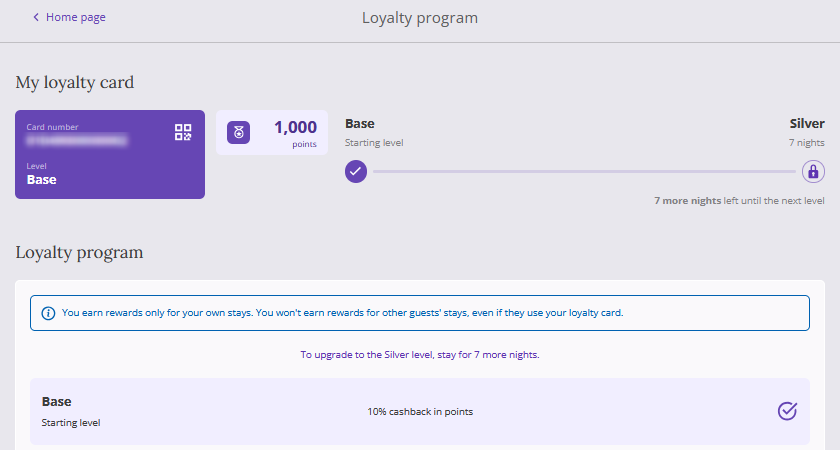
When reconciliation is enabled, a notification appears in the "Loyalty program" section of the guest account. It informs the cardholder that their card must be linked to a guest listed in the booking to receive rewards.
Bookings with the "Not rewarded" status are not displayed in "Transaction history".