If guests decide to pay with the "Bank card guarantee" payment method when making a booking via the booking engine on the hotel’s official website, they fill in the bank card details (its number, CVC code, and expiry date). These details are available in the "Reports" > "Bookings" section in the "Payment method" column.
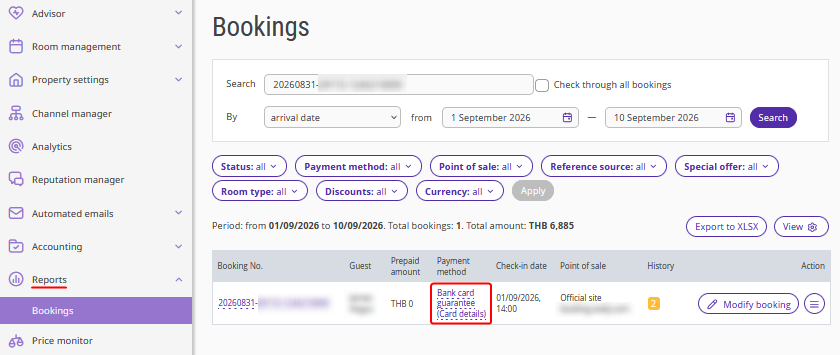
If there were incorrect data provided, you can request new bank card details.
1. Go to "Reports" > "Bookings" and find the required booking with incorrect bank card details.
2. Click the "Action" button and select "Request new card details".
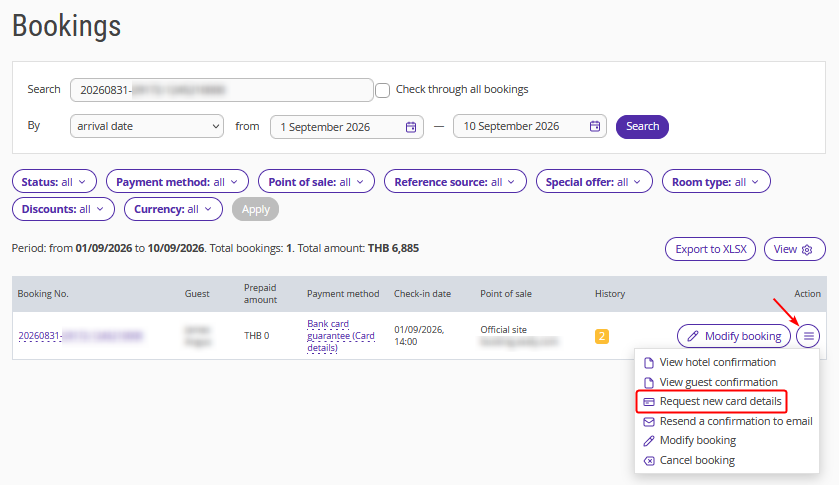
3. The guest will receive an email notification about invalid bank card details and be able to update it.
You will also receive a notification about the bank card details update via email.
New bank card details will be available in the "Reports" > "Bookings" section.
The bank card details storage policy after updating remains the same:
available for viewing no more than 3 times;
bank card details will be deleted 3 days after the first view;
if bank card details have never been viewed, they will be deleted 10 days after the guest’s departure date.