Daily report on unpaid bookings is a report that helps you track bookings with overdue payments and bookings for which the payment due date is approaching.
The report includes active bookings for which guests have selected one of the following payment methods:
The report displays bookings for which the guest has not yet paid the required amount and the check-in date has not yet arrived.
Note. The time in the report is based on the property's time zone.
Set up daily delivery of the report to monitor unpaid bookings in a timely manner and contact guests to clarify payment details when necessary.
Pay attention. The daily report on unpaid bookings is available if at least one of the listed payment methods is enabled. Report delivery is disabled by default.
How to set up the daily report on unpaid bookings
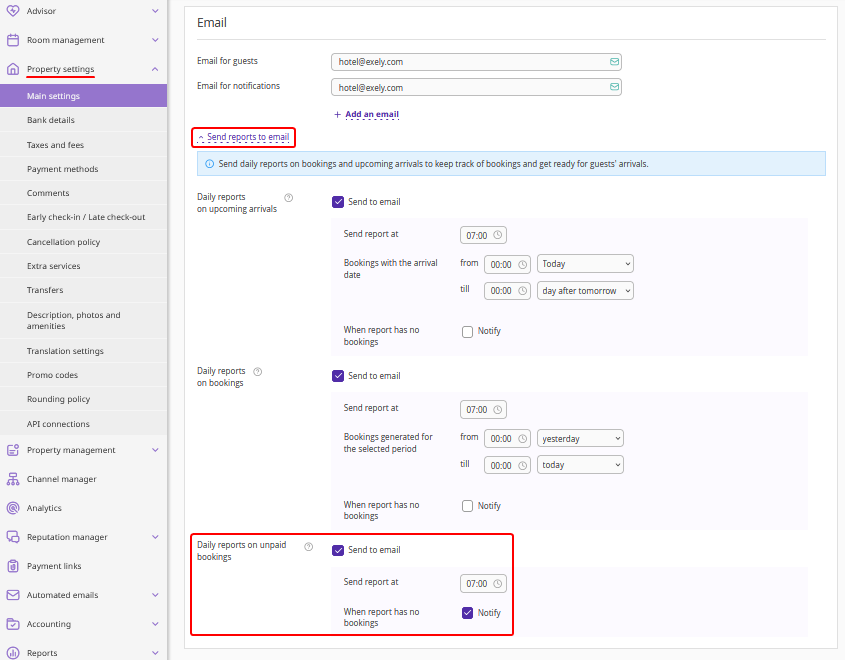
1. In the Exely extranet, go to "Property settings" > "Main settings".
2. Enter an email address in the "Email for notifications" field. The daily report on unpaid bookings will be sent to this email.
3. Click "Send reports to email".
4. In the "Daily reports on unpaid bookings" section, tick the "Send to email" check-box.
5. In the "Send report at" field, specify the time when the report should be sent. The delivery time is based on the time zone of the city where your property is located. The report will be generated and sent automatically every day at the specified time.
6. If you want to receive the report even when there are no unpaid bookings, tick the "Notify" check-box in the "When report has no bookings in the report" field.
If the check-box is ticked, the report will be sent daily, even if it contains no bookings. If the check-box is cleared, the report will be sent only if it contains at least one booking.
7. Save the changes.
Pay attention. The report and automatic cancellation of unpaid bookings are configured independently of each other. You can receive the report even if automatic booking cancellation is disabled. For details about setting up automatic booking cancellation, see the articles "Payment method «Deferred payment»" and “Payment method «Pay in two installments»”.
Which bookings are included in the report
The daily report on unpaid bookings consists of two sections.
Bookings with upcoming payment due dates
This section displays active bookings for which the payment due date is:
Today, after the specified report delivery time;
Tomorrow, before the end of the day.
The report includes only bookings for which the required payment has not yet been received and the check-in date has not yet arrived.
The following details are displayed for each booking:
Booking number;
Guest's full name;
Room type;
Stay dates;
Prepayment received;
Expected payment — the amount due;
Payment due date — the date and time by which the guest must make the payment;
Note.
Bookings with overdue payments
This section displays active bookings for which the payment due date has passed but the required amount has not been received from the guest.
The booking remains in this section until the payment is received or the check-in date arrives, provided that the booking remains active.
The following details are displayed for each booking:
Booking number;
Guest's full name;
Room type;
Stay dates;
Prepayment received;
Expected payment — the amount due;
Payment due date — the date and time by which the guest must make the payment;
Note.
The "Automatic cancellation" column indicates:
"YES" — automatic cancellation of unpaid bookings is enabled for a booking. The date and time by which the payment must be made are also displayed.
"NO" — automatic cancellation is disabled.
Pay attention. If automatic cancellation is enabled for a booking and the booking has already been canceled, it will not appear in the report because the report includes only active bookings.
How payment information is displayed
All amounts in the report are displayed in the booking currency.
Prepaid amount is the total amount of payments already recorded for the booking, including payments entered manually.
Expected payment is the amount the guest must pay by the specified due date:
For the “Pay in two installments” payment method — the remaining balance of the booking.
For the “Deferred payment” payment method — the required prepayment amount.
Payment due date is the date and time by which the payment must be made. For the “Pay in two installments” payment method, this is the due date for the second installment. For the “Deferred payment” payment method, it is the prepayment due date.
Bookings in the report are sorted by date, bookings with the earliest payment due date are displayed first.
Click the booking number in the report to open the booking in the "Reports” > “Bookings" section in the Exely extranet.
Example of the report
For example, a guest makes a booking with the “Pay in two installments” payment method. The second installment must be paid by November 15, 2026.
If the guest does not make the payment:
November 13 — the booking will not appear in the report yet.
November 14 — the booking will appear in the section "Bookings with a cancellation date after November 15".
November 15 — the booking will appear in the section "Bookings with an OVERDUE cancellation date" if the payment due date expired by the time the report is sent.
From November 16 onward — the booking will remain in the overdue payments section as long as it is active, the required payment has not been received, and the check-in date has not yet arrived.
If the guest makes the required payment or the check-in date arrives, the booking will no longer appear in the report.
If the booking is canceled, it will also be excluded from subsequent reports.
