The “Agents report” helps to evaluate the performance of online distribution channels: how much revenue each agent generates and how much the property spends on commissions. This helps make informed management decisions and control guest acquisition costs.
The data in the report is updated once a day at 05:00 local property time.
Who can access the report
The “Agents report” is available to all properties using Exely PMS.
Report information
The “Agents report” is located in the "Property management" > "Reports" section. It is available in two modes:
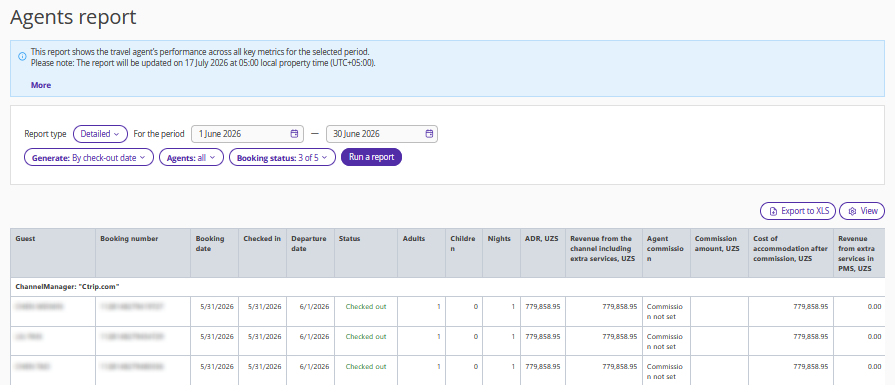
Detailed report.
Each row in the report represents a separate booking and displays guest and booking details. This mode is suitable for reconciliation with channels and analysis of specific bookings, for example, by an accountant.
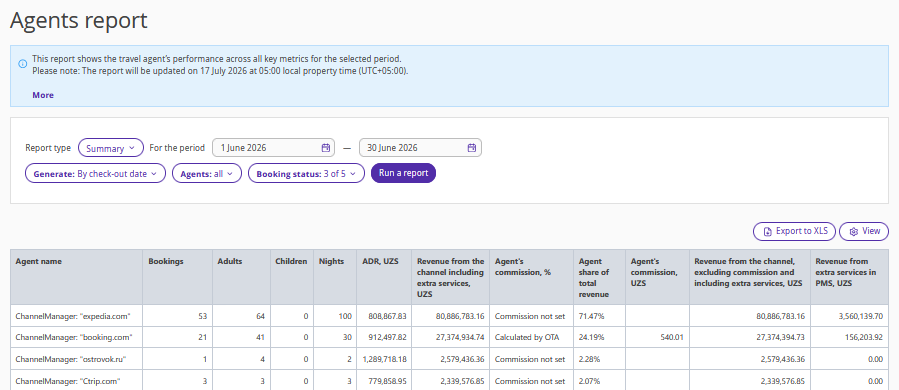
Summary report.
Each row in the report represents an agent (online distribution channel). This mode is suitable for evaluating channel performance and making management decisions, for example, by a property manager.
The filters are the same for both report types:
Period — the previous calendar month is selected by default.
Generate — by check-out date, check-in date, or dates of stay.
Agents — channels from which bookings were received. You can select one or several channels. All channels are selected by default.
Booking status — arrival, checked out, in-house, no-show, cancellation. The default option is "All".

How to interpret the main metrics :
ADR — the average room price per night. The calculation includes accommodation, early check-in, and late check-out only. Other services are not included.
Revenue from the channel including extra services — the amount paid by the guest through the channel, including: accommodation; services included in the rate plan; separately purchased services (transfer, spa, etc.); early check-in and late check-out fees. Charges added in Exely PMS are not included.
Agent’s commission, % — the commission percentage paid to the channel. It can be specified in Exely PMS. If the commission is calculated on the channel side, the report will display "Calculated by OTA". If the commission is neither configured in Exely PMS nor provided by the channel, the report will display "Commission not set".
Agent's commission — the commission amount paid to the channel. It can be calculated in Exely PMS or received from the channel.
Revenue from the channel, excluding commission and including extra services — The property's revenue from the booking after deducting the agent commission.
Revenue from extra services in PMS — services purchased at the property in addition to the booking (excluding early check-in and late check-out fees). These services are not included in the agent commission calculation. They may include services added to the booking through Exely PMS or external integrations.
Agent share of total revenue — a metric available in the summary report. It shows the percentage of total revenue generated by the channel.
How to download the report
To download the data as an Excel file, generate the report using the required filters and click the "Export to XLS" button.
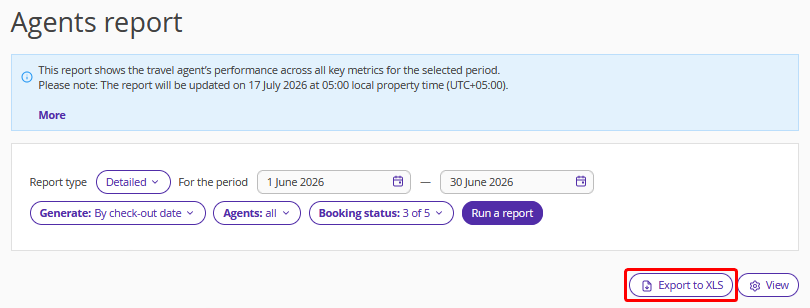
The exported report matches the currently selected report type — detailed or summary. The structure and data fully correspond to what is displayed in the extranet.
Report features
Why is commission missing for some bookings?
Commission may be missing if no commission percentage is specified in the agent profile and the channel did not provide a calculated commission amount for the booking.
Why do the figures change when the period changes?
Different period types use different calculation rules. When "By check-in date" or "By check-out" is selected in the “Generate” filter, the entire booking is included in the report. When "By dates of stay" is selected, only the portion of the stay and revenue that falls within the selected period is included.
Useful links
To learn how to set up agents and commissions, see the article “How to manage commissions for agent companies in Exely PMS”.
