In this article, we will review how to cancel a booking made at the property website.
How to cancel a booking from the property website
1. In the Exely extranet, go to "Reports" > "Bookings".
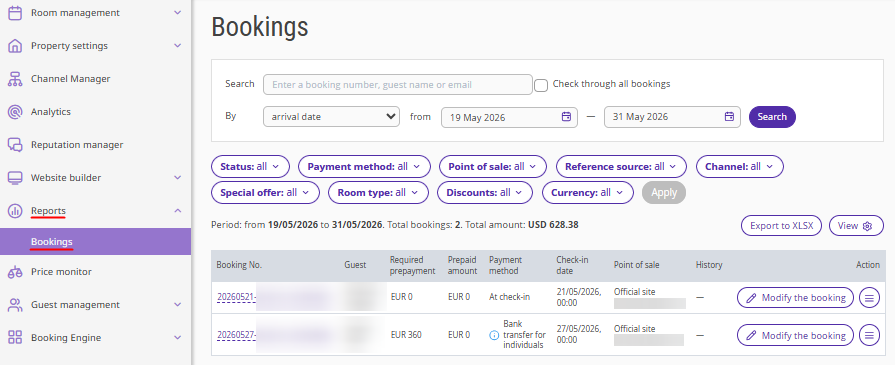
2. Find the required booking using filters, or enter the booking number in the "Search" field and tick the "Check through all bookings" check-box.
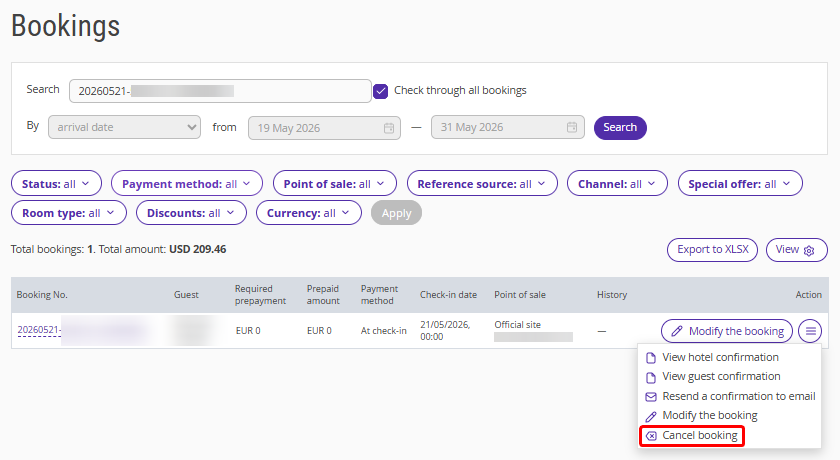
3. Click "Action" > "Cancel booking".
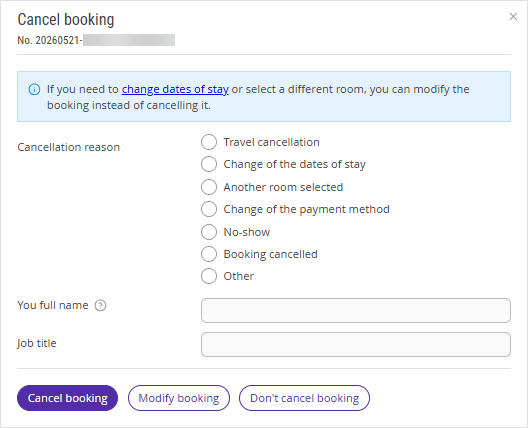
4. In the opened window, specify:
the cancellation reason,
your full name,
job title.
5. Click the “Cancel booking” button.
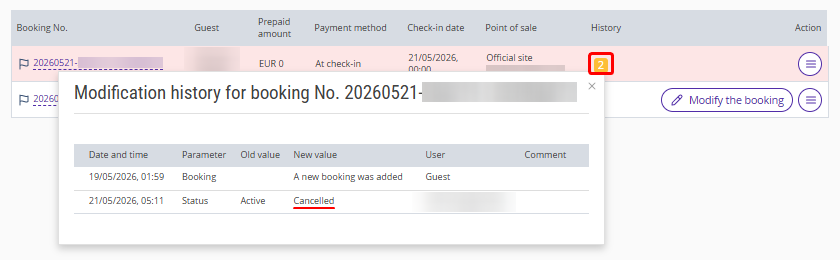
Once the booking is canceled, it will be highlighted in red. The history of changes for the booking will show the information about the booking cancellation and the user who made the cancellation.
A cancellation notification will be sent to the guest.
Pay attention. If the guest confirms the booking in the received email, the booking will be automatically reinstated, and it will not be possible to cancel it again in the Exely extranet. In this case, to cancel the booking, send a request to your Customer Support manager or Exely Customer Support team.
How to cancel a booking with prepayment
If the guest made a prepayment via any acquiring system or using one of the following payment methods, you will need to issue the refund yourself:
bank transfer for individuals;
bank transfer for legal entities.