The full list of segments can be found in “Guest management” > “Guest relations” > “Segments”.
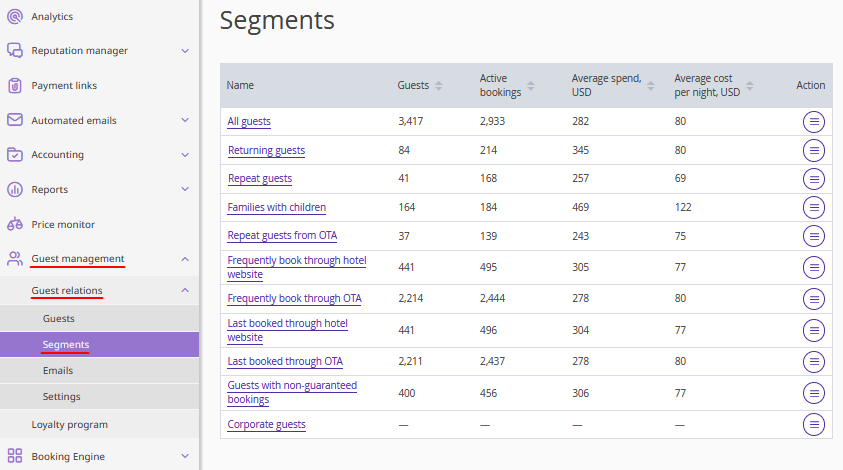
The page displays the following segments:
All guests,
Returning guests,
Repeat guests,
Families with children,
Repeat guests from OTA,
Frequently book through hotel website,
Frequently book through OTA,
Last booked through hotel website,
Last booked through OTA,
Guests with non-guaranteed bookings,
Corporate guests.
All guests
The complete list of all guests available in the database.
Returning guests
Guests who have made 2 or more bookings and have not canceled them.
Repeat guests
Guests who have made 3 or more bookings and have not canceled them.
Families with children
Guests who have at least one booking with child accommodation selected.
Repeat guests from OTA
Guests who have at least 3 successful bookings, and at least 50% of all their uncancelled bookings were made in channels.
Frequently book through hotel website
Guests who currently have more than 50% successful bookings from the website. As well as guests with the same number of bookings from the website and from channels, and the last booking was made on the website.
Frequently book through OTA
Guests who currently have more than 50% successful bookings from channels. As well as guests with the same number of bookings from the website and from channels, and the last booking was made in a channel.
Last booked through hotel website
Guests with “Website” indicated as the booking source in their last uncancelled booking.
Last booked through OTA
Guests with “OTA” indicated as the booking source in their last uncancelled booking.
Guests with non-guaranteed bookings
Guests who selected the “At check-in” payment method when booking and have not yet made the payment.
Corporate guests
Guests who choose the “Bank transfer for legal entities” payment method when booking.
