Booking Engine Features Designed
to Grow Direct Revenue

Localization & Accessibility

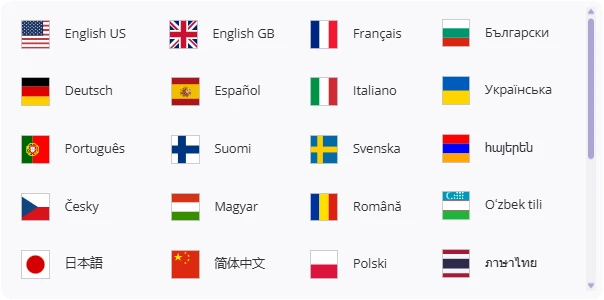
Languages available in Exely Booking Engine

40 Languages

The booking engine automatically selects the user’s language based on their location and allows them to change it at any time. This means a guest from France, Germany, or Japan can complete the booking without switching to OTAs simply because the website feels unclear or unfamiliar.

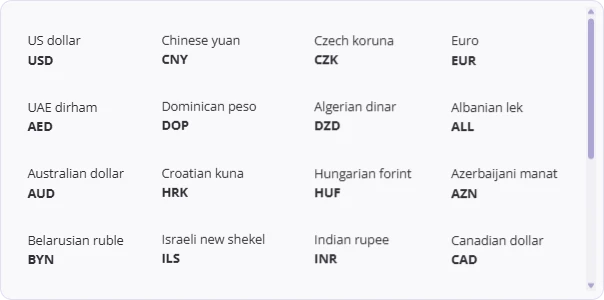
Currencies available in Exely Booking Engine

50 Currencies

Prices are automatically shown in the guest’s local currency, with the option to switch currencies manually. Guests see the final price in a format they understand, which reduces hesitation at the payment step and lowers the risk of booking abandonment.

User Experience

Mobile-First Design

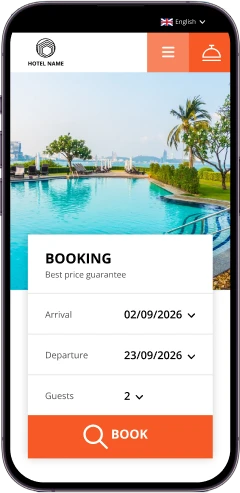
Booking Engine automatically adapts to mobile screens, including the calendar, pop-ups, and payment steps.

A mobile user can complete a booking without zooming, scrolling sideways, or losing context. This helps capture bookings that would otherwise be abandoned on mobile.

Mobile version of Exely Booking Engine
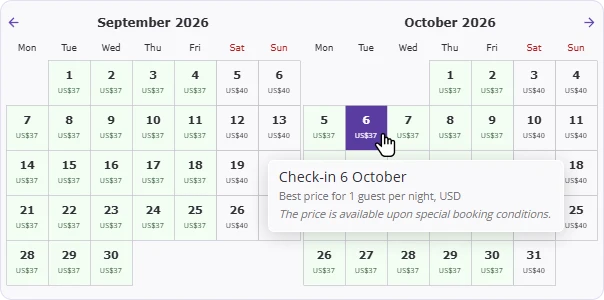
Availability calendar with minimum prices

Availability Calendar &
Minimum Prices

Guests can compare availability and minimum prices across different dates in one view. This makes it easier for guests to choose the best dates without leaving the booking flow.

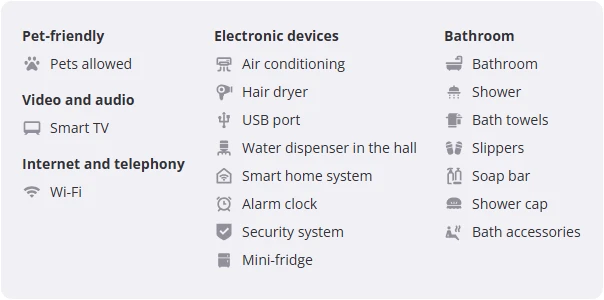
Room and property amenities in Exely Booking Engine

Room & Property Amenities

Guests see clear, intuitive amenity lists with icons that show everything included in each room category and across the property. This means fewer guest questions and fewer booking doubts: guests understand exactly what they get before booking, compare room categories more easily, and are less likely to leave the website to look for missing information on OTAs.

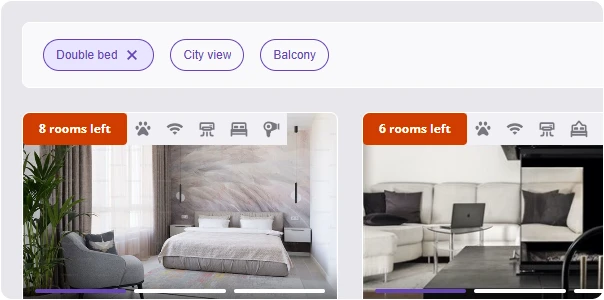
Bed preference and view filters

Bed Preference & View Filters

During room selection, guests can use simple filters to see only rooms that match their bed preferences and preferred window views. This helps guests find the right room faster and reduces frustration caused by scrolling through unsuitable options.

Conversion Optimization

Booking Motivators
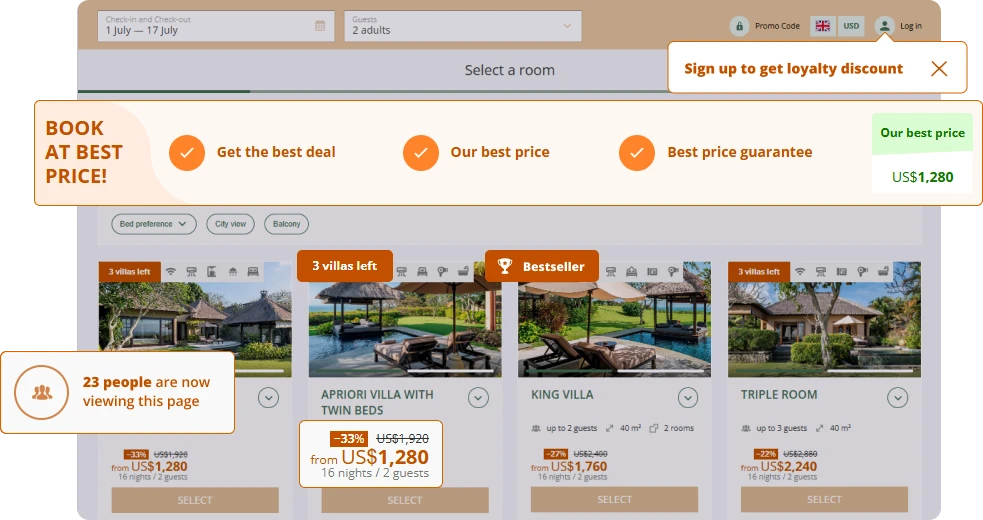
Booking motivators displayed in Exely Booking Engine

Discount Highlight

Displays a discounted price with the original price crossed out when a rate is on sale. This makes savings immediately visible and helps guests choose discounted offers faster.

Limited Availability Indicator

Shows messages like “X rooms left” when availability for a room category is low. This creates urgency and encourages guests to book before rooms sell out.

Live Demand Indicator

Shows real-time demand signals such as “X users currently viewing” or “last booked X hours ago”. These indicators reassure guests that the hotel is in demand and motivate quicker booking decisions.

Bestseller Badge

Marks selected room categories as “Bestseller”. Hotels can use it to promote either their most popular room or boost sales of a specific category.

Best Price Guarantee

Displays a banner confirming that the website offers the best available price. This reduces the need for guests to compare prices on OTAs and keeps them on the hotel’s website.

Meals Included Badge

Clearly highlights which meals are included in the rate. Guests instantly understand what’s included, which makes rate comparison easier.

Included Services Indicator

Shows services marked as “Included” directly in the booking flow. This increases perceived value without lowering the room price.

Popular Payment Method Indicator

Highlights the most convenient or commonly used payment method during checkout. This makes the payment step feel familiar and reduces hesitation.

Hotel USP Highlights

Displays key hotel advantages such as location, facilities, flexible policies, or guest reviews during booking.

Smart Widgets
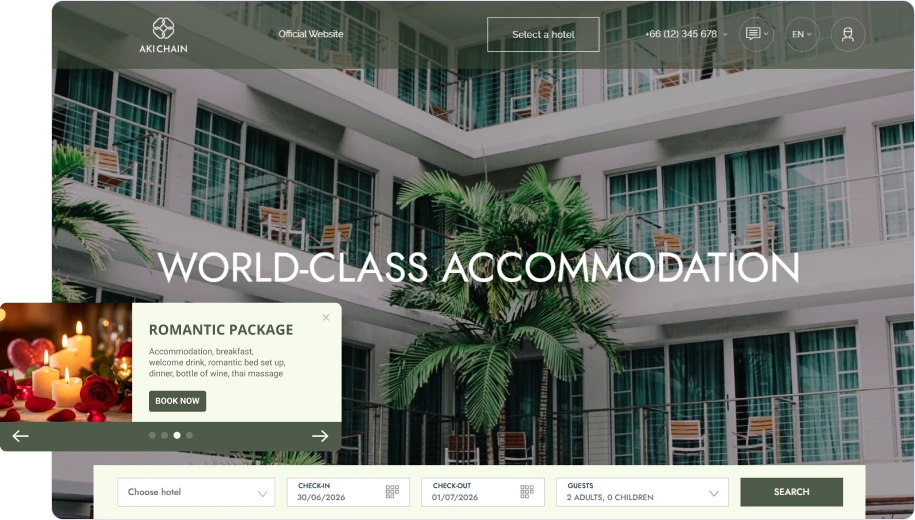
Smart widgets on a hotel website

Special Offer Widget

Displays a promotional message or offer on selected pages of your website. This helps hotels highlight direct-only deals and guide guests toward booking without changing the page layout.

Exit-Intent Widget

Appears when a guest is about to leave the website. It gives hotels a final chance to keep the guest engaged with a promo code, offer, or call to action.

Best Price Widget

Promotes lower or exclusive prices available on the hotel’s official website. This reassures guests and reduces the urge to compare prices on OTAs.

Black Friday Widget

Designed for seasonal or event-based campaigns such as Black Friday or flash sales. Hotels can quickly launch time-limited promotions without redesigning the website.

Custom Widget

Allows hotels to create their own widget with custom text, design, timing, and display rules. This gives full flexibility to support unique campaigns or business goals.

Abandoned Booking Emails

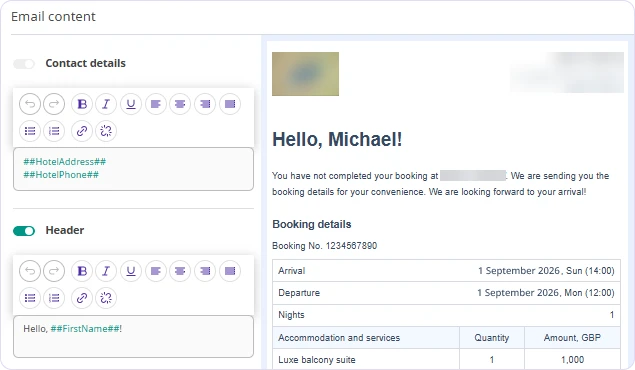
Automatically send reminder emails when a user starts a booking but does not complete it. A booking is considered abandoned if the guest reaches the final step without confirming payment or leaves Booking Engine inactive for a set period.

For guests, the email helps them return to their unfinished reservation with all details saved. For hotels, this is a simple way to recover lost demand, optionally adding incentives such as promo codes to motivate hesitant guests and increase completed bookings without manual follow-up.

Abandoned booking email editor

Cancellation & No-Show Prevention

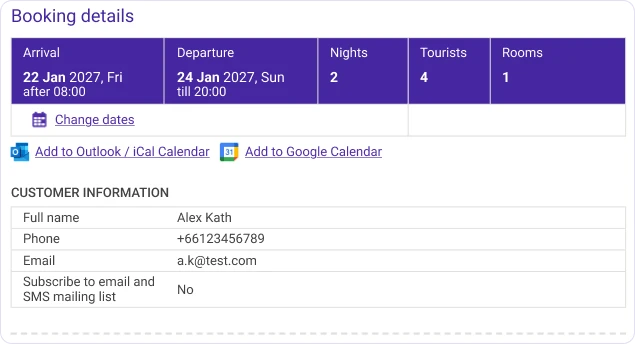
Booking details and calendar links

Flexible Cancellation Policies

You can create flexible cancellation rules based on time before arrival, check-in dates, or seasons, and apply different penalties for different periods.

Guests clearly see the cancellation terms before booking and in the confirmation email, while you protect revenue during peak dates and reduce last-minute cancellations with rules that match real demand.

Booking Confirmation Emails
with Booking Modification Links

After booking, guests automatically receive a confirmation email with full stay details and a secure link to manage their reservation. This reassures guests that the booking is confirmed and correct, while allowing them to make changes themselves without canceling or contacting staff.

Upselling & Revenue Growth

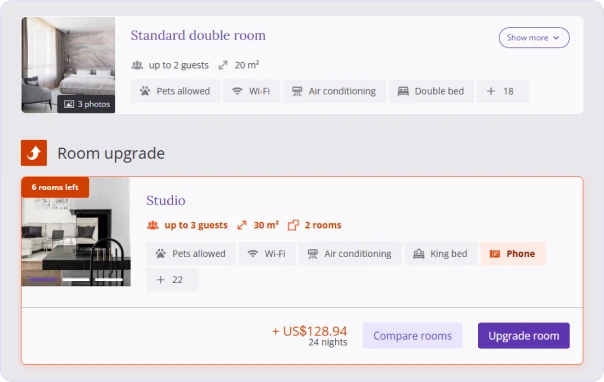
Room upgrade suggestion during booking

Room Upgrade Suggestions

During booking, guests are offered a higher room category with clearly shown benefits and a small price difference. Booking Engine compares room features and only suggests upgrades that offer better conditions while respecting guest preferences like bed type and view.

For hotels, this increases the average booking value naturally: guests upgrade themselves without pressure, and only to rooms that make sense for their stay.

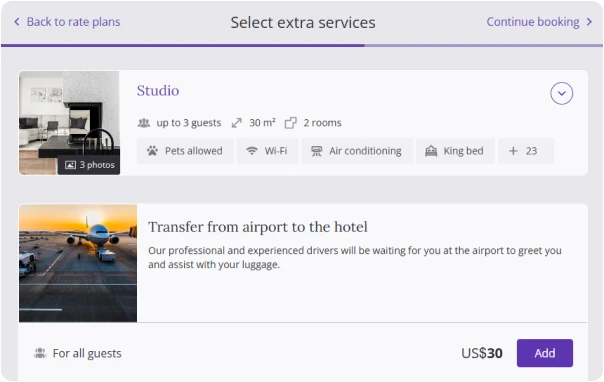
Extra services offered during booking

Extra Services Upselling

After selecting a room and rate, guests can add paid services such as meals, transfers, spa access, tours, or late check-out directly during booking. Services are clearly described, shown with photos, and automatically suggested in the right quantity based on the number of guests and nights.

For hotels, this increases the average check before arrival, reduces front-desk upselling pressure, and ensures services are booked and paid for in advance instead of being decided last minute.

Package deal in Exely Booking Engine

Package Deals

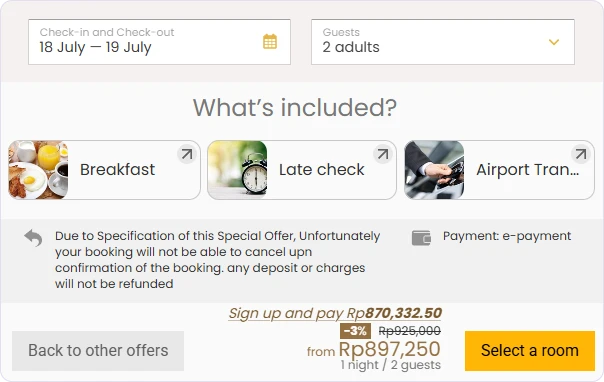
You can create rate plans that bundle accommodation with meals or additional services, such as breakfast, spa access, or experiences. These packages are clearly described, visually highlighted, and shown as ready-to-book offers during the booking process.

For guests, this makes it easy to understand what’s included and compare offers without calculating extras. For hotels, package deals increase the average check and help sell services upfront instead of relying on post-arrival upselling.

Pricing & Rate Management

Promotions &
Discounts
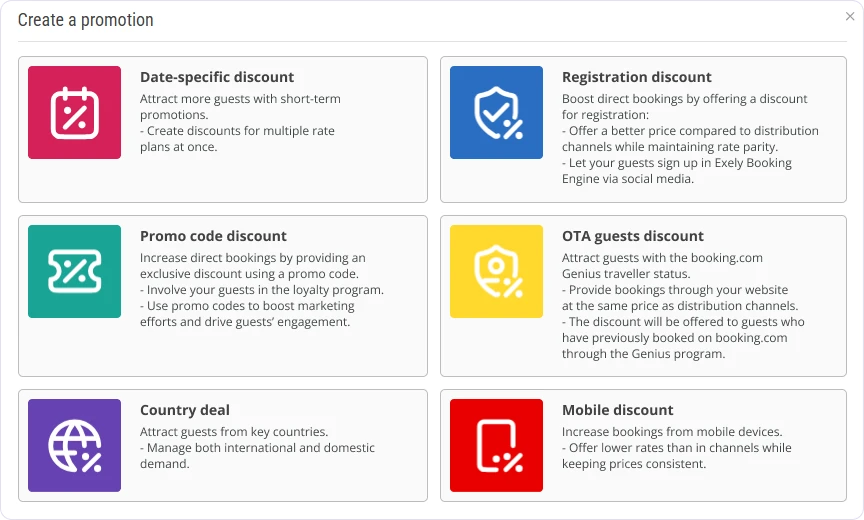
Promotion types in Exely

Mobile Discount

Automatically applies to guests booking from mobile devices. This helps convert mobile traffic, where guests are more likely to abandon bookings or switch to OTA mobile apps.

Country Deal

Offers special prices to guests based on their location. You can tailor offers to key source markets without changing base rates for everyone.

Promo Code Discount

Applied when a guest enters a valid promo code during booking. This is useful for marketing campaigns, partnerships, email marketing, or closed offers with controlled access.

Registration Discount

Shown only to guests who sign up on the hotel website. This encourages Loyalty Program account creation and repeat bookings.

Date-Specific Discount

Applied to stays booked for selected dates or periods. It helps you stimulate demand for low-occupancy dates or seasonal gaps without lowering prices year-round.

OTA Guest Discount

Displayed to guests who have OTA loyalty status. This helps hotels attract OTA users to book directly by matching or improving their expected benefits.

Discount for a Child on Extra Bed

Allows hotels to apply special pricing rules for children staying on extra beds. This makes family offers clearer and more attractive without manual price adjustments.

Preset Derived
Rate Plans
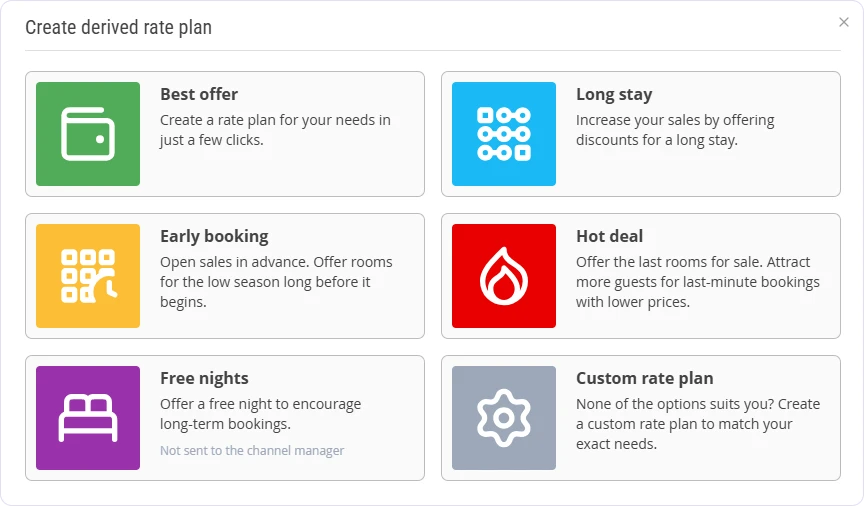
Preset derived rate plans

Best Offer

A discounted rate based on your main rate plan, with optional conditions such as length of stay or booking window.

Long Stay

A special rate available only when guests book a minimum number of nights. It encourages longer stays, improves occupancy, and increases average check.

Early Booking

A discounted rate for guests who book well in advance. Hotels secure demand earlier, improve forecasting, and reduce last-minute uncertainty.

Hot Deal

A short-term discounted rate available close to arrival. This helps hotels sell remaining inventory and react quickly to low occupancy dates.

Free Nights

An offer where one or more nights are free when guests book a longer stay. This is a strong incentive to extend stays and is available exclusively on the hotel website.

Custom Rate Plan

A fully flexible derived rate calculated by discount, surcharge, or formula. Hotels can create unique offers tailored to their strategy while keeping prices linked to the base rate.

Rate Restrictions
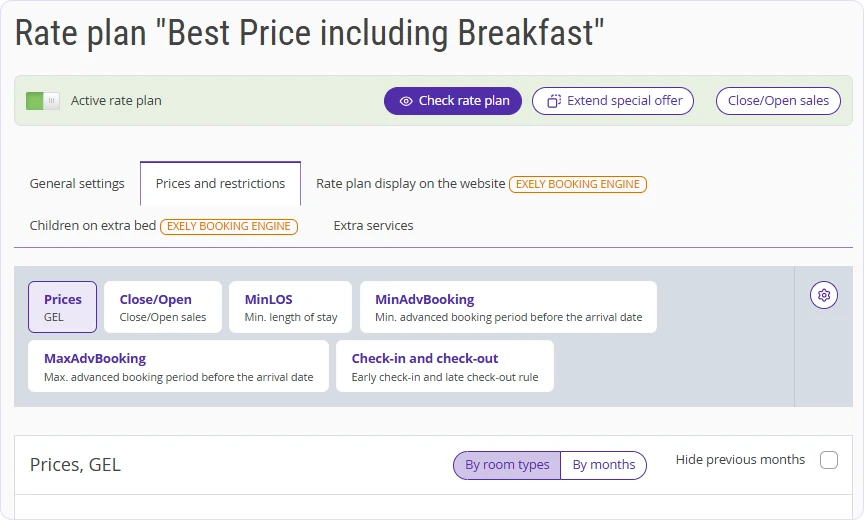
Rate restrictions settings

Closed

Stops sales for selected dates. You can use this to block bookings when rooms are unavailable or should not be sold on the website.

MinLOS (Minimum Length of Stay)

Requires guests to book at least a set number of nights. Commonly used to encourage longer stays during busy periods.

MinLOSArrival

Sets a minimum length of stay only for arrivals on a specific date. Useful for packages or fixed-stay offers.

FullPatternLOS

Allows only specific stay lengths. You can use this to strictly control stay patterns during events or peak seasons.

MaxLOS (Maximum Length of Stay)

Limits how many nights a guest can stay. Helps hotels avoid very long bookings that block availability.

MaxLOSArrival

Sets a maximum length of stay for arrivals on specific dates. Used to control inventory when demand is high.

MinAdvBooking (Minimum Advance Booking)

Guests must book a certain number of days before arrival. Typically used for early booking offers and planning demand in advance.

MaxAdvBooking (Maximum Advance Booking)

Limits how far in advance guests can book. Used for last minute deals or to keep rates flexible closer to arrival.

CTA (Closed to Arrival / No Check-In)

Guests cannot check in on selected dates. Often used for fixed-date packages or event-based stays.

CTD (Closed to Departure / No Check-Out)

Guests cannot check out on selected dates. Helps hotels control stay flow around busy check-out days.

Stay Controls

Blocks sales for a specific rate only on the website, without affecting OTAs. Allows hotels to prioritize or pause direct sales when needed.

Check-In & Check-Out Rules

Apply different early check-in or late check-out rules for selected dates. Useful during peak periods or events.

Payment Methods

Choose which payment methods are available for specific dates. You can require prepayment or limit payment options when risk is higher.

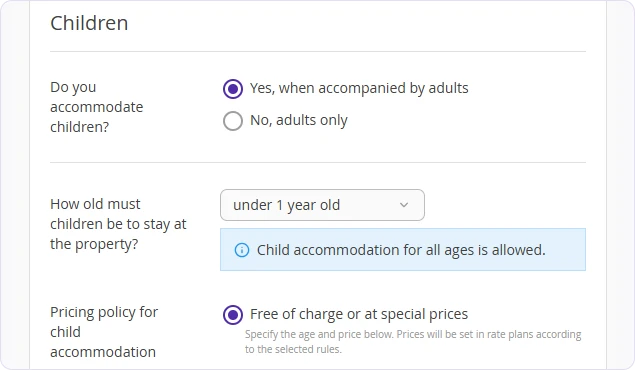
Child Accommodation Prices

Flexible child pricing rules based on age, room type, and occupancy. Hotels can set children to stay free, at a special price, or at the adult rate, with different rules for children with or without a separate bed.

Child accommodation pricing settings

Rate Mix

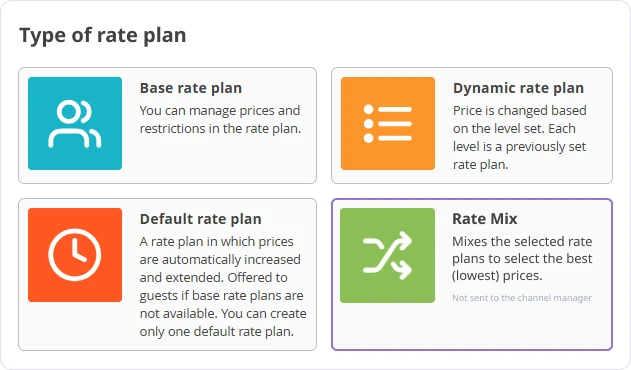
Automatically combines multiple rate plans into one booking to offer the best total price. When a stay spans different pricing periods, Booking Engine applies the better rate to each night — even if no single rate covers the full stay.

Rate Mix settings
Payment Methods
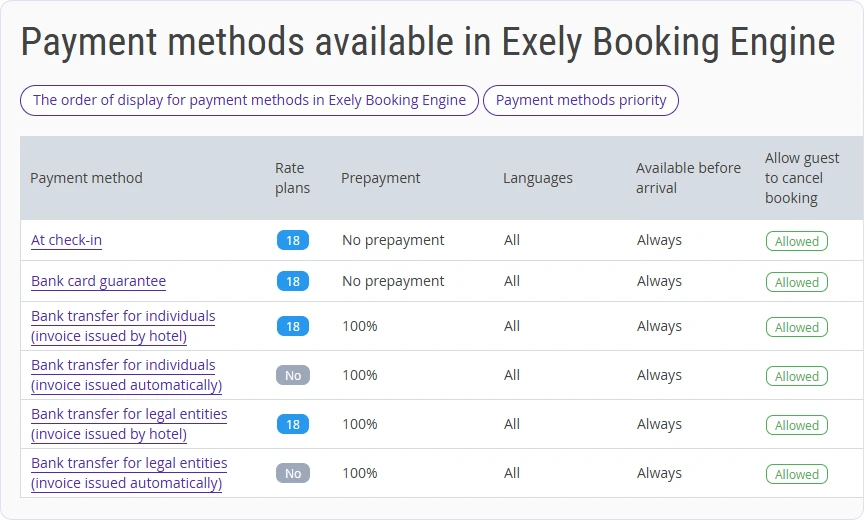
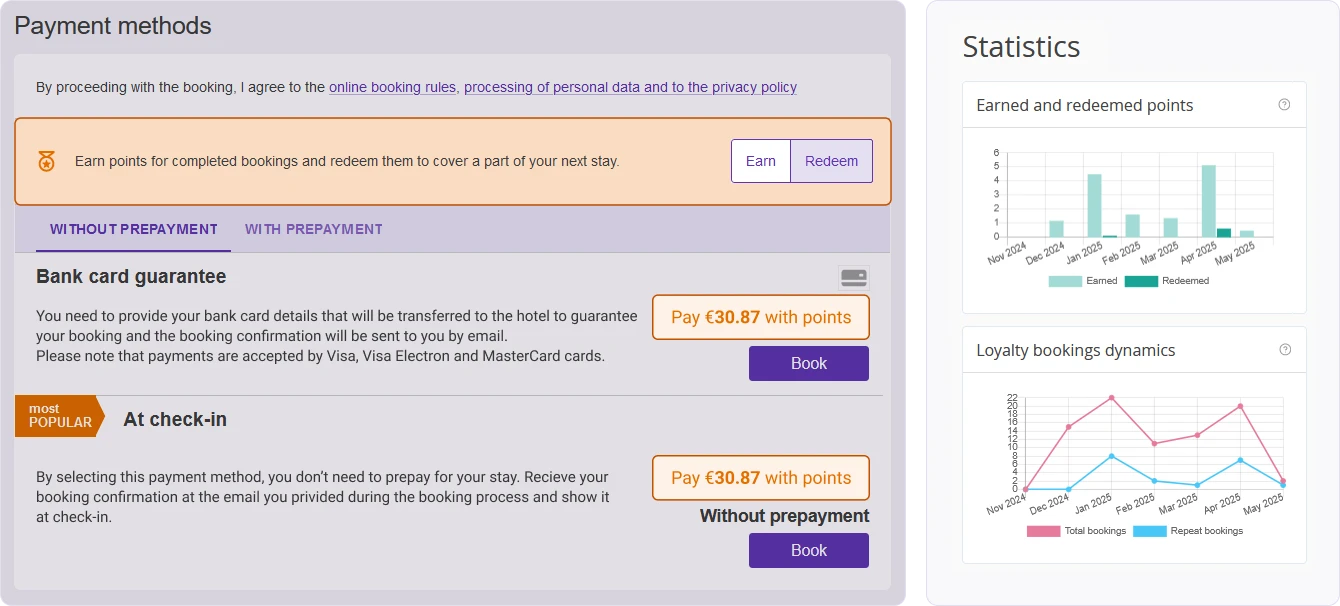
Payment methods available in Exely Booking Engine

Payment at Check-In

Guests book without prepayment and pay in full on arrival. This reduces booking friction and increases conversion.

Online Bank Card Payment

Guests pay online by bank card during booking. The booking is confirmed only after payment is completed.

Early Booking

A discounted rate for guests who book well in advance. Hotels secure demand earlier and improve forecasting.

Hot Deal

A short-term discounted rate available close to arrival. This helps hotels sell remaining inventory.

Bank Card Guarantee

Guests enter card details to secure the booking, without immediate payment. The hotel can charge the card under the agreed conditions.

Deferred Electronic Payment

Guests book now and pay later within a set timeframe. The payment deadline is shown in the confirmation and reminders can be sent.

Bank Transfer

Guests prepay by bank transfer using automatically generated payment documents for individuals or legal entities.

Peak Demand Management

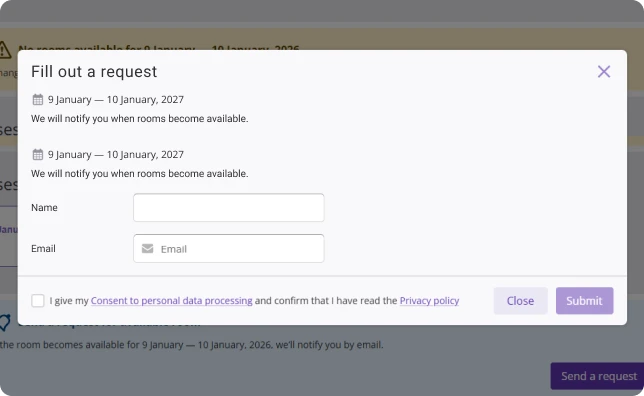
Automated waitlist request form

Automated Waitlist

When selected dates are fully booked, guests can leave their contact details and join a waitlist. If availability for those dates opens up, the system automatically notifies them. This helps you convert missed demand into confirmed bookings without manual follow-ups from your team.

Room Mix Within Reservation

If a single room is not available for the entire stay, Booking Engine can offer a combination of rooms across different dates within one reservation. This allows guests to complete their booking even during peak demand periods and helps you maximize occupancy instead of losing bookings due to partial availability.

Automated Date Suggestions

If the selected room type is unavailable, Booking Engine instantly suggests alternative available dates. This keeps guests in the booking flow and guides them toward bookable options instead of forcing them to start a new search or leave the website.

Trigger Emails

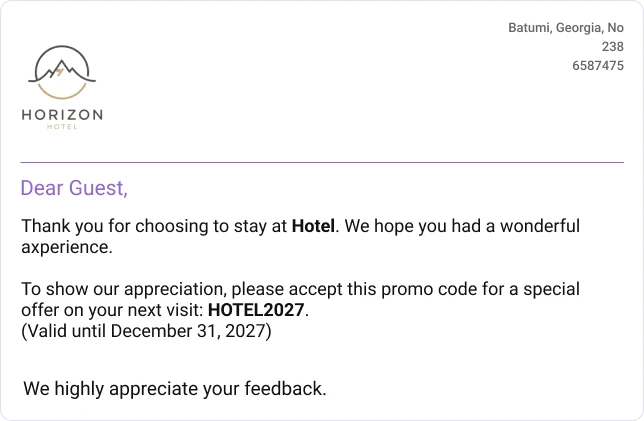
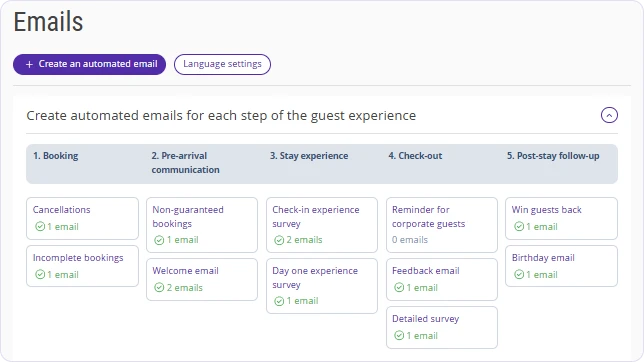
Automated guest email

Booking Confirmation Email

After booking, guests automatically receive a confirmation email with full stay details and a secure link to manage their reservation. This reassures guests that the booking is confirmed and reduces your team’s workload.

Pre-Arrival Email Reminder

A few days before arrival, guests receive an automated pre-arrival email with their booking details, cancellation policy, and optional information such as weather updates or hotel notes.

Post-Stay Emails & Feedback Surveys

After check-out, guests automatically receive a follow-up email with a short feedback survey and optional incentives for a future stay.

Abandoned Booking Email

If a guest starts a booking but does not complete it, the system automatically sends a reminder email with a link back to the unfinished reservation.

Loyalty Program

Exely Loyalty Program interface

Booking Engine-Based Accumulation & Redemption

Guests join and use loyalty benefits directly on your website: they log in on the hotel’s website, see their loyalty level and points, and get the right discount or redemption option automatically during booking.

Loyalty Enrollment & Levels

Guests can sign up in Booking Engine or in the guest account, receive a card automatically, and progress through loyalty levels based on nights, spend, or both.

Loyalty Rewards: Discounts or Bonus Points

Run loyalty as either member discounts applied after logging in or points that guests can redeem online. Points can be set as a percentage of booking value or points per night.

Free Night Vouchers

Issue a free night voucher to a specific guest as an extra perk they can redeem only in Booking Engine.

Guest Account

The guest account stores loyalty status, savings or points, and booking history in one place, and lets guests quickly start a new booking with their benefits active.

Loyalty Analytics

Track loyalty income versus discount cost, total bookings made with loyalty, split between first and repeat bookings, card issuance dynamics, and level distribution.

PMS Booking Accumulation

Loyalty earnings can include bookings created outside the website, such as reservations made via front desk or phone, when PMS integration is enabled.

TNG Loyalty Program Integration

If you use TNG with Opera or Fidelio, you can connect it in Exely so guests can use their TNG discounts or points when booking on your website.

Discount Vouchers

Create personalized discount vouchers for selected guests, such as high-value guests, repeat guests, or guests you want to bring back.

Referral Program

Guests can invite friends using a personal referral link connected to Loyalty Program. You can export referral activity to track invitations and bookings.
Rate Match

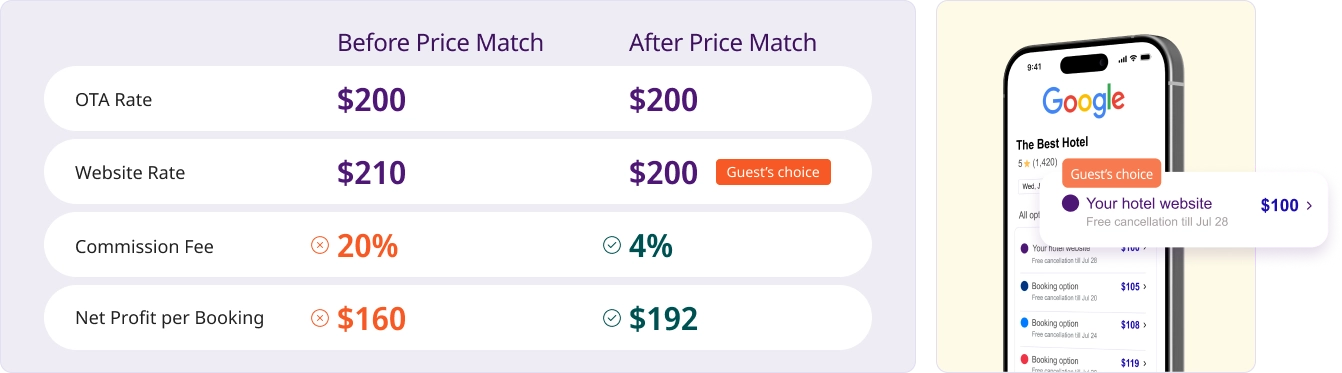
Rate Match price comparison

OTA Price Monitoring

Monitors your offers on OTA four times a day, including the full scan for the next 90 days and three focused checks for the next 14 days.

Multi-Rate Plan Support

Works with multiple base rate plans, including room-only, bed & breakfast, and full board.

Two-Way Price Sync

Automatically lowers your website price when a cheaper OTA rate appears and restores it once the promotion ends.

Price Drop Limit

Lets you set a maximum allowed price reduction to protect margins and avoid excessive discounts.

Price Proof Screenshots

Automatically captures screenshots as evidence whenever a lower OTA price is detected.

Google Free Booking Links Integration

Automatically sends your lowest direct rate to Google Free Booking Links, so guests see your website price directly in hotel search results.

Gift Cards

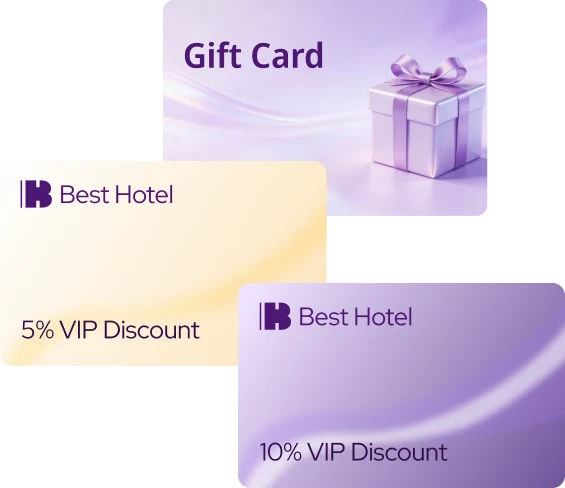
Customizable hotel gift cards

Customizable Gift Card Designs

Customize the gift card layout to match your hotel’s branding, including background images, fonts, logo, and brand colors.

Flexible Gift Card Value Options

Sell gift cards at face value or with a hotel-defined discount to stimulate demand and increase upfront revenue.

Fully Integrated Website Sales

Allow guests to purchase gift cards directly on your website without redirects or third-party platforms.

Automated Confirmation Emails with PDF Gift Cards

Send instant confirmation emails with a ready-to-use PDF gift card, reducing manual work for staff.

Services Booking Engine

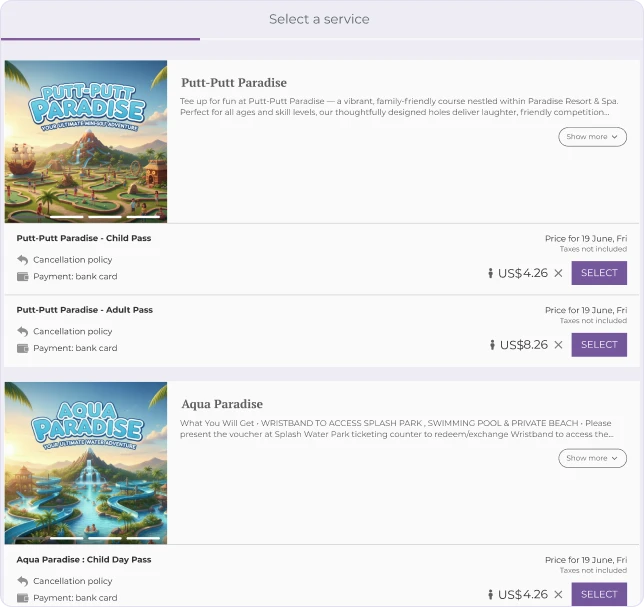
Services Booking Engine interface

Seamless Website Integration

Embed service booking directly into your hotel website to offer a smooth, on-brand booking experience.

Real-Time Service Availability Management

Manage availability dynamically to prevent overbooking and keep service capacity under control.

Automated Confirmation Emails

Automatically confirm service bookings by email, keeping guests informed without manual follow-up.

Multiple Payment Options

Offer the payment methods available in your Booking Engine, including bank card payments via integrated payment gateways.

Guest Relations

Guest Relations email automation interface

Automatic Guest Segmentation

Based on 21 criteria, Guest Relations segments guests using booking data from Exely Booking Engine, Exely Channel Manager, or PMS.

Segment Dashboards

Dashboards show key behavior metrics for each guest segment, including average spend, booking source, booking window, repeat visits, and purchases of extra services.

Customizable Email Templates

Create and edit email templates for different guest groups and communication scenarios. This keeps campaigns consistent with your hotel’s tone.

Automated Communication Scenarios

Set up automated scenarios across the guest journey, from pre-arrival upsell to repeat-stay offers and OTA-to-direct campaigns.