The "Emails" section of the Exely Guest Relations solution allows you to create emails for guests based on events and manage automated emails.
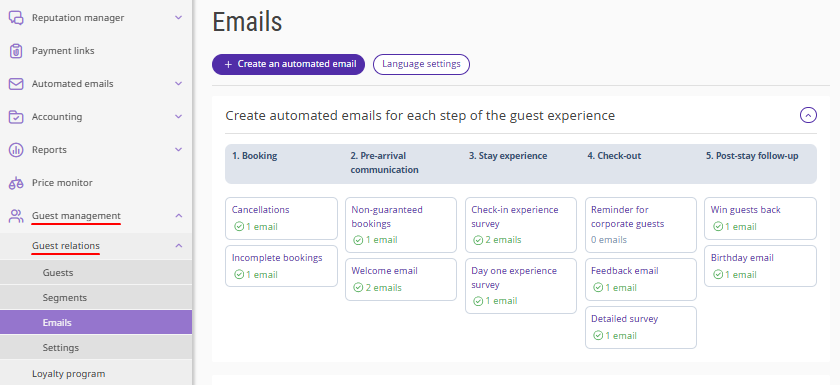
Previously, email management in the Exely extranet was available only in the "Automated emails" section. Now, you can also set email templates and manage automated emails in the "Guest management" > "Guest relations" > "Emails" section.
Automated email types
The section contains ready-made email scenarios triggered by the following events:
Email scenarios |
Event |
Email settings |
Related to booking date |
||
Non-guaranteed bookings |
Guest arrival |
X days before arrival |
Welcome email |
Guest arrival |
X days before arrival |
Check-in experience survey |
Guest check-in |
X days after check-in |
Day one experience survey |
Guest check-in |
Within the first day after check-in at HH:MM |
Feedback email |
Guest check-out |
X hours after check-out |
Win guests back |
Guest check-out |
X days after check-out |
Related to booking changes (event-based) |
||
Cancellations |
Guest cancels booking |
X hours after cancellation |
Incomplete bookings |
Guest did not complete the booking |
Emails are sent automatically 20 minutes after the guest leaves Exely Booking Engine |
Related to important guest dates |
||
Birthday email |
Guest’s date of birth |
X days before the birthday |
Linked to a specific calendar date |
||
Special offers |
Set by the administrator |
On day X at HH:MM |
All emails are tied to specific events. They can also be arranged by steps of the guest experience — the sequence of interactions a guest goes through with the property. For more details, refer to the article "How to create automated emails for each step of guest experience".
For instructions on how to work with emails, see the articles:
-
How to set up “Reminder for corporate guests” automated email
How to create emails for international guests in Exely Guest Relations
How to activate and deactivate automated emails in Exely Guest Relations
How to work with automated email statistics in Exely Guest Relations
How to create automated emails for each step of guest experience
