How to enable the payment with points for a specific rate plan
How payment with points is displayed in Exely Booking Engine
In Exely Loyalty Program: Points, you can select which rate plans allow guests to pay for their bookings with points.
This setting is also available when using the external loyalty program TNG Points.
To restrict the payment with points for rate plans, follow the instructions below after Exely Loyalty Program: Points is set up and activated.
When it is useful to restrict the payment with points
Promotions and rate plans with discounts
If a rate plan already includes a significant discount, allowing guests to pay with points may further reduce booking revenue. In this case, you can disable point redemption for promotional rate plans. For example, for "Early booking" or "Hot deal" rate plans, guests will pay for their booking using a regular payment method and can use their points later for another rate plan with higher profitability.
Peak dates and high season
During holidays, vacation periods, or major events, room demand is usually higher. For such dates, you can disable the option to pay with points for specific rate plans. Guests will still be able to earn points for their stay, but they will be able to redeem them in another booking if the selected rate plan allows paying with points. For example, after the high season ends.
How to enable the payment with points for rate plans
1. In the Exely extranet, go to "Property settings" > "Payment methods".
2. Click "Edit" next to the "Pay with points" payment method.
3. On the payment method page, select the rate plans for which guests will be able to pay with points and click the "Save" button.
Payment with points is available only for rate plans with the "Official site" point of sale and compatible primary payment methods.
Note. If the "Official site" point of sale or the compatible payment methods are disabled for some of the selected rate plans, the setting will be saved, but payment with points will not work for those rate plans.
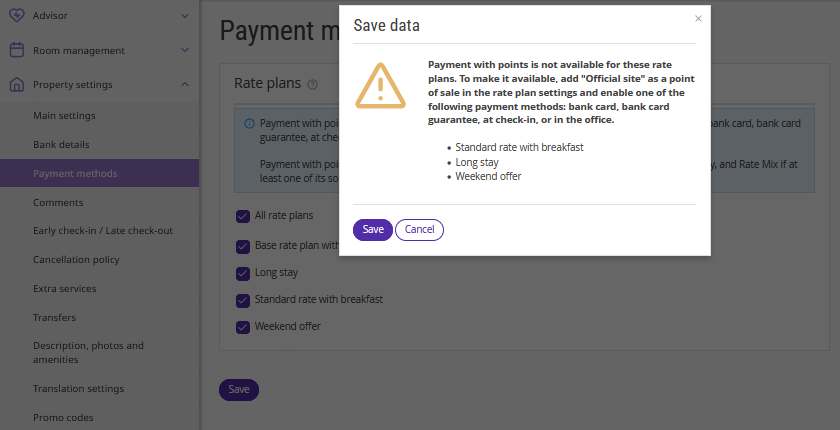
How to enable the payment with points for a specific rate plan
The payment with points can be enabled for most rate plans, including the default rate plan, free night, resort, and combined rate plans.
Note. This setting is not available for corporate rate plans or rate plans created in a currency other than the provider's primary currency. Points also cannot be redeemed when purchasing gift certificates or services without accommodation. For combined rate plans, the "Pay with points" setting is not displayed. However, if the payment with points is available in all source rate plans used by the combined rate plan, it will also be available for the combined rate plan itself.
1. Go to the “Room management” > "Rate plans" section and open the required rate plan.
2. On the "General settings" tab, tick the "Allow guests to pay with points" check-box.
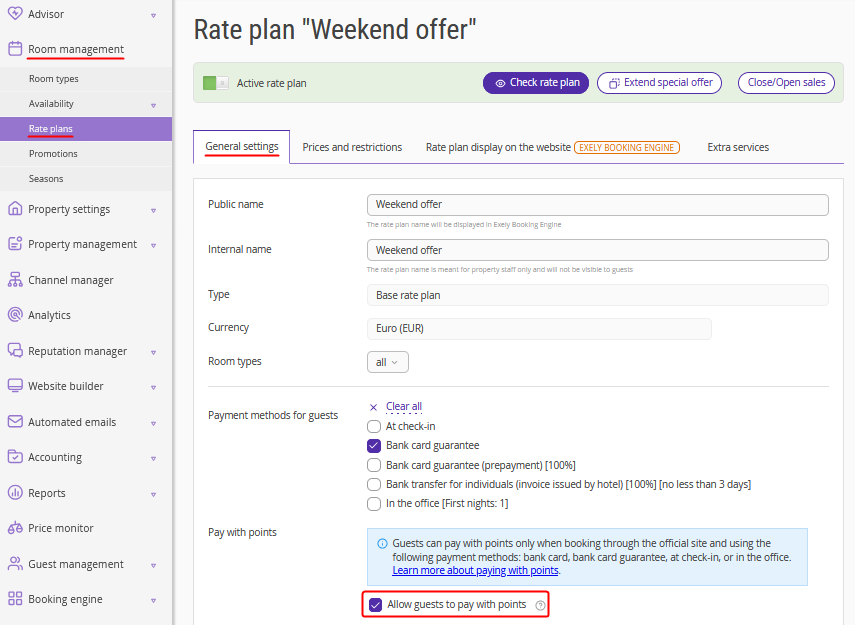
3. Before saving, make sure that:
the "Official site" point of sale is selected in the "General settings" tab;
at least one compatible primary payment method is selected (bank card, bank card guarantee, at check-in, or in the office).
4. Save the settings.
Pay attention. If the "Official site" point of sale or a compatible payment method is not selected for a rate plan, the option to pay with points will not work for it.
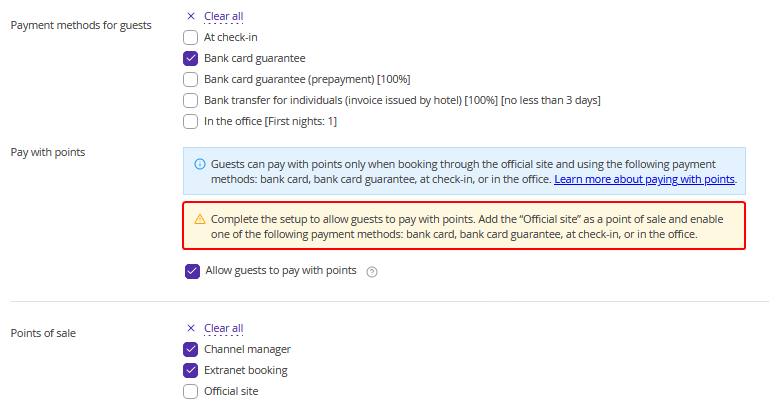
The setting features for different rate plan types
New rate plans
When creating a new rate plan, the "Pay with points" setting is enabled automatically, along with other available payment methods.
Existing rate plans
When Exely Loyalty Program: Points is enabled for the first time, the "Pay with points" payment method is automatically enabled for all existing rate plans with the "Active" status. Review your rate plans and disable payment with points where necessary.
Derived rate plans
The "Pay with points" payment method is not derived automatically from the parent rate plan, even if the setting "Derive payment methods" is enabled. Enable payment with points manually in the derived rate plan settings.
Payment method limitations
The following settings cannot be configured for the "Pay with points" payment method:
validity period (period when payment method is available);
languages for the booking engine.
How payment with points is displayed in Exely Booking Engine
If the "Pay with points" option is enabled for a rate plan, guests will see the option to redeem points at the payment step.
If the "Pay with points" option is disabled for a rate plan, the option to redeem points will be hidden for the booking.
If a guest books multiple rooms under different rate plans, the “Pay with points” option will be available only if it is enabled for all selected rate plans. This rule also applies when the booking includes a resort fee.
How to view bookings paid with points
To find bookings where guests used points:
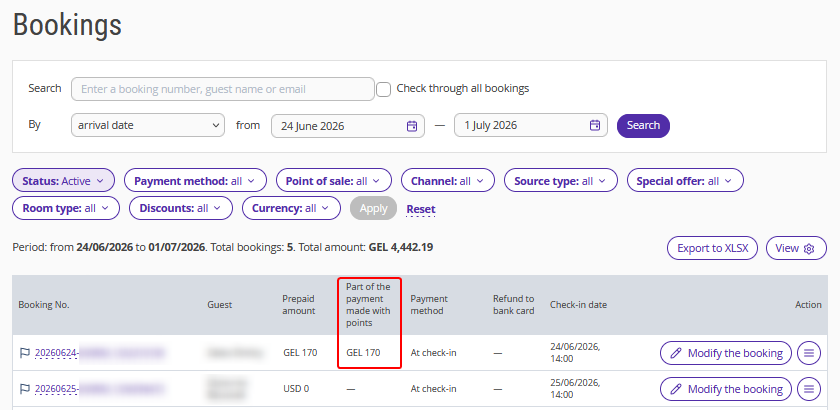
1. Go to "Reports" > "Bookings".
2. In the report table, find the “Part of the payment made with points" column. If there is no such column, add it using the “View” button.
3. View the amount of points redeemed for the required booking.
If the "Pay with points" payment method is not displayed in the Exely extranet, contact your Customer Support manager or Exely Customer Support team.
