Exely PMS allows you to assign positions to users. Positions are added to the reference and used for the following purposes:
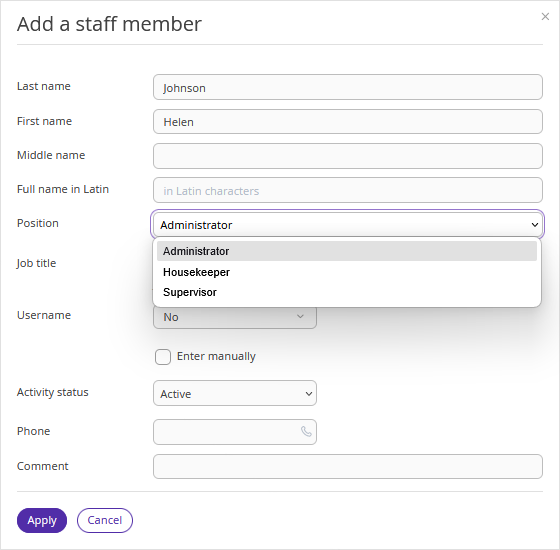
Administrator — you can configure the system to automatically add initials and a signature to invoices generated in the booking card in Front Desk or to document templates.
Housekeeper — is assigned as the person responsible for cleaning tasks in the full version of the "Housekeeping" extension.
Supervisor — is a position in Front Desk. However, assigning and inspecting cleaning tasks requires an access level of supervisor or higher. Supervisor permissions depend on the user's access level, not on the assigned position.
Owner — apartment owners can view occupancy and revenue data for their property in the "Reports" subsection.
NOTE. As the personal data controller, you are responsible for ensuring that guests, employees or representatives or that of a third party have given valid consent before their personal data is entered. See Part 2 under "WHAT PERSONAL DATA DO WE COLLECT?" in our Extranet Privacy Policy for details.
To add an employee to the reference:
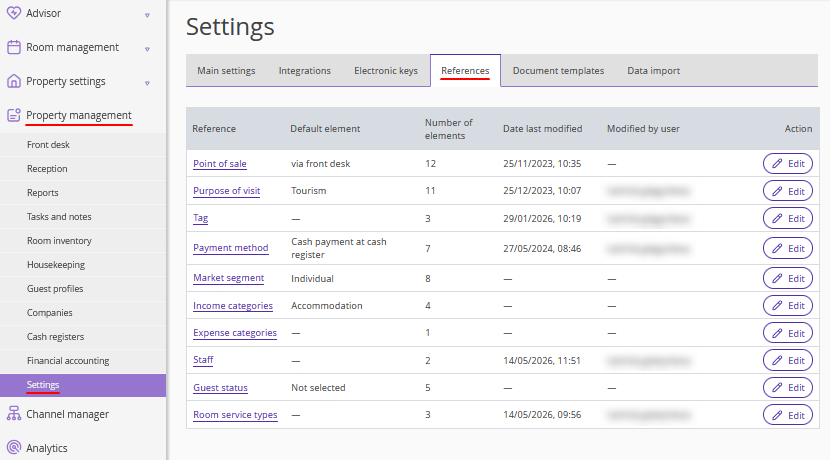
1. In the Exely extranet, go to “Property management” > “Settings” > the “References” tab.
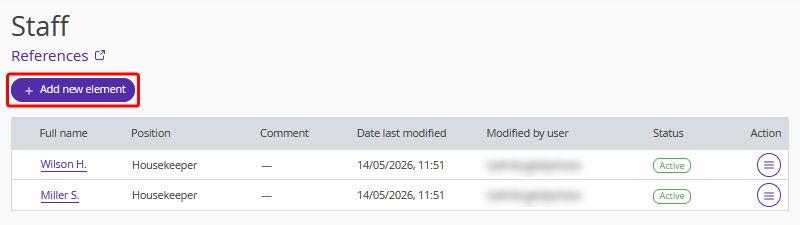
2. Open the “Staff” reference and click the “Add new element” button.
3. Fill in the employee’s personal details, select the position, and click “Apply”.
4. Click the “Save” button at the top of the page.
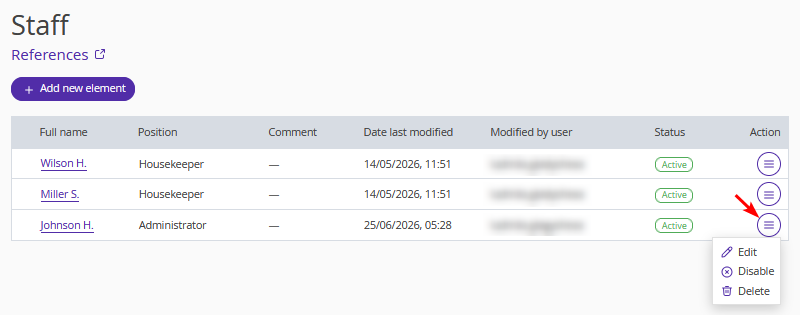
To edit, disable, or delete an employee from the reference, click the “Action” and select the required action. Once you have finished, click the “Save” button on the top page.