- Key terms
- How to enable selling villas as a whole or by individual rooms
- How to create a combined room type
- How to manage availability
- How other Exely solutions work with combined room types
If your property offers villas, connecting rooms, or other units that can be sold either as a whole or by individual rooms, use combined room types. Combined room types let you adjust your sales strategy based on seasonal demand and offer the same unit in different ways: as a whole or by individual rooms. Exely automatically manages the availability of combined room types, reducing the need for manual availability updates and minimizing the risk of overbooking.
Key terms
Combined room type is a room type that consists of several rooms of different room types. For example: 1 Suite + 2 Standard rooms = 1 villa.
Included room type is a room type that is part of a combined room type and can also be sold separately.
How to enable selling villas as a whole or by individual rooms
To enable combined room types, contact your Customer Support manager or Exely Customer Support team.
How to create a combined room type
Pay attention. Before creating a combined room type, make sure that all room types that will be included in it have already been created. If necessary, create them first. For detailed instructions, see "How to create a room type".
After the feature is enabled, the "Combined room type" section becomes available when creating or editing a room type in the Exely extranet.
To create a combined room type:
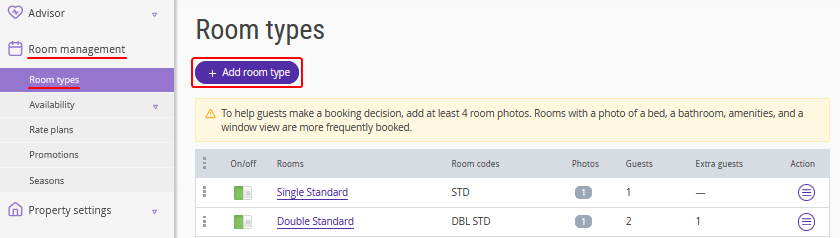
1. Go to "Room management" > "Room types" and click "Add room type".
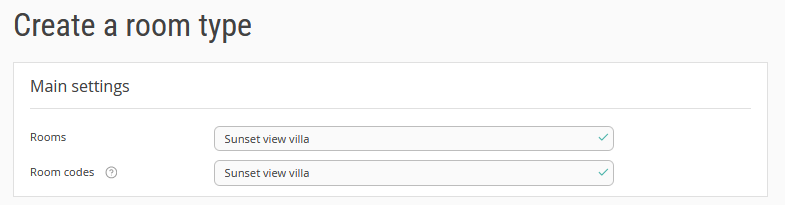
2. In the "Main settings" section, enter the full and short names for the room type. The full room type name is displayed in the booking engine.
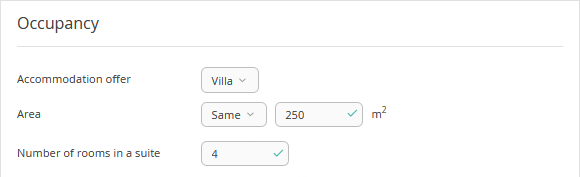
3. Select the required accommodation offer type. Specify the accommodation offer area and the number of rooms.
4. Specify the combined room type occupancy — the number of guests with main occupancy, the number of extra beds in the room, and the number of children that can be accommodated without bed. Exely Suite does not automatically calculate the total occupancy based on the room types included in the combined room type. If the required occupancy is not available in the drop-down list, contact your Customer Support manager or Exely Customer Support team.
5. In the “Combined room type” section, tick the “The room type is combined” check-box.
For "Included room types", select a room type and specify how many rooms of this room type are included in the combined room type.
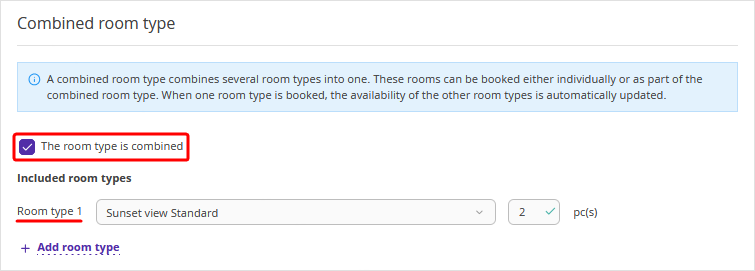
If necessary, click "Add room type" to include additional room types.
Pay attention. A combined room type can include any active room type except:
the room type currently being configured;
existing combined room types;
room types that are already included in another combined room type.
6. If pets are allowed in your property's settings, specify whether pets are allowed in the new combined room type.
7. Add room amenities and preferences.
8. Add the combined room type description and upload photos.
9. Click the "Save" button at the top of the page. The combined room type is created.
After the combined room type is created, make sure to:
Set room availability in "Availability".
Set prices for the new room type in rate plans.
If you use Exely PMS, create room inventory in Exely PMS
Features
A room type can be included in only one combined room type.
A combined room type cannot be included in another combined room type.
Before deactivating either a combined room type or one of its included room types, first remove the room type from the list of included room types in the combined room type settings.
Before deleting either a combined room type or one of its included room types, first remove the room type from the list of included room types in the combined room type settings, then deactivate the required room type, and only after that delete it.
How to manage availability
In "Room management" > "Room availability", the combined room type and its included room types are displayed as separate rows/columns.
You can choose one of the following sales strategies:
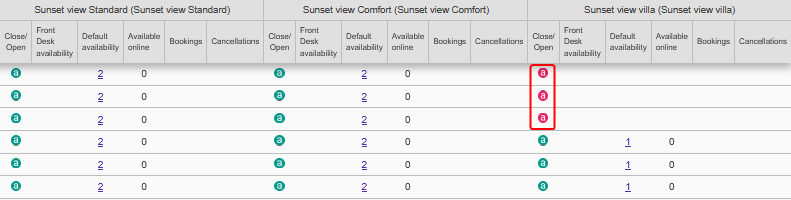
Sell villas only — close availability for the room types included in the combined room type. Only the combined room type will be available for booking on your website.
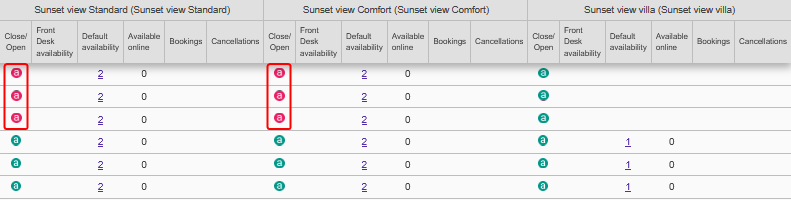
Sell individual rooms only — close availability for the combined room type. Guests will be able to book only individual rooms.
Sell villas and individual rooms simultaneously.
Exely automatically recalculates availability after every booking or cancellation:
If a guest books a combined room type, the availability of its included room types is automatically reduced.
If a guest books a room type that is included in a combined room type, Exely recalculates the availability of the combined room type.
When a booking is canceled, availability is automatically restored.
Important! If you change the composition of a combined room type, always review room availability after saving your changes.
Pay attention. Exely calculates availability mathematically and does not track the actual allocation of guests to physical rooms. To ensure that availability is calculated correctly, assign guests so that vacant rooms belonging to the same villa remain available together whenever possible.
The availability configuration depends on whether your property has integration with a PMS (including Exely PMS).
How to manage availability without the PMS integration
If you do not use a PMS, specify the availability of both combined room types and their included room types in the "Default availability" column.
There are no restrictions on the default availability of combined room types. The availability of a combined room type can be any value starting from 0.
The default availability of a room type included in a combined room type cannot be lower than the total number of rooms required to assemble the specified number of combined room types.
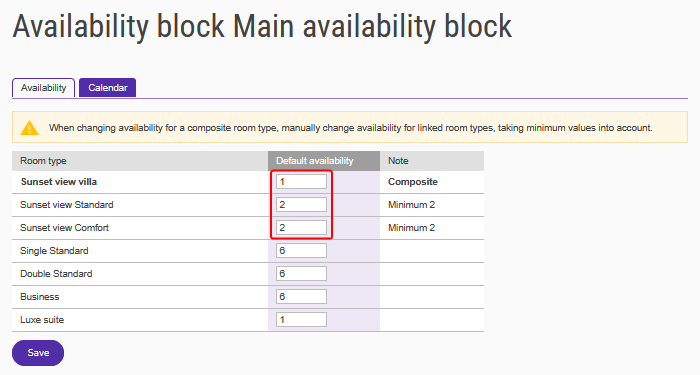
Example. Villa = 2 Standard rooms. The following availability settings are valid:
2 villas, 4 or more Standard rooms;
1 villa, 2 or more Standard rooms;
0 villas, 0 or more Standard rooms.
How to manage availability with the PMS integration set up (with a third-party PMS or Exely PMS)
Pay attention. If your PMS already supports connecting rooms or virtual rooms, do not enable the combined room types feature in the Exely extranet.
To ensure that selling combined room types both as a whole and by individual rooms works correctly, follow these requirements:
1. Configure the room type structure.
Create a separate room type in both your PMS and Exely for each combined room type. A combined room type can include only the room types assigned to it.
For example:
Villa 1 consists of four Standard rooms belonging to Villa 1.
Villa 2 consists of four Standard rooms belonging to Villa 2.
If all rooms included in the combined room type belong to the same room type, it is enough to create a single room type and specify the required number of rooms in "Room management" > "Availability".
2. Do not set the availability of a combined room type above 1.
The number of combined room types in both your PMS and Exely must not exceed one. The number of room types included in a combined room type must match its configuration. For example, if a villa consists of two Standard rooms, your PMS must contain one villa and two Standard rooms.
Pay attention. Exely supports selling only one combined room type. If more than one combined room type is created in your PMS, Exely cannot guarantee correct functionality or protection against overbooking. In this case, the property accepts the risk of overbooking.
3. Keep availability synchronized in your PMS.
If your property has integration with a PMS, the availability of the combined room type and their included room types must always remain synchronized.
For example, if a villa consists of two Standard rooms:
if your PMS sends availability for one villa and two Standard rooms, both the villa and the individual rooms will be available in Exely;
if the availability of the Standard rooms falls below the number required to assemble the villa, Exely automatically closes sales of the villa;
if the villa availability is 0 while the Standard rooms remain available, Exely automatically closes sales of the individual rooms.
4. Do not manage availability of a combined room type and its included room types independently.
If a villa booking is created in your PMS, do not mark its included rooms as “Out of order” and do not create temporary bookings for them. Likewise, if bookings exist for the individual rooms included in a villa, do not mark the villa as “Out of order” and do not create temporary bookings for it. Otherwise, Exely will close sales for both the villa and its included room types.
Features
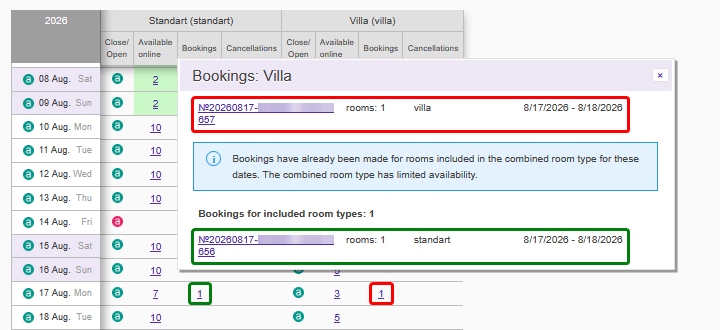
1. In the availability calendar, the "Bookings" window displays the number of bookings for the combined room type.
If a combined room type becomes unavailable because of bookings for its included room types, those bookings are also displayed in the "Bookings" window.
2. When individual rooms are sold, the availability of combined room types is reduced last. To maximize the opportunity to sell villas as a whole, assign guests first to vacant rooms in villas that already have occupied rooms. Move to the next villa only after all rooms in the current villa have been occupied.
3. When bookings for individual rooms are canceled, the availability of the combined room type is restored first. Assign guests so that vacant rooms remain within the same villa whenever possible.
4. The number of canceled bookings reflects the actual number of cancellations. For example, if a villa booking is canceled, Exely records one canceled villa booking only. No cancellations are recorded for the room types included in that villa.
5. When the combined room type sales mode is enabled, the "Increase by" and "Decrease by" options are unavailable for all room types in the bulk update tool in the "Availability" section.
How other Exely solutions work with combined room types
Exely Booking Engine
1. Combined room types and their included room types are displayed in Exely Booking Engine as separate room types. You can configure a separate name, photos, description, prices, and occupancy for each room type.
2. After every booking of either a combined room type or one of its included room types, Exely automatically updates the availability of all related room types.
3. If a combined room type or one of its included room types is unavailable for the selected dates, it cannot be booked in Exely Booking Engine.
Exely Channel Manager
1. To minimize the risk of overbooking, we recommend sending either combined room types or their included room types to sales channels. If you map both at the same time, the same physical unit can be booked twice: as a villa and as an individual room.
If necessary, it is possible to send both combined room types and their included room types to sales channels simultaneously. In this case, however, the property accepts the risk of overbooking.
2. Availability calculated according to the rules described above is automatically sent to Exely Channel Manager and Exely Booking Engine. If a guest books an entire villa, Exely closes availability for the room types included in that villa and sends the updated availability to all connected sales channels and the booking engine.
Exely PMS
In Exely PMS Front Desk, bookings for combined room types and the room types included in them are displayed as regular bookings without any additional visual connection between them.